
ai.cfg
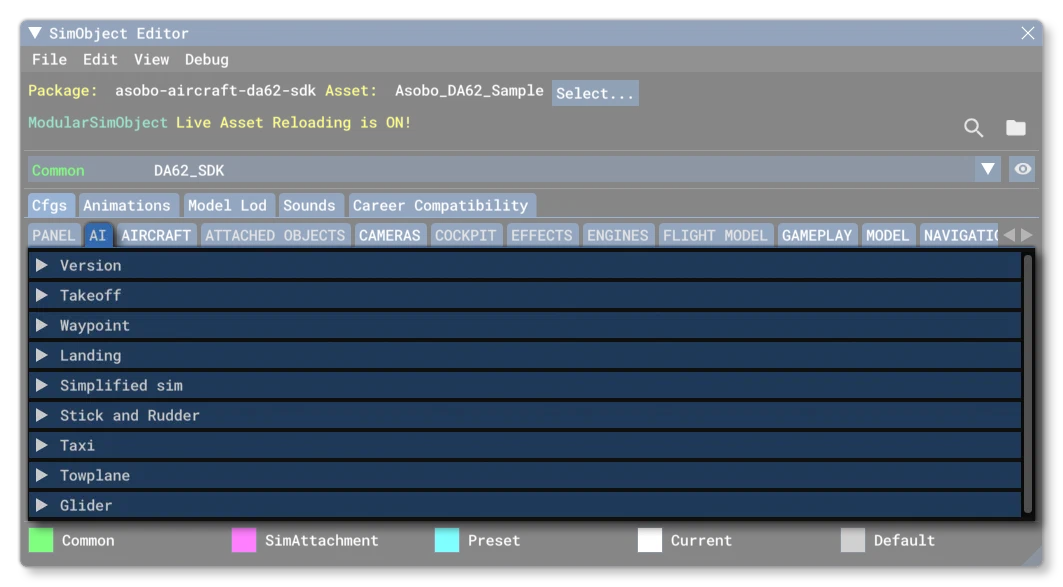
The ai.cfg is an optional file for SimObjects, unless you are creating an aircraft in which case it is mandatory. This file is considered critical when it comes to defining an aircraft as it contains the information required to tweak copilot, autopilot, and Air Traffic AI behavior. Below you can find information on the different sections used in the ai.cfg file as well as what parameters and values are expected within them.
It is worth noting that if the aircraft is to be used for AI Traffic, then only the following sections/parameters will be used:
[Version]- all[TAKEOFF]- all[WAYPOINT]- all[LANDING]-flareAngle[TAXI]- all
You can find further information on setting up an aircraft for AI Traffic from the following section:
[Version]
The [Version] section provides version information for the configuration file. In Microsoft Flight Simulator 2024, major versions should always be at least equal to 1. Note that this section information is mandatory and should always be included.
| Parameter | Description | Type | Required |
|---|---|---|---|
major | Major CFG file version number, values must be greater than 0. | Integer | Yes |
minor | Minor CFG file version number, values must be greater than 0. | Integer | Yes |
[TAKEOFF]
This section controls the different takeoff options for the AI. Available parameters are:
| Parameter | Description | Type | Required |
|---|---|---|---|
takeoffFlapsPosition | Desired flaps position during initial takeoff rollout for AI. This is a value between 0.0 and 1.0, where 0.0 is 0% and 1.0 is 100%.Default is 1.0 Percent Over 100. | Float | No |
takeoffVerticalSpeedGround | Not currently used by the simulation. | Float | No |
takeoffVerticalSpeedAir | Not currently used by the simulation. | Float | No |
takeoffAirspeedAirMultiplier | Not currently used by the simulation. | Float | No |
[WAYPOINT]
This section controls how the AI will deal with taxiway points, specifically the way it will move between them. Available parameters are:
| Parameter | Description | Type | Required |
|---|---|---|---|
SlowDownDistance | The distance, in meters, at which the vehicle will start slowing down before reaching a sharp turn or its destination.Default value is 50.0. | Float | No |
SlowDownSpeed | The speed, in Knots, to which the vehicle will slow down to before reaching a sharp turn or its destination.Default value is 0.4. | Float | No |
StopDistance | The distance, in meters, from the destination at which the vehicle considers that it has reached its destination, and will start actually braking to reach a full stop.Default is 2.0m. | Float | No |
SlowDownOnLastWayPoint | This determines if the vehicle should start really slowing down (but not trying to fully stop either), on the last 5 meters before its destination (TRUE, 1) or not (FALSE, 0).Default is TRUE. | Bool | No |
CanReverse | Sets whether the vehicle can reverse (TRUE, 1) or not (FALSE, 0).Default is TRUE. | Bool | No |
FrontRadiusMeters | The length, in meters, from the center of the vehicle to the front of it. It is used by the AI to better manage turns.The default is -1.0m, which means an approximate exaggerated value is computed by using a bounding box on the model. | Float | No |
[LANDING]
This section controls how the AI will deal with landing and will be used by both air traffic and the co-pilot. Available parameters are:
| Parameter | Description | Type | Required |
|---|---|---|---|
flareAngle | This setting defines the “ideal” flare angle, in degrees, for the aircraft when coming in to land, just after final approach and before actual touchdown.Default is -1.0°. | Float | No |
maxPitchRate | This sets the maximum rotational speed - in degrees per second - to change the aircraft pitch during landing.Default is 0.33333 degrees per second. | Float | No |
[SIMPLIFIEDSIM]
This section defines some characteristics of simplified versions of the Sim Object parameters and flight model that are only for AI aircraft air traffic. AI traffic doesn’t care at all about the wind, about remaining fuel, or most of the other world and physical parameters that are important to the user aircraft. The AI aircraft are done this way for performances reasons, but can still visually look correct to the user as long as the following parameters are correctly defined:
| Parameter | Description | Type | Required |
|---|---|---|---|
dampingVelocity | This value is used to dampen the aircraft rotational velocity when it is “sliding” on the ground - for example after a sharp turn.Default is 0.4. | Float | No |
brakesRotationDamping | This value is used to dampen the aircraft rotational velocity when it is “sliding” on the ground when brakes are applied.Default is 0.5. | Float | No |
headingAccelerationFromBankFactor | Sets the heading acceleration that will be added when the aircraft is banking. This is used - in conjunction with the headingInertia value - as part of the formula used to calculate the change in heading when the aircraft is banking.Default is 0.004 radians / second². | Float | No |
headingInertia | Sets the inertia applied to the aircraft heading when aircraft is banking. This is used - in conjunction with the headingAccelerationFromBankFactor value - as part of the formula used to calculate the change in heading when the aircraft is banking.Default is 0.001 radians / second². | Float | No |
airspeedAccelerationAugmentationPerFrame | Sets the airspeed acceleration - in ft per second squared - which is added every frame in order to reach the desired vertical airspeed.Default is 1.0 ft / second². | Float | No |
altitudeAccelerationPerFrame | This value - in ft per second squared per frame - is added on to the current aircraft altitude, every frame, in order to reach the desired altitude.Default is 5.0 ft / second². | Float | No |
verticalSpeedAccelerationAugmentationPerFrame | Sets the vertical speed acceleration - in ft per second squared - which is added every frame in order to reach the desired vertical airspeed.Default is 1.0 ft / second². | Float | No |
pitchAccelerationPerFrame | This value - in radians per second squared - sets the pitch acceleration, every frame.Default is 0.01 radians / second². | Float | No |
bankAccelerationPerFrame | This value - in radians per second squared - sets the bank acceleration, every frame.Default is 0.017 radians / second². | Float | No |
headingAccelerationPerFrame | This value - in radians per second squared - sets the heading acceleration, every frame.Default is 0.006 radians / second². | Float | No |
minRPMPct | Percentage over 100 of maximum RPM when the piston/turboprop plane is in “Idle” in Simplified Sim mode, for correct sounds and behavior. Usually between 0.25 and 0.75.Default value is 0.25 Percent Over 100. | Float | No |
landingGearAnimPct | Gear Animation Percentage for correct positioning of landing gear when the plane is passive or in Simplified Sim mode on the ground. Usually between 50.0 and 100.0.Default value is 65.0 percent | Float | No |
[STICKANDRUDDER]
This section controls the copilot and autopilot behavior for the AI of the aircraft. Manual editing of these values is strongly suggested instead of letting the sim use the default values so that the AI behavior is more in-line with the aircraft being used. Note that the The headingPID value is also used by non-user AI to control planes.
Note that in the following table, all PIDs should be listed in the following order:
- Proportional Control
- Integrator Control
- Derivative Control
- Integrator Boundary
- Derivative Boundary
Each value in the list should be a float, for example:
rudderGroundPID = 0.045, 0.001, 0.1, 1.0, 1.0
throttleGroundPID = 0.1, 0.10, 10.0, 10.0, 20.0
brakeDifferentialPID = 2.7, 0.001, 10.0, 1.0, 5.0
These parameters are also explored in more detail here:
Available parameters are:
| Parameter | Description | Type | Required |
|---|---|---|---|
rudderGroundPID | PID to adjust the rudder controls on the ground to stay on the centerline when taking off or taxiing using copilot and/or autopilot controls.Input is the heading error, output is the rudder control input.Default is: 0.015, 0.001, 0.001, 1.0, 1.0 | List of 5 Floats (see Data Types for more information). The table requires the following 5 inputs: Proportional factor, Integral factor, Derivative factor, I boundary, D boundary. For more information on these PID controller parameters, please see the section on PID’s. | No |
throttleGroundPID | PID to adjust the throttle controls on ground to stay at the target speed when taking off or taxiing using copilot and/or autopilot controls.Input is the ground speed error, output is the throttle lever position.Default is: 1.0, 0.1, 10.0, 10.0, 20.0 | List of 5 Floats | No |
throttlePID | PID to adjust the throttle controls to stay at the target speed when in the air using copilot and/or autopilot controls.Input is the airspeed error, output is the throttle lever position.Default is: 20.0, 0.3, 20.0, 20.0, 500.0 | List of 5 Floats | No |
pitchPID | PID to adjust the pitch controls to stay at the target pitch using copilot and/or autopilot controls.NOTE: this parameter is not used by FlyByWire aircraft.Input is the desired pitch, output is the pitch control input.Default is: 1.0, 0.01, 2.0, 0.6, 5.0 | List of 5 Floats | No |
rollPID | PID to adjust the roll controls to stay at the target bank angle using copilot and/or autopilot controls.Input is the desired bank, output is the bank control input.Default is: 1.0, 0.001, 1.0, 0.5, 8.0 | List of 5 Floats | No |
headingPID | PID to adjust the bank angle to stay at the target heading using copilot and/or autopilot controls.Input is the heading error, output is the target bank.Default is: 1.0, 0.01, 1.0, 1.0, 20.0 | List of 5 Floats | No |
verticalSpeedPID | PID to adjust the pitch to stay at the target vertical speed using copilot and/or autopilot controls.Input is the vertical speed error, output is the pitch control input adjustment.Default is: 0.5, 0.1, 0.5, 200.0, 5000.0 | List of 5 Floats | No |
nav_ex1PID | PID to adjust the heading to stay on the target navigation track using copilot and/or autopilot controls.Input is the angular deviation, output is the bank control input adjustment.Default is: 3.0, 0.01, 2.0, 0.035, 50.0 | List of 5 Floats | No |
nav_yawPID | PID to adjust the yaw (usually via rudder input) to stay on the target navigation track using copilot and/or autopilot controls.Input is lateral speed, output is the rudder control input.Default is: 0.02, 0.00006, 0.006, 0.3, 3.0 | List of 5 Floats | No |
glideSlopePID | PID to adjust the vertical speed to stay on the target glide slope using copilot and/or autopilot controls.Input is the angular deviation from the slope, output is the pitch control input adjustment.Default is: 5.52, 1.0, 3.0, 2.0, 60.0 | List of 5 Floats | No |
flightLevelPID | PID to adjust the pitch to stay at the target airspeed during flight level change mode using copilot and/or autopilot controls.Input is the airspeed error, output is the pitch control input adjustment.Default is: 10.0, 1.0, 10.0, 100.0, 1000.0 | List of 5 Floats | No |
[TAXI]
This section is used to define how the AI aircraft navigates the different taxiways. It has the following parameter:
| Parameter | Description | Type | Required |
|---|---|---|---|
DistanceToLaneLine | Sets the distance, in meters, for the aircraft from the center line of the taxiway, allowing you to position it better within its own lane. Note that setting this to 0 (or less than 0) will not position the aircraft along the center line, but instead will force the simulation to use the bounding sphere radius for the offset distance, clamped to a minimum value of 1.5m.Default value is 0. | Integer | No |
[AI_INPUT]
This section is used to define how the AI aircraft navigates the different taxiways. It has the following parameter:
| Parameter | Description | Type | Required |
|---|---|---|---|
throttlefactordelta | This value is used by the AI to control the speed at which changes will be applied to the throttle. The value is a multiplier, where a value of 1 means that the AI can go from 0% to 100% throttle in 1 second, a value of 2 is double that speed, so 0 to 100% in 0.5 seconds, etc…Default value is 2 and cannot be less than 0. | Float | No |
[TOWPLANE]
If this section has been added to the CFG file, it means the aircraft can be used as a tow plane. In these cases then you will need to include the reference_points.cfg to position where the tow cable should be, and include the following parameters:
| Parameter | Description | Type | Required |
|---|---|---|---|
minTurnAltitude | Defines the minimum AGL altitude - in ft - for the towplane to start turning after takeoff.Default value is 300. | Float | No |
spawnDistance | The spawn distance of the towplane relative to the position of the glider, in ft.Default value is 200. | Float | No |
[Glider]
This section is only required if the aircraft being defined is a glider.
| Parameter | Description | Type | Required |
|---|---|---|---|
defaultTowPlaneTitle | The container title of the winch SimObject that should be used for winched launches.Default is “”. | String | No |
winchSpawnDistance | The initial distance of the winch on the runway relative to the position of the glider in ft.Default value is 2000. | Float | No |
allowWinchLaunch | Whether this glider can be launched using a winch (1, TRUE) or not (0, FALSE).Default value is 1. | Bool | No |
allowTowPlaneLaunch | Whether this glider can be launched using a towplane (1, TRUE) or not (0, FALSE).Default value is 1. | Bool | No |
allowAutonomousLaunch | Whether this glider can launch itself without help (1, TRUE) or not (0, FALSE).Default value is 0. | Bool | No |
[WINCH]
This section is only required when creating a Winch ground vehicle. It has the following parameters:
| Parameter | Description | Type | Required |
|---|---|---|---|
launchHeading | The angle of the winch relative to the heading of the runway in degrees.Default value is 0. | Real | No |
parachuteTitle | The title of the SimObject to use as a parachute.Default is “Parachute”. | String | No |