
aircraft.cfg
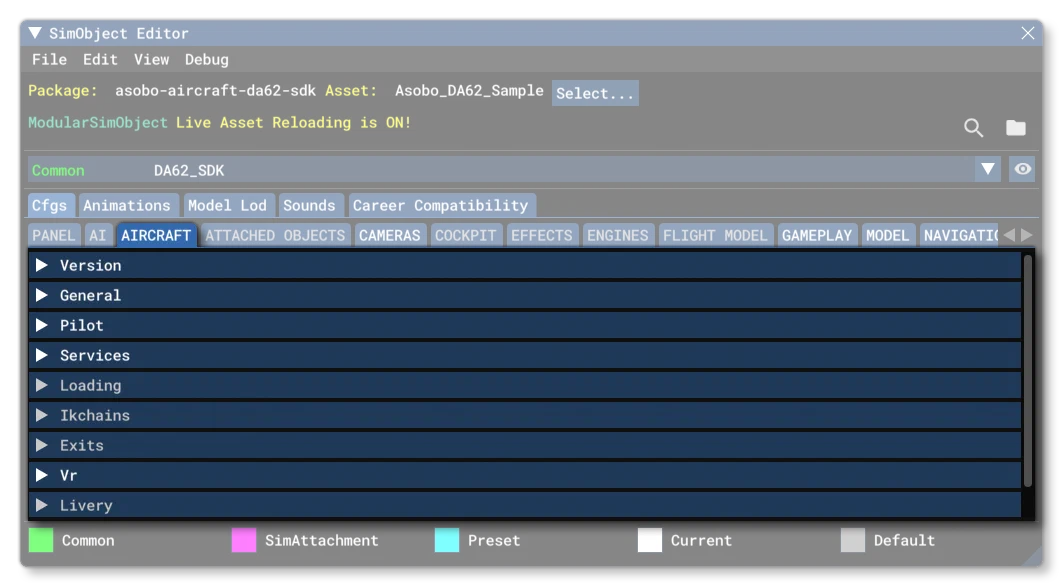
Every Microsoft Flight Simulator 2024 aircraft is defined by a mandatory Aircraft Configuration File called aircraft.cfg (although this file is not required for other non-aircraft SimObjects). It mainly provides general information about the aircraft and its variations to the simulation. Most of the data in this file can be set dynamically using The SimObject Editor - specifically from the Aircraft tab.
Below you can find information on the different sections used in the aircraft.cfg file as well as what parameters and values are expected within them.
[Version]
The [Version] section provides version information for the configuration file. In Microsoft Flight Simulator 2024, major versions should always be at least equal to 1.
Note that this section information is mandatory and should always be included.
| Parameter | Description | Type | Required |
|---|---|---|---|
major | Major CFG file version number, values must be greater than 0. | Integer | Yes |
minor | Minor CFG file version number, values must be greater than 0. | Integer | Yes |
[LIVERY]
This section is optional and only used when the aircraft being defined is a livery variation of an existing aircraft. The section only has one parameter:
| Parameter | Description | Type | Required |
|---|---|---|---|
base_container | This is the relative path to the aircraft package which this aircraft should be based on within the vfs when the simulation is running. | String | No |
It is important to note that adding a livery does not permit you to change all the aircraft parameters, only those given in the [FLTSIM.N] section.
[GENERAL]
In the [GENERAL] section of the Aircraft Configuration File there are multiple entries that relate to properly configuring a plane to be integrated into the sim in the following ways:
- multiplayer
- as a grounded/parked plane
- as part of the air traffic
The parameters available are mostly related to how the plane is identified by the database of the ICAO and they should all be non-localized.
| Parameter | Description | Type | Required |
|---|---|---|---|
atc_type | This is the “brand” name of the aircraft. | String | Yes |
atc_model | This is the model name of the aircraft. | String | Yes |
Category | The category for the SimObject. This is a general category used by the simulation as a filter for some options and activities. | Yes | |
Family | This parameter is used by the Collision Damage / Wear And Tear system to modify the rate and manner in which components will wear out.Default value is “Complex”. | String:1. Simple (eg: the C172)2. Complex (eg: the C208B)3. VeryComplex (eg: the B737) | No |
object_class | This parameter defines the class of aircraft with more detail than the category parameter, and is used as part of the criteria for deciding whether the aircraft can participate in some career activities.Default value is “Airplane”. | String:1. Airplane2. Helicopter3. Glider4. Balloon5. Airship6. Gyroplane7. Ornithopter8. TiltRotor9. Misc | Yes |
icao_type_designator | The ICAO type designator of the aircraft. It can be different to the atc_type field. All possible values are available from the ICAO official database(opens in a new tab). For example the Airbus A320 Neo:<span></span>icao_type_designator = "A20N"<span></span>Note that this is the parameter that will - in part - govern which aircraft are visible in a multiplayer scenario. Please see Note On Multiplayer for more information.If your aircraft is “experimental” or not listed in the official database, you may put what you wish here, and the tail number will be used by the ATC. | String | Yes |
icao_manufacturer | The ICAO manufacturer of the plane. It could be different from the actual manufacturer of the plane. All possible values are available from the ICAO official database(opens in a new tab). For example the Textron 172 Skyhawk:<span></span>icao_manufacturer = "CESSNA"<span></span>If your aircraft is “experimental” or not listed in the official database, you may put what you wish here, and the tail number will be used by the ATC. | String | Yes |
icao_model | The ICAO model name of the plane. It can be different to the atc_model field. All possible values are available from the ICAO official database(opens in a new tab). For example the Textron 172 Skyhawk:<span></span>icao_model = "172 Skyhawk"<span></span>Note that if your aircraft is “experimental” or not listed in the official database, you may put what you wish here. | String | Yes |
icao_engine_type | The ICAO engine type of the plane (for gliders use an empty string""). For example the Daher TBM 930:<span></span>icao_engine_type = "Turboprop/Turboshaft"<span></span> | String:1. “Piston”2. “Turboprop/Turboshaft”3. “Jet”4. “Electric”5. “Rocket”6. “None” (for gliders) | Yes |
icao_engine_count | The ICAO engine count of the plane (usually a value between 1 and 16, although for a glider it can be 0). For example the Daher TBM 930:<span></span>icao_engine_count = 1<span></span> | Integer | Yes |
icao_wtc | The ICAO Wake Turbulence Category(opens in a new tab) of the plane. For example the Daher TBM 930:<span></span>icao_WTC = "L"<span></span> | Enum:1. “L”2. “L/M”3. “M”4. “H” | Yes |
icao_generic | If TRUE, the plane is intended to be only used as a passive/Air Traffic plane and is not identifiable as a specific real plane. Please see the Aircraft.cfg - Air Traffic section for additional information related to this setting.Default is 0 (FALSE). | Bool | No |
For multiplayer, the user might be choosing to use optimized and generic planes to represent other players planes, or they might not possess the correct plane model. In those cases, if the icao_type_designator matches an entry in the ICAO database, the model will be swapped with a generic plane that is as close as possible to that plane, in terms of WTC, engine count and engine type.
For air traffic, if the icao_type_designator matches an existing entry in the ICAO database, it might be used to represent a plane from the Real Online traffic. Please check the [FLTSIM] section and the AI configuration file documentation for further information on correctly integrating the plane in the grounded/parked planes and in air traffic.
[PILOT]
This section was previously used for defining the pilot, copilot and instructor styles for the aircraft. However in Microsoft Flight Simulator 2024, only the parameters related to the copilot are used.
navigation_graph_pilot.cfg file, as explained here: Spawn Pilot (Transversal).This section can have the following parameters:
| Parameter | Description | Type | Required |
|---|---|---|---|
cabin_service | This is the name of the navigation service XML file that the copilot should use (omitting the file extension). Currently the only available service XML is “CopilotService”.Default value is “CopilotService”. | String | No |
generated_copilot | This is the name of the profile to use for the generated copilot model. It can be any one of those listed here: Generated Character Profiles. In general you will want it to be set to “Copilot”, but others can be used depending on the activity and type of aircraft.Default value is “”, which means no copilot will be spawned. | String | No |
copilot_behavior | This is used to set the initial copilot behaviour, as defined in the cabin_service file. Currently the only available service behaviour is “COPILOT”.The default value is “COPILOT”. | String | No |
hide_avatar | This is used to set up how the pilot avatar is hidden. If set to 0 (false), the pilot avatar will only be hidden when the cockpit camera is used. If set to 1 (true) then the pilot avatar will always be hidden while inside the aircraft, regardless of the camera being used. Note that this will not affect the avatar visibility outside the aircraft. This can be used if the aircraft has a pilot avatar included as part of the model and doesn’t want to display the one the simulation generates.Default value is 0. | Boolean | No |
pilot | This is the title of the SimObject - as set in the sim.cfg file. If you do not set this parameter then no pilot object will be spawned, although for user aircraft it may still spawn a pilot if a mission explicitly specifies one. If the player has a setting other than “Default” in the simulation options menu, then that setting will override this one (and may also spawn a pilot if this parameter is omitted). For a list of pilots available without creating your own SimObjects, please see the List Of Included Pilot/Copilot/Instructor SimObjects.NOTE: In “freeflight”, this parameter may be ignored if the aircraft flight_model.cfg has not defined a pilot station_load.N.Default is “”. | String | No |
copilot | This is the title of the SimObject - as set in the sim.cfg file fflight_model.cfg/strong> copilot. If you do not set this parameter then no copilot object will be spawned, although for user aircraft it may still spawn a copilot if a mission explicitly specifies one. If the player has a setting other than “Default” in the simulation options menu, then that setting will override this one (and may also spawn a copilot if this parameter is omitted). For a list of copilots available without creating your own SimObjects, please see the List Of Included Pilot/Copilot/Instructor SimObjects.NOTE: In “freeflight”, this parameter may be ignored if the aircraft flight_model.cfg has not defined a copilot station_load.N.Default is “”. | String | No |
instructor | This is the title of the SimObject - as set in the sim.cfg file for a human SimObject - that is to be used as instructor in an aircraft. This title is only used for user aircraft (never AI ones) and in missions, and only then if the mission XML specifies the instructor as default in the *.flt file. For a list of instructors available without creating your own SimObjects, yplease see the List Of Included Pilot/Copilot/Instructor SimObjects.Default is “”. | String | No |
pilot_default_animation | A string representing the animation (BlendTreeState) that will be used by the Human Character pilot. If using one of the included pilots this should be “Idle1_PoseAirliner” or “Idle1_PosePropeller”, depending on the type of aircraft.Default is "", "", "", "", "", "", "", "", "", "", "", "", "", "", "", "".Note that this parameter takes a table of 16 strings with the format: | List of strings | No |
copilot_default_animation | A string representing the animation (BlendTreeState) that will be used by the Human Character copilot. If using one of the included pilots this should be “Idle1_PoseAirliner” or “Idle1_PosePropeller”, depending on the type of aircraft.Default is “”. | List of strings | No |
pilot_attach_node | A string which is the name of a Node in the model of the aircraft, where the pilot will be attached.The default value is “PILOT_0”. | String | No |
copilot_attach_node | A string which is the name of a Node in the model of the aircraft, where the copilot will be attached.The default value is “COPILOT”. | String | No |
[SERVICES]
This section details which Airport Services can be available for this aircraft. Each line in this section contains a name of a service, followed by = 1 to mark it as available, or = 0 to make it unsuitable for the aircraft. Any unspecified service is considered unavailable (0) by default. The following parameters for services exist:
| Parameter | Description | Type | Required |
|---|---|---|---|
FUELTRUCK | Ability to call a FuelTruck from a parking. Even if unavailable, this does not prevent taxiing to a fuel station. | Bool | No |
BAGGAGE_LOADER | Determines whether the entire baggage service is available or not. | Bool | No |
CATERING_TRUCK | Determines whether a catering truck is available or not. | Bool | No |
BOARDING_RAMP | Determines whether a boarding ramp (moving stairs) is available or not. | Bool | No |
GROUND_POWER_UNIT | Determines whether ground power units are available or not. | Bool | No |
PUSHBACK | Indicates availability of the large pushback vehicle used mostly for airliners. | Bool | No |
SMALL_PUSHBACK | Indicates availability of small pushback vehicles for GA aircraft and private jets (requires centered nose wheel). | Bool | No |
MARSHALLER | Determines whether a marshaller is available or not. | Bool | No |
JETWAY | Determines whether a jetway is available or not (aircraft can still park at gates without connection). | Bool | No |
WINCH | Determines whether a winch is available or not (aircraft must be a glider). | Bool | No |
WING_RUNNER | Determines whether a wing runner is available or not (aircraft must be a glider). | Bool | No |
DISABLE_PASSENGER_BOARDING | When set to true (1), passenger boarding will be disabled for the aircraft. | Bool | No |
Note that most services require properly defined [Interactive Points] in order to be usable.
Also note that if neither PUSHBACK nor SMALL_PUSHBACK are available (for example with aircraft having a left and right front wheels instead of a centered one), the User will still be able to pushback the aircraft (with Shift+P), but this might appear as “magic” because no visible vehicle or human character will be seen pushing the aircraft.
[IKCHAINS]
This section is used to set up the inverse kinetic chain between the pilot extremities and the yoke/stick and pedals. Here you give the nodes on the cockpit model elements that should “connect” with the relevant part of the pilot/copilot model (hands and feet). The parameters available are:
| Parameter | Description | Type | Required |
|---|---|---|---|
right_hand_target | This is the name of the node on the stick/yoke where the right hand will be “connected”, eg: "Right_Hand_Ik_snap"Default value is “”. | String | No |
left_hand_target | This is the name of the node on the stick/yoke where the left hand will be “connected”, eg: "Left_Hand_Ik_snap"Default value is “”. | String | No |
left_foot_target | This is the name of the node for the foot pedal where the right foot will be “connected”, eg: "Right_Foot_Ik_snap"Default value is “”. | String | No |
right_foot_target | This is the name of the node for the foot pedal where the left foot will be “connected”, eg: "Left_Foot_Ik_snap"Default value is “”. | String | No |
[EXITS]
This section defines the exits for the aircraft.
major of the flight_model.cfg is set to a value less than 1 (in qhich case this section will be used instead of [INTERACTIVE POINTS]..It can have the following parameters:
| Parameter | Description | Type | Required |
|---|---|---|---|
number_of_exits | This value defines the number of simulated exits, or doors, on the aircraft. | Integer | Yes |
exit.N | Each one of these entries defines the properties of an exit starting at 0 up to number_of_exits - 1. The parameter requires a list of 5 values, in the following order:* The open and close rate percent per second (where 1.0 is fully open)* The X position relative to Datum Reference Point* The Y position relative to Datum Reference Point* The Z position relative to Datum Reference Point* The type of exit (0 = Main, 1 = Cargo, 2 = Emergency)For example:exit.0 = 0.4, -16.50, -4.5, 0.5, 0; | List of Floats | No |
[VR]
For each base aircraft, a VR section should be added to bind node descriptors to the actual meshes or animations of the glTF file for the aircraft (see VR Helpers for model setup information). This section has the following parameters:
| Parameter | Description | Type | Required |
|---|---|---|---|
collective_anim | This is the name of the collective animation, eg: "HANDLING_COLLECTIVE_Lever"Default value is “”. | String | No |
collective_node | This is the name of the collective node of the model. Note that this node - and all its children - will be highlighted when the collective is selected by the user.Default value is “”. | String | No |
collective_collision_mesh | This is the optional collision mesh added to enhance interactions with the collective. See the section Yoke / Collective Collision Meshes for more information.Default value is “”. | String | No |
yoke_anim_x | This is the name of the horizontal stick animation left/right or the rotational yoke animation left/right, eg: "HANDLING_YOKE_Lever_StickLR"Default value is “”. | String | No |
yoke_anim_y | This is the name of the vertical (depth) yoke animation, eg: "HANDLING_YOKE_Lever_StickForeAft"Default value is “”. | String | No |
yoke_node | This is the name of the yoke node of the model. Note that this node - and all its children - will be highlighted when the yoke is selected by the user.Default value is “”. | String | No |
yoke_collision_mesh | This is the optional collision mesh added to enhance interactions with the yoke. See the section Yoke / Collective Collision Meshes for more information.Default value is “”. | String | No |
For more information on VR controls for the yoke / stick / collective, please see here:
[InteractionMgr.N]
This section initialises the interaction manager for the aircraft. This section must be added if there are interactions between SimObjects in the aircraft, for example, the interaction between the pilot, the seat, and the seatbelt. You can define multiple of these sections numbering them from 0, where each section is applied to a variation of the aircraft. You can find further information on interactions from the the following page:
This section can have the following parameters:
| Parameter | Description | Type | Required |
|---|---|---|---|
graph | This parameter requires the name of the navigation graph file that is to be used.Note that if there is no navigation graph to be used, yet you still require the interaction manager to be initiated, you should put NONE as the value for this parameter. | String | Yes |
[FLTSIM.N]
The [FLTSIM.N] section(s) are used to define the behavior of the aircraft as a SimObject, and whether it is available to the user or not. You can define multiple of these sections numbering them from 0, where each section is a variation of the aircraft. The following parameters exist for this section:
| Parameter | Description | Type | Required |
|---|---|---|---|
title | The aircraft variation name. Names are a unique identifier of SimObjects and their variants. We recommend using your company name as a prefix, to guarantee the uniqueness of your SimObject even when included with objects produced by other 3rd party developers. | String | Yes |
operating_status | This parameter tells the simulation what status the aircraft has. The string given here will affect what activities the aircraft can participate in as well as how it is displayed to the user. The status descriptions are as follows:1. in_service: an aircraft that is “real” and exists in the world and is currently in actual use.2. retired: an aircraft that is “real” but currently decommissioned and not in use anywhere in the world (for example, Concorde).3. experimental: an aircraft that is physically possible and has either been prototyped or at least fully designed, but never put into production or active service.4. fantasy: an aircraft that does not exist outside of the fictional world in any form.The default value is “in_service”. | String:1. in_service2. retired3. experimental4. fantasy | No |
targeted_specializations | This is used in conjunction with the online version of the Career Compatibility tool to define whether an aircraft is available for a career specialisation or not. The parameter requires a list of Specialisation Codes to define the specialisations that you wish the aircraft to participate in. As an example:<span></span>targeted_specializations = CHT-AEC, CAR-PLM, FIR-EXA, SAR-PLN<span></span>Using this parameter you can exclude your aircraft from compatible specialisations by ommitting the specialisation code from this list. So the aircraft will only be available to those specialisations that are listed here and have been validated. If no specialisations are listed here the aircraft will not be available in any career activity. | List of strings | Yes |
military | When this is set to 1 (TRUE) then the aircraft will be considered a military aircraft.Default value is 0 (FALSE). | Boolean | No |
premium | When this is set to 1 (TRUE) then the aircraft will be considered a premium (luxury) aircraft.Default value is 0 (FALSE). | Boolean | No |
model | The folder for the aircraft model (if it’s the default “model” folder, leave as an empty string “”). | String | No |
panel | The folder for the aircraft panel (if it’s the default “panel” folder, leave as an empty string “”). | String | No |
sound | The folder for the aircraft sounds (if it’s the default “sound” folder, leave as an empty string “”). However we recommend that you specify a path to to the sound folder, for example:sound="\..\..\MyCompany_MyAircraft\sound"It is worth noting that you can also specify a folder name suffix instead of a full path, for example:sound=CFMWhen using a suffix like this, the code will then look for a folder called sound.CFM in the aircraft package folder.IMPORTANT! By adding a folder name suffix, your event names will concatenate your PC.PCK file name with your suffix, for example: Play_MyCompany_MyAircraft _MySuffix_EventName. | String | No |
soundai | The folder for the aircraft AI sounds (if it’s the default “soundai” folder, leave as an empty string “”). However we recommend that you specify a path to to the sound AI folder, for example:soundai="\..\..\MyCompany_MyAircraft\soundai"It is worth noting that you can also specify a folder name suffix instead of a full path, for example:soundai=CFMWhen using a suffix like this, the code will then look for a folder called soundai.CFM in the aircraft package folder.IMPORTANT! By adding a folder name suffix, your event names will concatenate your PC.PCK file name with your suffix, for example: Play_MyCompany_MyAircraft _AI_MySuffix_EventName. | String | No |
texture | The folder for the aircraft textures (if it’s the default “texture” folder, leave as an empty string “”). | String | No |
effects | The folder for the aircraft lighting effects (if it’s the default “effects” folder, leave as an empty string “”).NOTE: This is only for light effects, as explained in this section - Implementing Lights. | String | No |
kb_checklists | Procedures/Checklist sibling file name. | String | No |
kb_reference | Reference information sibling file name. | String | No |
description | A full description of the aircraft variation. | String | No |
short_description | A short description of the aircraft variation. | String | No |
wip_indicator | The current development status of the variation. | Integer:1. -1 = Disabled2. 0 = Rough3. 1 = First Pass4. 2 = Finished | No |
ui_manufacturer | Localisable string indicating the manufacturer. NOTE: This is required for the correct setup of the Aircraft Classification Details in the simulation UI. | String | No |
ui_type | Localisable string indicating the aircraft type.NOTE: This is required for the correct setup of the Aircraft Classification Details in the simulation UI. | String | No |
ui_typerole | String indicating the typical aircraft role. Can only be one of those listed currently. This will change what type of data is shown in the simulation UI when the user is inspecting the aircraft. If an incorrect string is given (ie: not one of those from the list), then the UI will only show the weight of the aircraft. Note that if your aircraft does not fit any of the descriptive strings available, then you should pick the one that is closest in terms of general properties.Please note that this parameter will also have an effect on the orientation of the aircraft when it spawns into a career mission. Please see here for more information: Pre-Mission Checks. | String:Commercial Airliner747-400 V3747-400BCF V3747-400D V3747-400ER V3747-400ERF V3747-400F V3747-400M V3Single Engine PropTwin Engine PropSingle Engine TurboPropTwin Engine TurboPropTwin Engine JetRegional JetSingle Engine JetRotorcraftGliderAirshipHot Air Balloon | No |
ui_variation | Localisable string indicating the variation (ie: preset) of the aircraft.NOTE: This is also used in the setup of the Aircraft Classification Details in the simulation UI. | String | No |
ui_createdby | Name of the person or company that created the asset.NOTE: Aircraft that have the same icao_model and ui_createdby values will be grouped together as variations of the same model in the Free Flight aircraft selection screen and in the aircraft store in Career mode. | String | No |
ui_thumbnailfile | Relative path to the thumbnail image for the aircraft asset. | String | No |
ui_certified_ceiling | The service ceiling/max certified operating altitude, in ft.This value should always be set correctly, as it will be displayed in the simulation UI as part of the Aircraft Classification Details, and it is also a fallback for the cruise_alt parameter. | Float | Yes |
ui_max_range | The maximum distance the aircraft can fly between take-off and landing, in nm.NOTE: This is also used in the setup of the Aircraft Classification Details in the simulation UI. | Float | No |
ui_autonomy | The maximum duration the aircraft can fly between take-off and landing in hours. | Float | No |
ui_fuel_burn_rate | The average fuel consumption per hour, in lbs.This data is used to determine if a fuel-powered or hybrid aircraft is compatible with a career mission. See Pre-Mission Checks for more information.For hybrid aircraft, it is advised to indicate a fuel burn rate corresponding to a cruise where both types of energy are used simultaneously (the term hybrid aircraft is used here to describe an aircraft that presents a mix of electrical and fuel-powered engines).NOTE: This is also used in the setup of the Aircraft Classification Details in the simulation UI. | Float | No |
ui_powerplant_specifics | A short localisable string that describes the powerplant of the aircraft. This can be the make and model or something more generic, for example:1. Pratt & Whitney PT6A-67AG2. Radial Piston Engine3. 2 BladesNOTE: This is also used in the setup of the Aircraft Classification Details in the simulation UI. | String | No |
ui_electrical_engine_consumption | This defines the consumption of all electrical engines used for propulsion when operating at normal speed and at cruise altitude, in kW.This data is used in relation with ui_engine_available_electrical_capacity to determine if an electrical or hybrid aircraft is compatible with a career mission. See Pre-Mission Checks for more information.For hybrid aircraft, it is advised to indicate a consumption corresponding to a cruise where both types of energy are used simultaneously (the term hybrid aircraft is used here to describe an aircraft that presents a mix of electrical and fuel-powered engines).Default value is 0. | Float | No |
ui_engine_available_electrical_capacity | This defines the sum of the capacities of all batteries powering electrical engines used for propulsion, in kWh.This data is used in relation with ui_electrical_engine_consumption to determine if an electrical or hybrid aircraft is compatible with a career mission (the term hybrid aircraft is used here to describe an aircraft that presents a mix of electrical and fuel-powered engines). See Pre-Mission Checks for more information.Default value is 0. | Float | No |
ui_instrumentation | A short localisable string that describes the instrumentation of the aircraft. This can be the make and model or something more generic, for example:1. Garmin G3X Touch2. Mixed (analog and digital instruments)NOTE: This is is also used in the setup of the Aircraft Classification Details in the simulation UI. | String | No |
ui_additional_information | A short localisable string that gives any important additional information about the aircraft, for example:1. Fitted with a liquid sprayer system2. Set up for aerial observation and reconnaissance3. Base model of the aircraftNOTE: This is also used in the setup of the Aircraft Classification Details in the simulation UI. | String | No |
atc_id | This gives the registration number of the aircraft (note that it can be modified in the simulation options by the user). The options for how this is displayed will depend on the [VPaintingN] settings of the panel.cfg file.For more information please see here: Registration Numbers. | String | No |
atc_airline | The airline name. | String | No |
atc_flight_number | The flight number. | String | No |
atc_heavy | Whether the aircraft is heavy (TRUE, 1) or not (FALSE, 0). | Bool | No |
atc_parking_types | List of types of parking permitted for the aircraft. This is a single string containing a comma separated list of possible parking types, eg: "GATE,RAMP,CARGO" | String:1. ANY2. RAMP3. CARGO4. MIL_CARGO5. MIL_COMBAT6. GATE7. DOCK | No |
atc_parking_codes | A single string containing a comma separated list of parking codes, eg: “F18,A” | String | No |
isAirTraffic | If this is set to TRUE (1) then this variation is considered to be optimized for use as a parked plane, or as part of air traffic.Please see the Aircraft.cfg - Air Traffic section for additional information related to this setting. | Bool | No |
canBeUsedByAITraffic | If this is set to TRUE (1) the aircraft will appear in AI Offline AirTraffic and/or in Parked Aircraft. If set to FALSE (0) then it won’t be used for these things.The default value is TRUE (1).Please see the Aircraft.cfg - Air Traffic section for additional information related to this setting. | Bool | No |
isUserSelectable | If this is set to FALSE (0) this variation is not selectable to the user for flying (ie: it won’t appear on the aircraft selection screen).Please see the Aircraft.cfg - Air Traffic section for additional information related to this setting.IMPORTANT! If the aircraft can be selected by the user for flying, it must have a panel.cfg as well. | Bool | No |
icao_airline | Non-localized ICAO designator of the airline if the variation is a livery for a real airline.Please see the Aircraft.cfg - Air Traffic section for additional information related to this setting. | String | No |
isTowPlane | This parameter can be used to flag the aircraft as available for use as a tow plane for gliders.Default value is false. | Bool | No |
interior_occlusion_factor | The interior models of the aircraft (passengers, seats, cargo, etc…) will have Ambient Occlusion included as part of their material definition when they were modeled. However, this may need adjusting at run-time depending on the aircraft they are being used in. As such this parameter can be adjusted to modify the amount of AO to be applied when the model is inside the aircraft.NOTE: This can be further adjusted using the node_occlusion_factor parameter when working with node graphs.Default value is 1. | Float | No |
capacity | This value is the number of available seats in the aircraft, minus the pilot and copilot.Default value is 0. | Integer | No |
Specialisation Codes
The following table gives all the codes required for the targeted_specializations parameter:
| Specialisation | Dressing Code | Cabin Code |
| Medevac - Plane | MED-PLN | MED_Cabin |
| Cargo Transport (Light) - Plane | CAR-PSO | CAR_Cabin |
| Cargo Transport (Medium) - Plane | CAR-PLC | CAR_Cabin |
| Cargo Transport (Heavy) - Plane | CAR-PCC | CAR_Cabin |
| Cargo Transport (Super Heavy) - Plane | CAR-PVO | CAR_Cabin |
| Remote Cargo Ops - Plane | CAR-PLM | CAR_Cabin |
| Cargo Transport - Rotorcraft | CHT-ROH | CHT_Cabin |
| Aerial Construction - Rotorcraft | CHT-AEC | CAR_Cabin |
| Scientific Research - Plane | DIC-SCR | DIC_Cabin |
| Passenger Transport - Plane | COF-PCC | COF_Cabin |
| Passenger Transport - Rotorcraft | COF-ROT | COF_Cabin |
| Charter Service (Private) - Plane | PRC-PSO | COF_Cabin / PRC_Cabin |
| Charter Service (VIP) - Plane | PRC-PLC | PRC_Cabin |
| Charter Service (VIP Airliner) - Plane | PRC-PCC | PRC_Cabin |
| Search & Rescue - Plane | SAR-PLN | N/A |
| Search & Rescue - Rotorcraft | SAR-ROT | SAR_Cabin |
| Search & Rescue (Hoist) - Rotorcraft | SAR-ROI | SAR_Cabin |
| Aerial Firefighting (Initial Attack) - Plane | FIR-INA | FIR_Cabin |
| Aerial Firefighting (Extended Attack) - Plane | FIR-EXA | FIR_Cabin |
| Skydive Aviation - Plane | SKP-PLN | SKP_Cabin |
| Agricultural Aviation - Plane | AEA-PLN | AEA_Cabin |
| Agricultural Aviation - Rotorcraft | AEA-ROT | AEA_Cabin |
| Aerial Advertising - Plane | AAD-PLN | AAD_Cabin |
| First Flight - Plane | FIF-PLN | COF_Cabin |
| Flightseeing - Plane | TOR-PLN | COF_Cabin |
| Flightseeing - Rotorcraft | TOR-ROT | COF_Cabin |
| Ferry Flight - Plane | FEF-PLN | DEFAULT |
[EFFECTS]
Each entry can be followed by a ,1 if the effect is to be run for a single iteration. Set this number to ,0 or leave blank for the effect to continue as long as the respective action is active, for example:
[EFFECTS]
vaportrail_l = fx_vaportrail_l, 0
vaportrail_r = fx_vaportrail_r, 0
l_wingtipvortice = fx_wingtipvortice_l, 1
r_wingtipvortice = fx_wingtipvortice_r, 1
If you make an entry in the configuration file it will replace the default effects with a new one, or - to turn off the effect - add an entry that references the fx_dummy effect (which does nothing).
The table below outlines the aircraft effects parameters, though of course not all effects are supported on all aircraft:
| Parameter | Description | Single Iteration | Type | Required |
|---|---|---|---|---|
wake | A wake effect for water. Default: fx_wake. | False | Enum | No |
water | Landing, taxiing, or taking off from water effect. Default: fx_spray. | False | Enum | No |
waterspeed | Traveling at speed on water. Default: fx_spray. | False | Enum | No |
dirt | Moving on dirt. Default: fx_tchdrt. | False | Enum | No |
concrete | Moving on concrete. Default: fx_sparks. | False | Enum | No |
touchdown | Touchdown effect. Default: fx_tchdwn. | True | Enum | No |
contrail | Contrail effect for jets above 29,000 ft. Default: fx_contrail_l. | False | Enum | No |
startup | Engine startup. Default: fx_engstrt. | True | Enum | No |
landrotorwash | Rotor wash (helicopters only). Default: fx_rtr_lnd. | False | Enum | No |
waterrotorwash | Water rotor wash (helicopters only). Default: fx_rtr_wtr. | False | Enum | No |
vaportrail_l | Left wing vapor trail. Default: fx_vaportrail_l. | False | Enum | No |
vaportrail_r | Right wing vapor trail. Default: fx_vaportrail_r. | False | Enum | No |
l_wingtipvortice | Left wingtip vortice (e.g., jets like F18). Default: fx_wingtipvortice_l. | True | Enum | No |
r_wingtipvortice | Right wingtip vortice. Default: fx_wingtipvortice_r. | True | Enum | No |
fueldump | Fuel dump active. Default: fx_dummy (no effect). | False | Enum | No |
EngineFire | Engine fire. Default: fx_engfire. | False | Enum | No |
EngineDamage | Engine damage. Default: fx_engsmoke. | False | Enum | No |
EngineOilLeak | Oil leak. Default: fx_OilLeak. | False | Enum | No |
SkidPavement | Skid on tarmac leaving a mark. Default: fx_skidmark. | False | Enum | No |
SnowSkiTrack | Skid on snow. Default: fx_dummy (no effect). | False | Enum | No |
WheelSnowSpray | Takeoff on snow. Default: fx_WheelSnowSpray. | False | Enum | No |
WheelWetSpray | Takeoff on wet runway. Default: fx_WheelWetSpray. | False | Enum | No |
WetEngineWash | Propeller wash effect on wet terrain below 20 m. Default: fx_WetEngineWash. | False | Enum | No |
SnowEngineWash | Propeller wash effect on snow or snowfall below 20 m. Default: fx_SnowEngineWash. | False | Enum | No |
WaterBallastDrain | Water ballast draining (gliders only). Default: fx_WaterBallastDrain. | False | Enum | No |
PistonFailure | One or more piston failures. Default: fx_PistonFailure. | True | Enum | No |
In all cases, the enum value used can be any one of the following:
fx_wake
fx_spray
fx_tchdrt
fx_sparks
fx_tchdwn
fx_contrail_l
fx_engstrt
fx_rtr_lnd
fx_rtr_wtr
fx_vaportrail_l
fx_vaportrail_r
fx_wingtipvortice_l
fx_wingtipvortice_r
fx_engfire
fx_engsmoke
fx_OilLeak
fx_skidmark
fx_WheelSnowSpray
fx_WheelWetSpray
fx_WetEngineWash
fx_SnowEngineWash
fx_WaterBallastDrain
fx_PistonFailure
fx_dummy
Effects can also be specified for an aircraft within a list using the following format:
effect.*N* = effect.N = \<nodename\>#\<SimCode\>#<fxFileName>
Where N is the effect number and nodename is the model node that the effect will be attached to. SimCode is a script expression that has to return TRUE or FALSE (1 or 0), and the effect will show up based on this value. Here is a more thorough example:
effect.0 = L1_EngineFX#(A:GENERAL ENG COMBUSTION:1, boolean)#fx_reactorHeat
effect.1 = L2_EngineFX#(A:GENERAL ENG COMBUSTION:2, boolean)#fx_reactorHeat
effect.2 = R1_EngineFX#(A:GENERAL ENG COMBUSTION:3, boolean)#fx_reactorHeat
effect.3 = R2_EngineFX#(A:GENERAL ENG COMBUSTION:4, boolean)#fx_reactorHeat
The last input in the line is a *.fx file. At this time, it is not yet possible to re-define the effects used.
*.fx files in the fs-base-effects-legacy folder of your Microsoft Flight Simulator 2024 installation.Here’s a full example for a Boeing:
[EFFECTS]
wake=fx_wake
water=fx_spray
dirt=fx_tchdrt
concrete=fx_sparks
touchdown=fx_tchdwn, 1
effect.0 = L1_EngineFX#(A:GENERAL ENG COMBUSTION:1, boolean)#fx_reactorHeat
effect.1 = L2_EngineFX#(A:GENERAL ENG COMBUSTION:2, boolean)#fx_reactorHeat
effect.2 = R1_EngineFX#(A:GENERAL ENG COMBUSTION:3, boolean)#fx_reactorHeat
effect.3 = R2_EngineFX#(A:GENERAL ENG COMBUSTION:4, boolean)#fx_reactorHeat