
EFB Notifications
From any app of the EFB, it is possible to trigger notifications that will be displayed at the top of the tablet. These notifications can then be saved in the notification menu, accessible through the notification icon in the top left corner of the EFB. Notifications come in two types:
Temporary Notifications
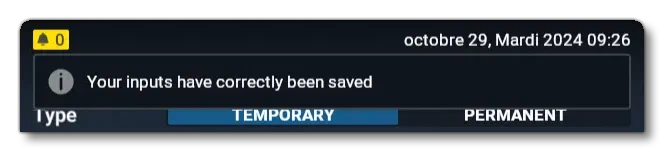
These are notifications which will be deleted completely once their display time has passed.
Permanent Notifications
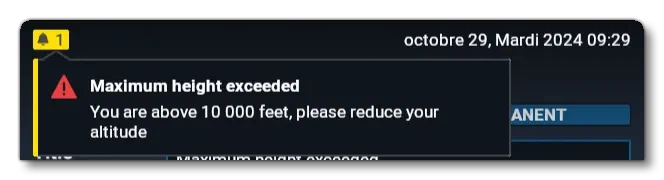
These are notifications which are added to the notification menu even if their are not displayed at the top of the EFB anymore. The notification needs to be manually removed from the notification menu for it to disappear.
Creating The Notifications
To create notifications in the EFB there are three utility functions that you will need. The first is obligatory as it is needed to import the required functions, and the other two are for either the temporary or permanent notifications.
Import utility functions into your app:
import { createTemporaryNotif, createPermanentNotif } from '@efb/efb-api';
Temporary notification prototype:
function createTemporaryNotif(
    delayMs: number,
    description: string,
    style?: EfbNotificationStyle,
    descriptionArguments?: Map<string, MaybeSubscribable<string>>,
    icon?: string | VNode
): EfbTemporaryNotification
Permanent notification prototype:
function createPermanentNotif(
    delayMs: number,
    title: string,
    description: string,
    style?: EfbNotificationStyle,
    descriptionArguments?: Map<string, MaybeSubscribable<string>>,
    icon?: string | VNode,
    color?: string | number,
    action?: () => VNode
): EfbPermanentNotification
To add it to the notifications stack, you will need first to pass the NotificationManager to your app. To achieve this, include the notification manager in the props of your AppView, in your app render method:
public render(): TVNode<TemplateAppView> {
    return <TemplateAppView bus={this.bus} notificationManager={this.notificationManager} />;
}
With that done, you can then go ahead and add your notification with the methods provided by the manager, eg:
Add a notification that you have created or retrieved previously:
const newNotif= createTemporaryNotif(3000, "Your inputs have correctly been saved", 'info');
this.props.notificationManager.addNotification(newNotif);
Add a new notification directly:
this.props.notificationManager.addTemporaryNotification(3000, "Your inputs have correctly been saved", 'info');
this.props.notificationManager.addPermanentNotification(5000, "Maximum height exceeded", "You are above 10 000 feet, please reduce your altitude", 'warning');
Having done this the notification(s) should appear at the top of the EFB, and if it is permanent - in the notification menu.