
Simulation Variables
SimVars are “simulation variables” and they are the way that third party APIs and add-ons can get information about the current state of the simulation. In general these variables are used to control aircraft behaviors by permitting you to retrieve data about things like weather conditions, position, or aircraft status, and in many cases they can also be used to modify something within the simulation, in particular aircraft instruments and controls - although they can also have many other purposes within any add-on package.
You can find detailed information about each particular SimVar on the following pages:
- Simulation Variable Units
- Camera Variables
- Services Variables
- Miscellaneous Variables
- Aircraft SimVars:
- Aircraft Autopilot/Assistant Variables
- Aircraft Brake/Landing Gear Variables
- Aircraft Control Variables
- Aircraft Electrics Variables
- Aircraft Engine Variables
- Aircraft Flight Model Variables
- Aircraft Fuel Variables
- Aircraft Miscellaneous Variables
- Aircraft Radio Navigation Variables
- Aircraft System Variables
- Helicopter Variables
- Balloon Variables
We have a Visual Studio project that can be used to generate the SimVar Watcher tool, which can be used to monitor and edit SimVars as the simulation runs. You can find full details here:
There is also a further section dedicated to Event IDs. These are used as a way to interface between different simulation systems, with the user at the top level the various sub-systems within the simulation at the bottom. You can find all these event IDs in the following section:
Finally, there is an additional document for Audio Design that lists the RTPC events and the SimVars they are associated with:
SimVar Index
Below you can find indexed all the SimVars available, presented this way to facilitate finding the required variable at a glance or through the search system:
A
AI AUTOTRIM ACTIVE AGAINST PLAYER
AIRCRAFT ALTITUDE ABOVE OBSTACLES
AIRSHIP COMPARTMENT OVERPRESSURE
AIRSHIP COMPARTMENT TEMPERATURE
AIRSPEED INDICATED THEORETICAL
AIRSPEED SELECT INDICATED OR TRUE
APU BLEED PRESSURE RECEIVED BY ENGINE
ATC ARRIVAL AIRPORT IS TOWERED
ATC DEPARTURE AIRPORT IS TOWERED
ATC FIRST VFR ARRIVAL PATTERN WAYPOINT NAME
ATC FP ARRIVAL TRAFFIC PATTERN IS LEFTHANDED
ATC FP DEPARTURE TRAFFIC PATTERN IS LEFTHANDED
ATC OVERFLYING AIRPORT UNANNOUNCED
ATC PREVIOUS WAYPOINT ALTITUDE
ATC RUNWAY HEADING DEGREES TRUE
ATC RUNWAY RELATIVE POSITION X
ATC RUNWAY RELATIVE POSITION Y
ATC RUNWAY RELATIVE POSITION Z
ATC RUNWAY TDPOINT RELATIVE POSITION X
ATC RUNWAY TDPOINT RELATIVE POSITION Y
ATC RUNWAY TDPOINT RELATIVE POSITION Z
ATC WAYPOINTS HIGHEST ALTITUDE
ATTITUDE INDICATOR BANK DEGREES
ATTITUDE INDICATOR PITCH DEGREES
AUTOPILOT AIRSPEED ACQUISITION
AUTOPILOT AIRSPEED HOLD CURRENT
AUTOPILOT AIRSPEED MAX CALCULATED
AUTOPILOT AIRSPEED MIN CALCULATED
AUTOPILOT ALTITUDE MANUALLY TUNABLE
AUTOPILOT APPROACH IS LOCALIZER
AUTOPILOT FLIGHT DIRECTOR ACTIVE
AUTOPILOT FLIGHT DIRECTOR BANK
AUTOPILOT FLIGHT DIRECTOR BANK EX1
AUTOPILOT FLIGHT DIRECTOR PITCH
AUTOPILOT FLIGHT DIRECTOR PITCH EX1
AUTOPILOT HEADING MANUALLY TUNABLE
AUTOPILOT MANAGED SPEED IN MACH
AUTOPILOT MANAGED THROTTLE ACTIVE
B
BOARDINGRAMP ELEVATION CURRENT
BOARDINGRAMP ORIENTATION CURRENT
BOARDINGRAMP ORIENTATION TARGET
BOARDINGRAMP STRAIGHT POSITION Y
BOARDINGRAMP STRAIGHT POSITION Z
BRAKE DEPENDENT HYDRAULIC PRESSURE
C
CAMERA ACTION COCKPIT VIEW RESET
CAMERA ACTION COCKPIT VIEW SAVE
CAMERA VIEW TYPE AND INDEX MAX
CATERINGTRUCK AIRCRAFT DOOR CONTACT OFFSET Z
CATERINGTRUCK ELEVATION CURRENT
CATERINGTRUCK ELEVATION TARGET
COCKPIT CAMERA INSTRUMENT AUTOSELECT
D
E
ELECTRICAL AVIONICS BUS VOLTAGE
ELECTRICAL BATTERY BUS VOLTAGE
ELECTRICAL BATTERY ESTIMATED CAPACITY PCT
ELECTRICAL EXTERNAL POWER AMPS
ELECTRICAL EXTERNAL POWER VOLTAGE
ELECTRICAL HOT BATTERY BUS AMPS
ELECTRICAL HOT BATTERY BUS VOLTAGE
ELECTRICAL RELAY BREAKER PULLED
ELECTRICAL RELAY CONNECTION ON
EMPTY WEIGHT CROSS COUPLED MOI
F
FLAPS CURRENT SPEED LIMITATION
FLARM THREAT RELATIVE ALTITUDE
FLARM THREAT TIME TO COLLISION
FLY ASSISTANT CANCEL DESTINATION
FLY ASSISTANT CANCEL DESTINATION DISPLAY
FLY ASSISTANT HAVE DESTINATION
FLY ASSISTANT LANDING SPEED DISPLAY MODE
FLY ASSISTANT NEAREST CATEGORY
FLY ASSISTANT NEAREST METADATA
FLY ASSISTANT NEAREST SELECTED
FLY ASSISTANT SET AS DESTINATION
FLY ASSISTANT STALL SPEED DISPLAY MODE
FLY ASSISTANT TAKEOFF SPEED DISPLAY MODE
FLY ASSISTANT TAKEOFF SPEED ESTIMATED
FLY ASSISTANT TAXI RIBBONS ACTIVE
FLY ASSISTANT TELEPORT TO INCREASED ALTITUDE
FUEL SELECTED QUANTITY PERCENT
FUEL TOTAL QUANTITY WEIGHT EX1
FUELSYSTEM TANK TOTAL QUANTITY
FUELSYSTEM TANK USABLE CAPACITY
G
GEAR EMERGENCY HANDLE POSITION
GENERAL ENG COMBUSTION SOUND PERCENT
GENERAL ENG EXHAUST GAS TEMPERATURE
GENERAL ENG FUEL PUMP SWITCH EX1
GENERAL ENG FUEL USED SINCE START
GENERAL ENG HOBBS ELAPSED TIME
GENERAL ENG MIXTURE LEVER POSITION
GENERAL ENG OIL LEAKED PERCENT
GENERAL ENG PROPELLER LEVER POSITION
GENERAL ENG REVERSE THRUST ENGAGED
GENERAL ENG THROTTLE LEVER POSITION
GENERAL ENG THROTTLE MANAGED MODE
GLASSCOCKPIT AUTOMATIC BRIGHTNESS
GPS APPROACH TIMEZONE DEVIATION
H
HELICOPTER MASTER THROTTLE POSITION
HYDRAULIC ACCUMULATOR PRESSURE
HYDRAULIC ACCUMULATOR QUANTITY
HYDRAULIC ACTUATOR PCT INTEGRITY
HYDRAULIC COMPONENT LIQUID QUANTITY
HYDRAULIC COMPONENT LIQUID QUANTITY RATIO
HYDRAULIC LINE INPUT SIDE LIQUID QUANTITY
HYDRAULIC LINE INPUT SIDE LIQUID QUANTITY RATIO
HYDRAULIC LINE INPUT SIDE PRESSURE
HYDRAULIC LINE OUTPUT SIDE LIQUID QUANTITY
HYDRAULIC LINE OUTPUT SIDE LIQUID QUANTITY RATIO
I
INDUCTOR COMPASS PERCENT DEVIATION
INTERACTIVE POINT JETWAY LEFT BEND
INTERACTIVE POINT JETWAY LEFT BEND EX1
INTERACTIVE POINT JETWAY LEFT DEPLOYMENT
INTERACTIVE POINT JETWAY LEFT DEPLOYMENT EX1
INTERACTIVE POINT JETWAY RIGHT BEND
INTERACTIVE POINT JETWAY RIGHT BEND EX1
INTERACTIVE POINT JETWAY RIGHT DEPLOYMENT
INTERACTIVE POINT JETWAY RIGHT DEPLOYMENT EX1
INTERACTIVE POINT JETWAY TOP HORIZONTAL
INTERACTIVE POINT JETWAY TOP HORIZONTAL EX1
INTERACTIVE POINT JETWAY TOP VERTICAL
INTERACTIVE POINT JETWAY TOP VERTICAL EX1
IS ANY OPEN INTERACTIVE POINTS RISKING TO CAUSE CRASH
IS CAMERA RAY INTERSECT WITH NODE
J
K
L
LEADING EDGE FLAPS LEFT PERCENT
LEADING EDGE FLAPS RIGHT ANGLE
LEADING EDGE FLAPS RIGHT INDEX
LEADING EDGE FLAPS RIGHT PERCENT
LIGHT AMBIENT COLOR START RGBA
LIGHT GLARESHIELD POWER SETTING
LIQUID DROPPING DOOR FLOW VOLUME
LIQUID DROPPING DOOR OPEN TARGET
LIQUID DROPPING DOOR OPEN VALUE
LIQUID DROPPING SCOOP FLOW VOLUME
LIQUID DROPPING SCOOP OPEN TARGET
LIQUID DROPPING SCOOP OPEN VALUE
LIQUID DROPPING TANK CAPACITY VOLUME
LIQUID DROPPING TANK CURRENT VOLUME
LIQUID DROPPING TANK PCT FULL VOLUME
LIQUID DROPPING TANK PCT FULL WEIGHT
LIQUID DROPPING TANK TOTAL CAPACITY
LIQUID DROPPING TANK TOTAL CAPACITY VOLUME
LIQUID DROPPING TANK TOTAL CURRENT VOLUME
LIQUID DROPPING TANK TOTAL WEIGHT
LIQUID DROPPING TOTAL DROPPED FLOW
LIQUID DROPPING TOTAL DROPPED FLOW VOLUME
LIQUID DROPPING TOTAL SCOOPED FLOW
M
MARKER BEACON SENSITIVITY HIGH
MARSHALLER AIRCRAFT DIRECTION PARKINGSPACE
MARSHALLER AIRCRAFT DISTANCE DIRECTION X PARKINGSPACE
MARSHALLER AIRCRAFT DISTANCE DIRECTION Z PARKINGSPACE
MARSHALLER AIRCRAFT ENGINE SHUTDOWN
MARSHALLER AIRCRAFT HEADING PARKINGSPACE
N
O
ORNITHOPTER GLIDE MODE ENABLED
ORNITHOPTER WING HORIZONTAL TILT
ORNITHOPTER WING VERTICAL TILT
ORNITHOPTER WINGS BRAKE ACTIVE
ORNITHOPTER WINGS BRAKE ENABLED
ORNITHOPTER WINGS CLUTCH STATE
P
PARTIAL PANEL TURN COORDINATOR
PARTIAL PANEL VERTICAL VELOCITY
PAYLOAD STATION NUM SIMOBJECTS
PLANE ALT ABOVE GROUND MINUS CG
PLANE HEADING DEGREES MAGNETIC
PLANE TOUCHDOWN HEADING DEGREES MAGNETIC
PLANE TOUCHDOWN HEADING DEGREES TRUE
PLANE TOUCHDOWN NORMAL VELOCITY
PNEUMATICS AREA TARGET TEMPERATURE
PNEUMATICS AREA TARGET TEMPERATURE PCT
PNEUMATICS AREAS MAX TEMPERATURE
PNEUMATICS AREAS MIN TEMPERATURE
PNEUMATICS CABIN ALTITUDE RATE
PNEUMATICS COMPONENT NUMBER OF MOLES
PNEUMATICS COMPONENT TEMPERATURE
PNEUMATICS DIFFERENTIAL PRESSURE
PNEUMATICS ENGINE BLEED AIR PRESSURE
PNEUMATICS ENGINE BLEED AIR PRESSURE EX1
PNEUMATICS ENGINE BLEED AIR TEMPERATURE
PNEUMATICS ENGINE BLEED FLOW RATIO
PNEUMATICS JUNCTION LINE OPENING STATUS
PNEUMATICS PACK FLOW MODE VALUE HIGH
PNEUMATICS PACK FLOW MODE VALUE LOW
PNEUMATICS PACK FLOW MODE VALUE NORM
PNEUMATICS PACK FLOW MODE VALUE
PNEUMATICS TARGET CABIN ALTITUDE
PNEUMATICS VALVE TARGET STATUS
PRESSURIZATION CABIN ALTITUDE GOAL
PRESSURIZATION CABIN ALTITUDE RATE
R
RADIATOR COOLING FLAPS POSITION
RECIP ENG ALTERNATE AIR POSITION
RECIP ENG ANTIDETONATION FLOW RATE
RECIP ENG ANTIDETONATION TANK MAX QUANTITY
RECIP ENG ANTIDETONATION TANK QUANTITY
RECIP ENG ANTIDETONATION TANK VALVE
RECIP ENG COOLANT RESERVOIR PERCENT
RECIP ENG CYLINDER HEAD TEMPERATURE
RECIP ENG EMERGENCY BOOST ACTIVE
RECIP ENG EMERGENCY BOOST ELAPSED TIME
RECIP ENG ENGINE MASTER SWITCH
RECIP ENG FUEL NUMBER TANKS USED
RECIP ENG NITROUS TANK MAX QUANTITY
RECIP ENG NITROUS TANK QUANTITY
RECIP ENG NUM CYLINDERS FAILED
RECIP ENG RADIATOR TEMPERATURE
RECIP ENG SUPERCHARGER ACTIVE GEAR
RECIP ENG TURBINE INLET TEMPERATURE
REFERENCE SPEED MAX IAS GEAR DOWN
REJECTED TAKEOFF BRAKES ACTIVE
ROTOR COLLECTIVE BLADE PITCH PCT
S
STALL PROTECTION SYSTEM YOKE SHAKER INTENSITY
STRUC AIRSPEED HOLD PID CONSTS
STRUCT BODY ROTATION ACCELERATION
STRUCT EYEPOINT DYNAMIC OFFSET
STRUCT SURFACE RELATIVE VELOCITY
T
TCAS INTRUDER RELATIVE ALTITUDE
TCAS RECEIVED RESOLUTION ADVISORY
THROTTLE INPUT BLOCKED BY LOWER BOUNDS
THROTTLE INPUT BLOCKED BY UPPER BOUNDS
TOTAL WEIGHT CROSS COUPLED MOI
TRAILING EDGE FLAPS LEFT ANGLE
TRAILING EDGE FLAPS LEFT INDEX
TRAILING EDGE FLAPS LEFT PERCENT
TRAILING EDGE FLAPS RIGHT ANGLE
TRAILING EDGE FLAPS RIGHT INDEX
TRAILING EDGE FLAPS RIGHT PERCENT
TURB ENG AFTERBURNER PCT ACTIVE
TURB ENG AFTERBURNER STAGE ACTIVE
TURB ENG COMMANDED N1 OVERRIDE ACTIVE
TURB ENG CONDITION LEVER POSITION
TURB ENG ITT COOLING EFFICIENCY LOSS
TURB ENG MASTER STARTER SWITCH
TURB ENG PRIMARY NOZZLE PERCENT
TURB ENG REVERSE NOZZLE PERCENT
TURB ENG THROTTLE COMMANDED N1
U
V
W
WATER BALLAST EVERY VALVE OPEN
WATER LEFT RUDDER STEER ANGLE PCT
WATER RIGHT RUDDER STEER ANGLE
WATER RIGHT RUDDER STEER ANGLE PCT
WEAR AND TEAR CHECK PROGRESSION
WEAR AND TEAR EXPOSED PARTS LEVEL
WEAR AND TEAR EXPOSED PARTS LOWEST LEVEL
WEAR AND TEAR OVERSTRESS DAMAGE RATE
WEAR AND TEAR OVERSTRESS FACTOR
Y
Z
Convenience SimVars
Within the simulation variables, there are some which we have labeled as convenience SimVars. What this means is that while the SimVar exists within the code and can be used like any other SimVar, it has no effect on the actual simulation and is there as a convenience for you to use in custom logic. This just means just means that any behaviour you want the SimVar to have must be created by you though the use of programmed logic in the model behaviour files, JS, or WASM.
Note on SimVar Data Types
When accessing SimVars using the SimConnect API, you would first create a data definition using the function SimConnect_AddToDataDefinition and in that you would tell the simulation the data type for the variable. By default this is a 64 bit float, but for most simulation variables this can be almost any appropriate data type (that fits the unit of the SimVar) and the same data type should be used when getting or setting the value later. When a specific data type is required - for example SIMCONNECT_DATA_LATLONALT - this will be mentioned in the description for the variable.
SimConnect has no BOOL data type. For this kind of value, you can use an int or a float, and the simulation will interpret 0 as false, and anything over 0 will be interpreted as true.
Note On SimVars In Multiplayer
Previous iterations of Flight Simulator permitted the communication of SimVars between aircraft when multiplayer was active, either within a shared cockpit or to all aircraft. However Microsoft Flight Simulator 2024 does not have the same concept of shared cockpit as previous versions, as such only a small number of variables are communicated between all aircraft. The table below lists all of these variables, and they are also flagged within the SimVar descriptions on their respective pages. Note that the SimVars are split into two categories where:
- Near: these SimVars are transmitted to all aircraft within a 500m radius.
- Far: these SimVars are transmitted to all aircraft up to a maximum radius of 10,000m.
NEAR (up to 500m)
FAR (up to 10,000m)
Simvar Watcher
An essential tool when working with the various simulation variables and setting up an aircraft is the Simvar Watcher tool:
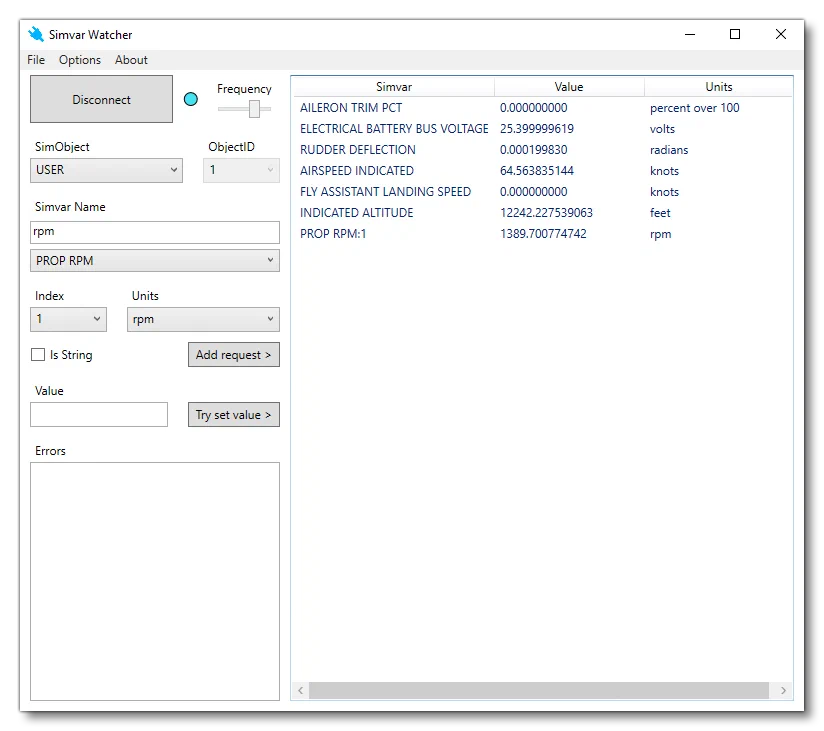
This tool permits you to connect to the simulation in real-time and view the values of almost any SimVar available, as well as set the SimVar to a different value (if the SimVar is settable). Find out more information on this useful tool here:
SimVars And RPN
When creating add-ons for aircraft - primarily Instruments - you will need to be able to access Simulation Variables (SimVars) and change them based on user input in the form of Key Events. Both using SimVar values and using input key events is done using operations written in RPN, as explained below. Note that you can also find many use-cases and examples in the different ModelBehavior templates.
SimVars permit you to get the state of a component, or the state of something in the simulation, and they are generally accessed using the following RPN format:
(A:[simvar_name]:[simvar_index], [units])Note that the “index” value is only required by a few SimVars. Here are some simple examples:
(A:SIM ON GROUND, Bool)
(A:AIRSPEED TRUE, Knots)
(A:TURB ENG IGNITION SWITCH EX1:1, Enum)
It should be noted that sometimes you will see simulation variables written using snake case, and prefixed with SIMVAR_, as that is how they appear in the simulation code itself. However when using them in RPN, you should omit the SIMVAR part as well as the _. For example:
SIMVAR_CIRCUIT_ON -> (A:CIRCUIT ON:1, Bool)SimVars With Multiple Indices
Some simvars will require multiple parameters in order to retrieve the expected value. One such example is WEAR AND TEAR LEVEL, which is designed to retrieve the current wear status of a part of the aircraft. However to specify which part to query you will need to provide both the type of the part you are interested in, and the index of that part. For example, say you want to query about the state of the second piston engine. For that you would first need to provide it the value 39 - which is the number that corresponds to the piston engine as explained here: Wear And Tear Component IDs. You would then need to provide a second value which corresponds to the piston engine you wish to retrieve the wear of, in this case 2. Using RPN, this would be done as follows:
2 (A:1:WEAR AND TEAR LEVER:39, Percent)Here the SimVar “index” is used to send the first parameter as usual for other SimVars with a single parameter. The second parameter, however, requires you to specify how many extra values should be popped from the stack and sent to the SimVar. This is done by adding the value 1 into the A: variable definition, which indicate that you want to pop one parameter. This parameter value is specified to be 2.
In rare cases, the second parameter for the SimVar is retrieved from another SimVar. This is commonly found when working with the electrical system, for example the SimVar CIRCUIT CONNECTION ON requires a circuit index and a bus index, with the bus index coming from the SimVar BUS LOOKUP INDEX. The RPN for this would be written like this:
2 (>A:BUS LOOKUP INDEX, Number) (A:CIRCUIT CONNECTION ON:45, Bool)The BUS LOOKUP INDEX SimVar has been deprecated, and should no longer be required, since all the SimVars that used to use it, can now take two parameters and you can supply a bus name or index to them directly.
Using Names Instead Of Indices
Many components in the various systems for an aircraft are indexed and also named. In previous version of the simulation, the index was what you would use in a SimVar to refer to the component, however with the introduction of modular SimObjects, indices are no longer reliable as they can change as part of the merge process. To make sure you are referencing the correct component now, you you can (and should) use the name of the component, rather than its index (and components should all be unique).
Using the name instead of an index follows this format:
<SIMVAR>:'<NAME>'_nSo, for example, using the HYDRAULIC VALVE ACTIVE SimVar, we would have something like the following:
(A:HYDRAULIC VALVE ACTIVE:'VALVE_GEAR_LEFT_1'_n, Bool)