
Master Mixer Hierarchy
We highly recommend that you set up the correct routing to your sounds so they will then be configurable from the in-game UI mixer. We also highly recommend that you have a look in the SDK templates - supplied as part of the Wwise Sample Project - to get an overview of the games default routing and then use it in your own integration pipeline.
Parent Buses
When setting up sound routing, there are certain “parent” buses that should never be used directly for routing your sounds. These buses are designed as parents to the “child” buses listed in the sections below, and as such all sounds should be routed to the appropriate child, not the parent. Using these parent buses means that your aircraft won’t benefit from the in-game UI volume level mixer, nor from the global dynamic mixing structure.
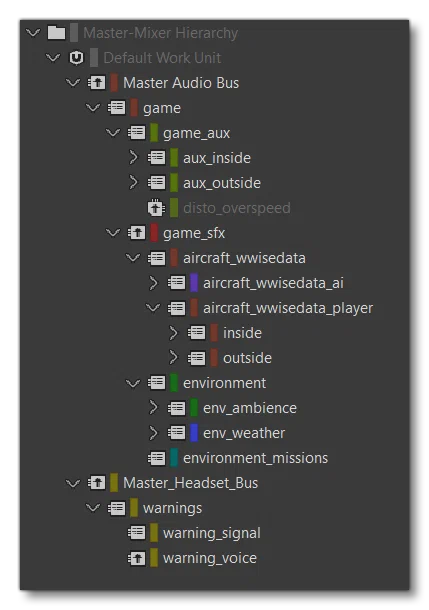
The following parent buses should never be directly routed:
Master Audio Busgamegame_auxaux_insideaux_outsidegame_sfxaircraft_wwisedataaircraft_wwisedata_aiaircraft_wwisedata_playerinsideoutsideengine_insideengine_outside
The following two parent buses are secondary master buses for avionics through headphones, and - like the other parent buses listed above - they should never be routed directly:
Master_Headset_Buswarnings
Output Buses For Cockpit View
The table below shows the bus structure for player sounds from the cockpit. All sounds that play from the inside view should be routed through these buses:
Each one of these output buses has an ambisonic child bus dedicated to ambisonic takes. For more information, please see here(opens in a new tab).
| Output Bus Inside | Description |
|---|---|
combustion_inside | This bus is dedicated to combustion sounds in cockpit view. |
jetwhine_inside | This bus is dedicated to turbine jetwhine sounds in cockpit view. |
propeller_inside | This bus is dedicated to propeller sounds in cockpit view. |
rotor_inside | This bus is dedicated to rotor sounds in cockpit view. |
grounds_inside | This bus is dedicated to ground sounds in cockpit view, such as, ground roll, or touchdown sounds. |
instruments_inside | This bus is dedicated to instruments sounds in cockpit view, such as cockpit foleys (pedals, yokes, push button, knobs sounds). |
miscellaneous_inside | This bus is dedicated to miscellaneous sounds in cockpit view, such as flight control, fuel pumps, hydraulics, and gears. |
rain_inside | This bus is dedicated to rain sounds in cockpit view. |
rattles_inside | This bus is dedicated to rattles sounds in cockpit view. |
walla_inside | This bus is dedicated to walla sounds in cockpit view. |
warning_inside | This bus is dedicated to warning sounds in cockpit view. |
winds_inside | This bus is dedicated to wind sounds in cockpit view. |
Output Buses For Outside View
The table below shows the bus structure for player aircraft sounds coming from the outside viewpoint. All the sounds that plays from the outside view should be routed through these buses.
| Output Bus Outside | Description |
|---|---|
combustion_outside_generic | This bus is dedicated to combustion sounds for piston aircraft in outside view. |
combustion_outside_turbine | This bus is dedicated to combustion sounds for turboprop, turbofan and turbojet aircraft in outside view. |
jetwhine_outside_generic | This bus is dedicated to turbine jet whine sounds for little turboprop and turbofan aircraft in outside view. |
jetwhine_outside_turbine | This bus is dedicated to turbine jet whine sounds for medium to large turboprop and turbofan and turbojet aircraft in outside view. |
propeller_outside | This bus is dedicated to propeller sounds in outside view. |
rotor_outside | This bus is dedicated to rotor sounds in outside view. |
grounds_outside | This bus is dedicated to ground sounds in outside view, such as, ground roll, or touchdown sounds. |
instruments_outside | This bus is dedicated to instruments sounds in outside view. |
miscellaneous_outside | This bus is dedicated to miscellaneous sounds in outside view. |
rain_outside | This bus is dedicated to rain sounds in outside view. |
rattles_outside | This bus is dedicated to rattle sounds in outside view. |
walla_outside | This bus is dedicated to walla sounds in outside view. |
warning_outside | This bus is dedicated to waning sounds in outside view. |
winds_outside | This bus is dedicated to winds sounds in outside view. |
AI Output Buses for outside view
You will find the same bus structure for AI aircraft SimObjects:
| Output Bus Outside | Description |
|---|---|
combustion_generic_ai | This bus is dedicated to combustion sounds for piston AI aircraft. |
combustion_turbine_ai | This bus is dedicated to combustion sounds for turboprop, turbofan and turbojet AI aircraft. |
jetwhine_generic_ai | This bus is dedicated to turbine jet whine sounds for little turboprop and turbofan AI aircraft. |
jetwhine_turbine_ai | This bus is dedicated to turbine jet whine sounds for medium to large turboprop and turbofan and turbojet AI aircraft. |
propeller_ai | This bus is dedicated to propeller AI sounds. |
rotor_ai | This bus is dedicated to rotor AI sounds. |
grounds_ai | This bus is dedicated to ground AI sounds, such as, ground roll, or touchdown sounds. |
instruments_ai | This bus is dedicated to instruments AI sounds in outside view. |
miscellaneous_ai | This bus is dedicated to miscellaneous AI sounds in outside view. |
rain_ai | This bus is dedicated to rain AI sounds in outside view. |
rattles_ai | This bus is dedicated to rattle AI sounds in outside view. |
walla_ai | This bus is dedicated to walla AI sounds in outside view. |
warning_ai | This bus is dedicated to waning AI sounds in outside view. |
winds_ai | This bus is dedicated to winds AI sounds in outside view. |
Aux Buses
There are two different Auxiliary Buses available to you when creating audio, both of which are explained below.
Game-Defined Auxiliary Sends
In the sound XML, the AcousticParameters contains several ReverberationPreset parameters. These parameters allows you to set up Shareset reverbs into custom auxiliary buses (rev_inside_custom, and rev_outdoor_custom) which will then be used as game-defined buses. This means that all sounds that are tagged “using game-defined aux sends” in the WwiseProject will be sent to the custom bus with the effect Shareset you defined in the sound.xml.
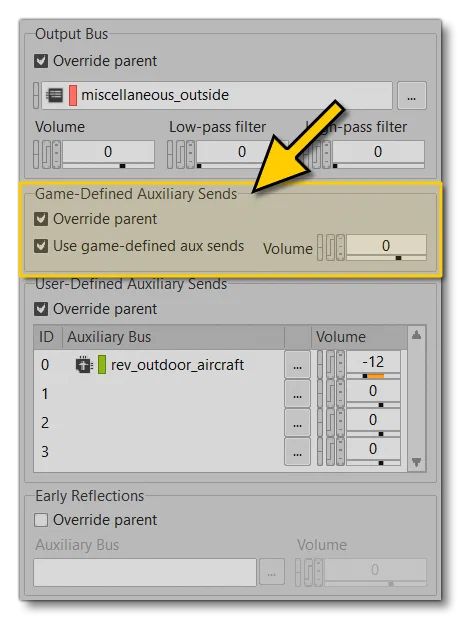
Doing it this way ensures that every content provider can create their own cockpit and/or outdoor reverberation for their aircraft, by adding the newly created Shareset into the Wwise package. Adding the shareset to the package is done by simply dragging the shareset in the WWise UI onto your soundbank, as illustrated below:
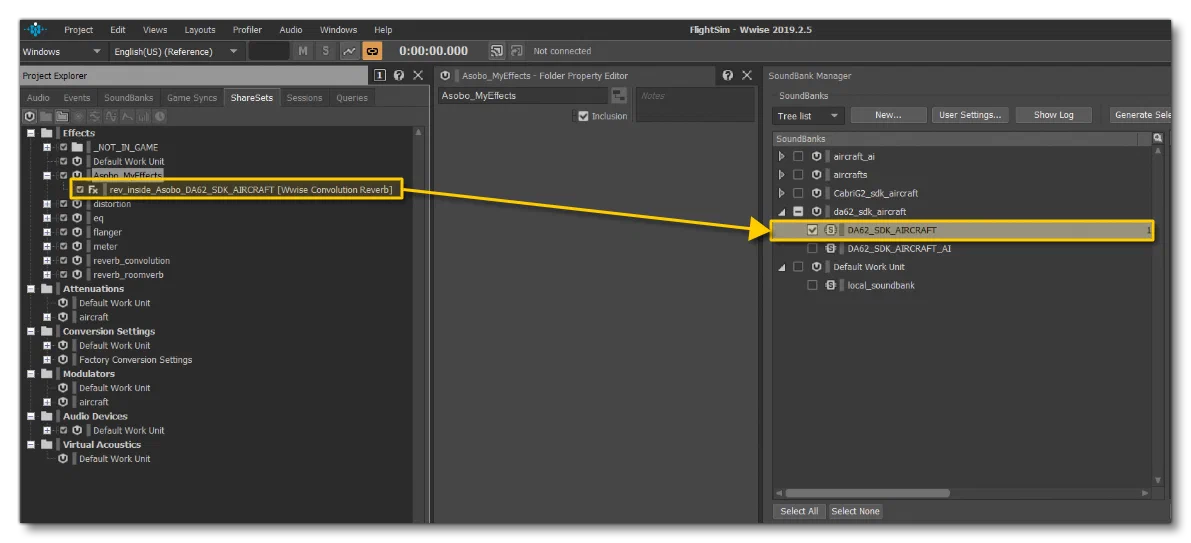
You will then need to set up the right Shareset name in the sound.xml file. For example:
<AcousticParameters>
    <Parameter Name="ReverberationPreset" SharesetInside="rev_my_reverb_inside" SharesetOutside="rev_my_reverb_outside"/>
</AcousticParameters>
Please have a look at the sound.xml categories page to see how to correctly set up your acoustic parameters through sound.xml.
Here is the list of Game-Defined Reverb Aux Buses that are shared in the Wwise project. In Wwise, aux bus are available following this Master-Mixer hierarchy path:
Master-Mixer HierarchyDefault Work UnitMaster Audio Busgamegame_aux.
| Aux Bus Name | Description |
|---|---|
reflections | This bus is dedicated to the acoustic reflections that things like engines will make when close to reflective sources like the ground or the walls of a canyon. |
rev_cabin_custom | - |
rev_cabin_custom_ambisonic | - |
rev_inside_custom | This bus is the one where SharesetInside is setup for player SimObjects. |
rev_inside_custom_ambisonic | - |
rev_outdoor_custom | This bus is the one where SharesetOutside is setup for player SimObjects. |
rev_outdoor_custom_ambisonic | - |
rev_outdoor_custom_ai | This bus is the one where SharesetOutside is setup for AI SimObjects. |
Finally, here is the list of the Cockpit Acoustic Sharesets that already exist in the Wwise sample project. Feel free to use them on your own aircraft:
| Shareset Name | Description |
|---|---|
rev_inside_generic_airliner | Convolution Reverb using IR captured in ATR 42 600 |
rev_inside_generic_medium | Convolution Reverb using IR captured in TBM 930 |
rev_inside_generic_small | Convolution Reverb using IR captured in SR22 |
rev_inside_generic_custom | Convolution Reverb using IR captured in ATR 42 600 |
rev_inside_c152 | Convolution Reverb using IR captured in Cessna 152 |
rev_inside_c172n | Convolution Reverb using IR captured in Cessna 172N |
rev_inside_c172sp | Convolution Reverb using IR captured in Cessna 172SP |
rev_inside_CabriG2 | Convolution Reverb using IR captured in Cabri G2 |
rev_inside_cap10c | Convolution Reverb using IR captured in Cap10 |
rev_inside_da40 | Convolution Reverb using IR captured in a Diamond DA40 |
rev_inside_da62 | Convolution Reverb using IR captured in a Diamond DA62 |
rev_inside_dr400 | Convolution Reverb using IR captured in a Robin Dr400 |
rev_inside_dv20 | Convolution Reverb using IR captured in a Diamond DV20 |
rev_inside_FDCT | Convolution Reverb using IR captured in a Flight Design CT |
rev_inside_pipercub | Convolution Reverb using IR captured in a Pipercub |
rev_inside_pipistrel | Convolution Reverb using IR captured in a pipistrel Virus SW121 |
rev_inside_pitts_s2s | Convolution Reverb using IR captured in a Pitts S2S |
rev_inside_savage | Convolution Reverb using IR captured in a Zlin Savage Cub |
rev_inside_sr22 | Convolution Reverb using IR captured in a Cirrus SR22 |
rev_inside_tbm930 | Convolution Reverb using IR captured in a TBM 930 |
rev_inside_vl3 | Convolution Reverb using IR captured in a JMB VL3 |
rev_inside_xcub | Convolution Reverb using IR captured in a Cubcrafter Xcub |
User-defined Auxiliary Sends
For outside reverberation, you can also use generic buses that we have shared with the community. All default aircraft models are using these buses with the user-defined mode. For example, here is the generic Outside Reverb Aux Bus available in the Wwise project:
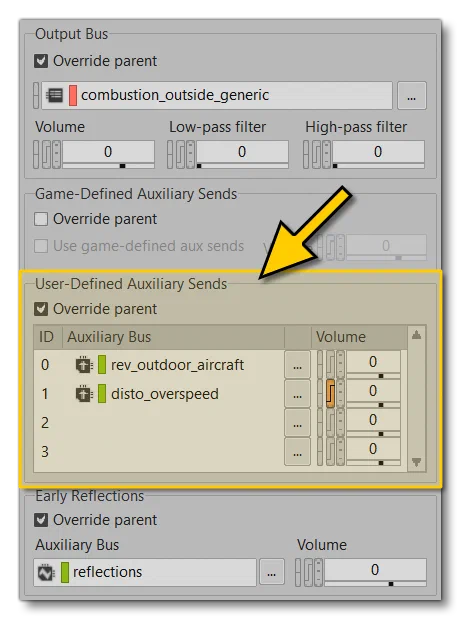
Every content provider can use the following as user-defined buses:
| Aux Bus Name | Description |
|---|---|
rev_outdoor_aircraft | This is a generic outside reverb for aircraft. |
rev_outdoor_aircraft_low_end | This is a generic outside reverb with more low end. It is mainly designed for airliners. |
rev_outdoor_aircraft_modulations | This is a generic outside reverb with some EQ modulation. |
rev_outdoor_custom | This is a generic outside reverb for aircraft, created for you to customise for your own needs. |
rev_outdoor_custom_ai | This is a generic outside reverb for AI aircraft. |
disto_overspeed | This is a generic distortion effect used in the case of over-speeding with an aircraft. |
Early Reflections
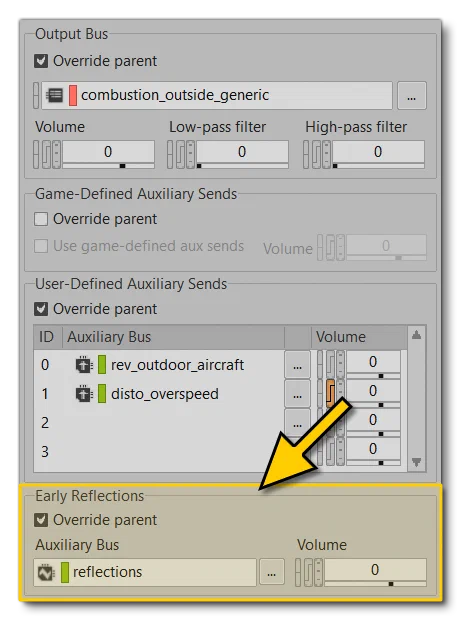
An early reflection bus has been created for use with Microsoft Flight Simulator 2024 aircraft. This bus is designed to simulate the way sound is reflected from close physical objects like the ground or the side walls of a canyon. In general this bus is required for the for the engine sound effects (see here for details: Early Reflections), but it can be used for all external sounds to add further realism.
This bus will require that you have installed the Reflect Plugin(opens in a new tab).
Using this bus is simply a case of routing your exterior sounds to the Early Reflections bus named “reflections” in the Master Mixer Hierarchy, as shown below:
Secondary Output Buses
The Master_Headset_Bus, as its name suggests, is a secondary Master bus dedicated to sounds heard through headphones using the Communication Device output bus. This is where you can route avionics warnings that are supposed to play in the user’s headset.
| Output Bus Outside | Description |
|---|---|
warning_signal | This bus is dedicated to warning signal sounds that come through user headset. |
warning_voice | This bus is dedicated to voice warnings sounds that come through user headset. |
Ambisonic Output Buses
The Master_Headset_Bus, as its name suggests, is a secondary Master bus dedicated to sounds heard through headphones using the Communication Device output bus. This is where you can route avionics warnings that are supposed to play in the user’s headset.
| Output Bus Outside | Description |
|---|---|
warning_signal | This bus is dedicated to warning signal sounds that come through user headset. |
warning_voice | This bus is dedicated to voice warnings sounds that come through user headset. |