
Shared States and Switches
The WwiseSampleProject provides you with many State and Switch groups which you can use to integrate your audio in the game, and this page gives you all the details required to use them. Note that you can’t create new Switch or State groups, as those are included in the Init Soundbanks of the WwiseSampleProject. If required, you can work around this by using SimVarSounds, Requirements Attributes, or even by creating your own game parameters.
Shared Viewpoint States
You can find the VIEWPOINT States group here: \States\aircraft\VIEWPOINT
This state group will help you switching smoothly between you sounds on camera changes. We always recommend using it for engine sounds, so you can easily manage the engine sound transition between the inside and outside viewpoint:
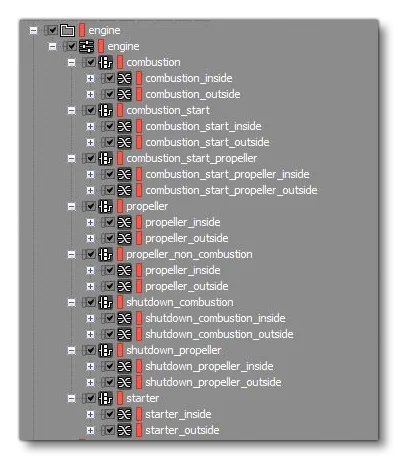
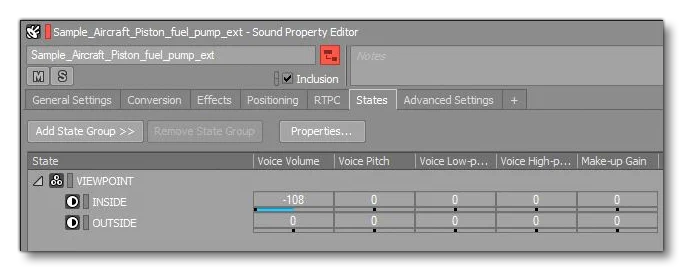
You can also use it to mute outside or inside sounds in the Sound Property Editor:
Shared Surfaces Type Switches
You can find the surface type switch group here:
\Switches\surface\surfaces
This switches group allows to integrate sounds depending on the ground surface:
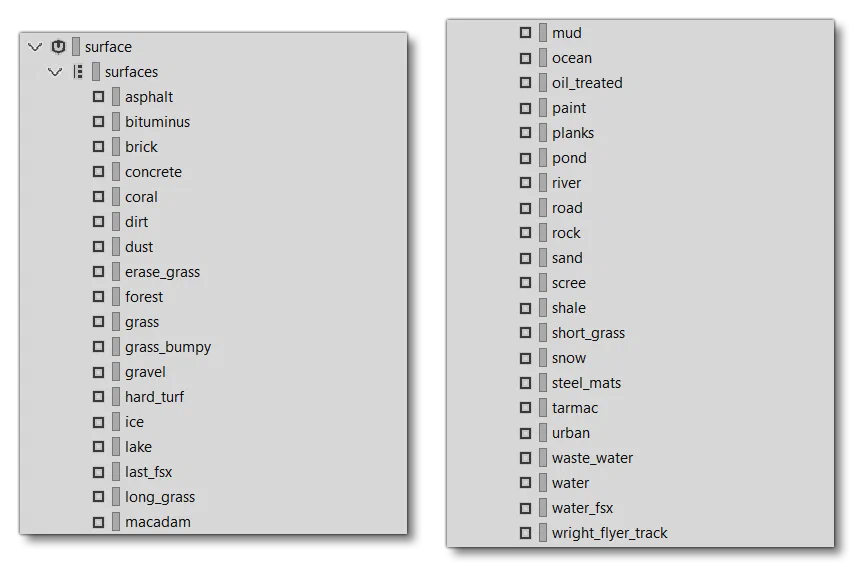
This switch group is using the SIMVAR_SURFACE_TYPE game parameter. It’s implemented by default on GroundSounds triggers, but you can use it on any audio events (rattles, shakes, etc…). Just make sure to send the correct SURFACE TYPE SimVar on your sound through the sound.xml, for example:
<WwiseRTPC SimVar="SURFACE TYPE" Units="ENUM" Index="0" RTPCName="SIMVAR_SURFACE_TYPE" /> Shared Flight Control Switches
Flight control switches are hooked to SimVar through Wwise RTPC. If you want to use them, make sure to send the SimVar into Wwise RTPC using the sound.xml. As an example, here’s some XML for the left aileron of an aircraft:
<Sound WwiseData="true" WwiseEvent="aileron_left" NodeName="AILERON_LEFT" ContinuousStopDelay="1.0" SimVar="AILERON POSITION" Units="PERCENT" Index="1">
      <WwiseRTPC SimVar="AILERON POSITION" Units="PERCENT" Index="1" RTPCName="SIMVAR_AILERON_POSITION" />
      <WwiseRTPC SimVar="AILERON POSITION" Units="PERCENT" Index="1" Derived="true" RTPCName="SIMVAR_AILERON_POSITION_DERIVED" />
  </Sound>
The table below lists the available switches:
| Switch Group name | SIMVAR | RTPCName | Derived | Description |
|---|---|---|---|---|
aileron_left_movement | AILERON POSITION | SIMVAR_AILERON_POSITION | No | This switch allows you to bind sounds on left aileron movements and stops. You should set up “Index=1” as a sound attribute in the sound.xml. |
aileron_right_movement | AILERON POSITION | SIMVAR_AILERON_POSITION | No | This switch allows you to bind sounds on right aileron movements and stops. You should set up “Index=2” as the sound attribute in the sound.xml. |
elevator_movement | ELEVATOR POSITION | SIMVAR_ELEVATOR_POSITION | No | This switch allows you to bind sounds on elevator movements and stops. |
rudder_movement | RUDDER POSITION | SIMVAR_RUDDER_POSITION | No | This switch allows you to bind sounds on rudder movements and stops. |
flaps_left_move_generic | TRAILING EDGE FLAPS LEFT PERCENT | SIMVAR_TRAILING_EDGE_FLAPS_LEFT_PERCENT_DERIVED | Yes | This switch allows you to bind sounds on left flaps movements and stops. |
flaps_right_move_generic | TRAILING EDGE FLAPS RIGHT PERCENT | SIMVAR_TRAILING_EDGE_FLAPS_RIGHT_PERCENT_DERIVED | Yes | This switch allows you to bind sounds on right flaps movements and stops. |
flaps_left_up_down | TRAILING EDGE FLAPS LEFT PERCENT | SIMVAR_TRAILING_EDGE_FLAPS_LEFT_PERCENT_DERIVED | Yes | This switch allows you to bind sounds on left flaps up or down movements. |
flaps_right_up_down | TRAILING EDGE FLAPS RIGHT PERCENT | SIMVAR_TRAILING_EDGE_FLAPS_RIGHT_PERCENT_DERIVED | Yes | This switch allows you to bind sounds on right flaps up or down movements. |
canopy_movement | CANOPY OPEN | SIMVAR_CANOPY_OPEN_DERIVED | Yes | This switch allows you to bind sounds on canopy movements and stops. |
exit_door_movements | EXIT OPEN | SIMVAR_EXIT_OPEN_DERIVED | Yes | This switch allows you to bind sounds on exit door movements and stops. |
exit_door_direction | EXIT OPEN | SIMVAR_EXIT_OPEN_DERIVED | Yes | This switch allows you to bind sounds on exit door on opening or closing movements. |
gears_movement | GEAR TOTAL PCT EXTENDED | SIMVAR_GEAR_TOTAL_PCT_EXTENDED_DERIVED | Yes | This switch allows you to bind sounds on exit door movements and stops. |
gears_direction | GEAR TOTAL PCT EXTENDED | SIMVAR_GEAR_TOTAL_PCT_EXTENDED_DERIVED | Yes | This switch allows you to bind sounds on gears ups or down movements. |
left_gears_movements | GEAR_LEFT_POSITION | SIMVAR_GEAR_LEFT_POSITION_DERIVED | Yes | This switch allows you to bind sounds on left gear movements and stops. |
left_gears_direction | GEAR_LEFT_POSITION | SIMVAR_GEAR_LEFT_POSITION_DERIVED | Yes | This switch allows you to bind sounds on left gears ups or down movements. |
right_gears_movements | GEAR_RIGHT_POSITION | SIMVAR_GEAR_RIGHT_POSITION_DERIVED | Yes | This switch allows you to bind sounds on right gear movements and stops. |
right_gears_direction | GEAR_RIGHT_POSITION | SIMVAR_GEAR_RIGHT_POSITION_DERIVED | Yes | This switch allows you to bind sounds on right gears ups or down movements. |