TREE OBJECTS
A Tree object is an scenery object element that is used to add tress into the scene or SimProp Container. When you select this object type, the Objects window and you can select one of several types of tree object:

To place a tree object element in the scene you can select the one you want from the list (you can use the thumbnail option to see a preview of the tree), and then click the Add button. After placing it in the scene you can use the Translate Gizmo to position the tree where you want, or you can enable One-Click Placing and simply click in the world to place it (and continue clicking to add multiple versions). You may also use the Rotation Gizmo to change the angle the tree is shown at, as well as the Scale Gizmo to change its size.
Tree Properties
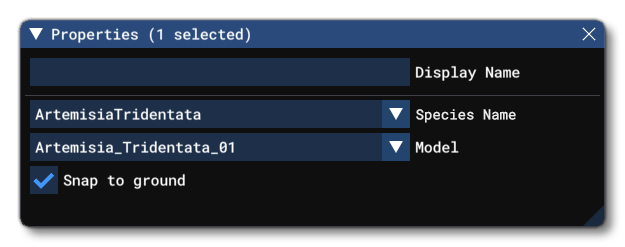
Tree objects have the following Properties which can be edited:
-
Display Name
This is the name of the tree as it will be displayed in the The Scenery Contents List. This can be edited and is helpful for identifying elements when you have a lot of items in the content list.
-
Species Name
The name of the tree species being placed. Selecting this will open a list of all the available species, with the ones that are applicable to the current biome listed at the top:
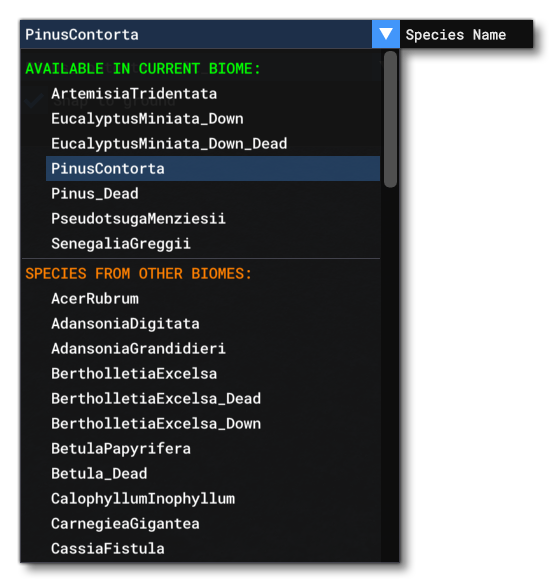
In general you should only place trees that are listed as available in the current biome, since placing trees from outside the biome may incur a performance hit (you can do it, for aesthetic or other reasons, just try not to place too many from outside the biome).
-
Model
Many tree objects have multiple different models to add variety to scenes, and from this menu you can select the model that you want for the scene you are creating.
-
Snap To Ground
This option is enabled by default, and will "snap" the tree to the ground so that - regardless of the terrain height - the element will always be at ground level, even when moving it. Enabling this means that the altitude Gizmo does nothing, while disabling this will permit you to change the altitude.
SimProp Container Only Properties

If the Tree Object is being added to a SimProp Container, the properties will show the following additional 3 options:
-
Only In Edition
When this is checked, the Tree object will only be visible when the the SimProp Container is being edited, but not when placed in the simulation.
-
Optimizable
Checking this option means that the Tree object can be "optimised" - ie: the simulation will modify the spawn probability - based on the user graphics settings and platform, where it's approximately:- Ultra: 100 %
- High: 50 %
- Medium: 25%
- Low: 12%
- xbox: 12%
-
Override AO Strength
When checked, this option will show a slider that permits you to override the automatic ambient occlusion settings. This can let you better match the lighting on the object with the rest of the scene.