
RTPC And Simulation Variables
This section outlines the Shared RTPC Parameters that are pre-defined in the WwiseSampleProject, and that can be linked to Simulation Variables so you can use them to trigger audio from your aircraft or scenery SimObjects. This list is by no means all the SimVars that you can use, and you can add new ones as required in Wwise from the RTPC tab:
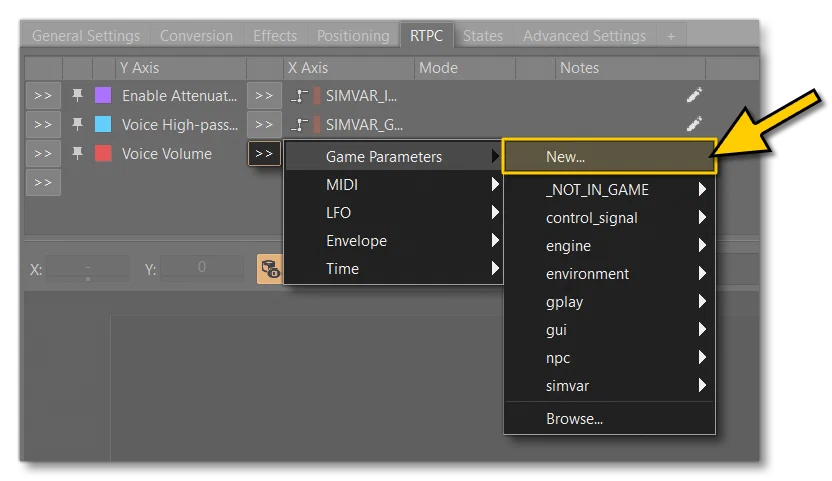
When adding your own RTPC game parameters linked to SimVars, we suggest following the already established schema of adding SIMVAR_ as a prefix, and replacing all spaces with underscores _. If any of the SimVars need an additional index value, this can be added as a suffix with the format _N, where N is the index to be used. Check the included RTPC game parameters if you need a reference.
None of these RTPC parameters directly correlate to any SimVar, and it is up to you to correctly make the correlation when Creating The Sound.xml using the RTPCName attribute of the <WwiseRtpc /> tag. These RTPC parameters are provided as a convenience, since they are the ones that are most likely to be used on your own aircraft, but you can create your own at any time.
For more information please see the section on Audio.
Ambient Default Game Parameters
The RTPC game parameters listed here are useful when it comes to dealing with certain ambient audio effects. You can find them in the following location in Wwise: >> Game Parameters >> simvar >> ambient
| RTPC | Simvars | Units |
|---|---|---|
SIMVAR_AMBIENT_PRECIP_RATE | AMBIENT PRECIP RATE | Mask: 2 = None, 4 = Rain, 8 = Snow |
SIMVAR_AMBIENT_WIND_DIRECTION | AMBIENT WIND DIRECTION | Degrees |
SIMVAR_AMBIENT_WIND_VELOCITY | AMBIENT WIND VELOCITY | Knots |
APU Default Game Parameters
The RTPC game parameters listed here are useful when it comes to creating audio effects for the aircraft APU. You can find them in the following location in Wwise: >> Game Parameters >> simvar >> apu
| RTPC | Simvars | Units |
|---|---|---|
SIMVAR_APU_PCT_RPM | APU PCT RPM | Percent Over 100 |
SIMVAR_APU_PCT_STARTER | APU PCT STARTER | Percent Over 100 |
Engine Default Game Parameters
By default, in the Wwise data approach, Simvar values are sent in Wwise RTPCs. All of these are available in the WwiseSampleProject. You can find them in: >> Game Parameters >> simvar >> engine
Shared with Combustion, Propeller, CombustionStart and Shutdown sounds:
| RTPC | Simvars | Units |
|---|---|---|
SIMVAR_ENG_MANIFOLD_PRESSURE | ENG MANIFOLD PRESSURE | Inches of mercury (inHg) |
SIMVAR_GENERAL_ENG_COMBUSTION | GENERAL ENG COMBUSTION | Boolean |
SIMVAR_GENERAL_ENG_COMBUSTION_SOUND_PERCENTSIMVAR_GENERAL_ENG_COMBUSTION_SOUND_PERCENT_DERIVED💡︎ | GENERAL ENG COMBUSTION SOUND PERCENT | Percent Over 100 |
SIMVAR_GENERAL_ENG_DAMAGE_PERCENT | GENERAL ENG DAMAGE PERCENT | Percent |
SIMVAR_GENERAL_ENG_FAILED | GENERAL ENG FAILED | Boolean |
SIMVAR_GENERAL_ENG_FUEL_PUMP_ON | GENERAL ENG FUEL PUMP ON | Boolean |
SIMVAR_GENERAL_ENG_FUEL_PUMP_SWITCH | GENERAL ENG FUEL PUMP SWITCH | Boolean |
SIMVAR_GENERAL_ENG_FUEL_VALVE | GENERAL ENG FUEL VALVE | Boolean |
SIMVAR_GENERAL_ENG_PCT_MAX_RPM | GENERAL ENG PCT MAX RPM | Percent |
SIMVAR_GENERAL_ENG_RPMSIMVAR_GENERAL_ENG_RPM_DERIVED💡︎ | GENERAL ENG RPM | RPM |
SIMVAR_GENERAL_ENG_STARTER | GENERAL ENG STARTER | Boolean |
SIMVAR_MASTER_IGNITION_SWITCH | MASTER IGNITION SWITCH | Boolean |
SIMVAR_RECIP_ENG_CYLINDER_HEAD_TEMPERATURE | RECIP ENG CYLINDER HEAD TEMPERATURE | Rankine |
SIMVAR_RECIP_ENG_PRIMERSIMVAR_RECIP_ENG_PRIMER_DERIVED💡︎ | RECIP ENG PRIMER | |
SIMVAR_THROTTLE_LOWER_LIMIT | THROTTLE LOWER LIMIT |
The derived version of the SimVar simply means you should be using the derived attribute in the <Sound> element.
For Propeller sounds:
| RTPC | Simvars | Units |
|---|---|---|
SIMVAR_PROP_BETA | PROP BETA | Radians |
SIMVAR_PROP_MAX_RPM_PERCENT | PROP MAX RPM PERCENT | Percent Over 100 |
SIMVAR_PROP_RPM | PROP RPM | RPM |
For Rotor sounds:
| RTPC | Simvars | Units |
|---|---|---|
SIMVAR_DISK_BANK_ANGLE | DISK BANK ANGLE | |
SIMVAR_DISK_BANK_PCT | DISK BANK PCT | Percent |
SIMVAR_DISK_PITCH_ANGLE | DISK PITCH ANGLE | |
SIMVAR_DISK_PITCH_PCT | DISK PITCH PCT | |
SIMVAR_RECIP_ENG_BRAKE_POWER_PCT | RECIP ENG BRAKE POWER PCT | Percent |
SIMVAR_ROTOR_CLUTCH_ACTIVE | ROTOR CLUTCH ACTIVE | |
SIMVAR_ROTOR_COLLECTIVE_BLADE_PITCH_PCTSIMVAR_ROTOR_COLLECTIVE_BLADE_PITCH_PCT_DERIVED💡︎ | ROTOR COLLECTIVE BLADE PITCH PCT | Percent |
SIMVAR_ROTOR_CYCLIC_BLADE_MAX_PITCH_POSITION | ROTOR CYCLIC BLADE MAX PITCH POSITION | Percent |
SIMVAR_ROTOR_CYCLIC_BLADE_PITCH_PCTSIMVAR_ROTOR_CYCLIC_BLADE_PITCH_PCT_DERIVED💡︎ | ROTOR CYCLIC BLADE PITCH PCT | Percent |
SIMVAR_ROTOR_RPM | ROTOR RPM | RPM |
SIMVAR_ENG_ROTOR_RPM | ENG ROTOR RPM | Percent Over 100 |
SIMVAR_TAIL_ROTOR_BLADE_PITCH_PCTSIMVAR_TAIL_ROTOR_BLADE_PITCH_PCT_DERIVED💡︎ | TAIL ROTOR BLADE PITCH PCT | Percent |
For JetWhine sounds on turbine engines and Combustion sounds on turboprop, turbofan, turbojet and engines:
| RTPC | Simvars | Units |
|---|---|---|
SIMVAR_TURB_ENG_AFTERBURNER | TURB ENG AFTERBURNER | Bool |
SIMVAR_TURB_ENG_BLEED_AIR | TURB ENG BLEED AIR | Pounds per square inch (psi) |
SIMVAR_TURB_ENG_CORRECTED_FF | TURB ENG CORRECTED FF | Pounds per hour |
SIMVAR_TURB_ENG_CORRECTED_N1 | TURB ENG CORRECTED N1 | Percent |
SIMVAR_TURB_ENG_CORRECTED_N2 | TURB ENG CORRECTED N2 | Percent |
SIMVAR_TURB_ENG_ITT | TURB ENG ITT | Rankine |
SIMVAR_TURB_ENG_JET_THRUST | TURB ENG JET THRUST | Pounds |
SIMVAR_TURB_ENG_MAX_TORQUE_PERCENT | TURB ENG MAX TORQUE PERCENT | Percent Over 100 |
SIMVAR_TURB_ENG_N1 | TURB ENG N1 | Percent |
SIMVAR_TURB_ENG_N2 | TURB ENG N2 | Percent |
SIMVAR_TURB_ENG_PRESSURE_RATIO | TURB ENG PRESSURE RATIO | Ratio |
SIMVAR_TURB_ENG_REVERSE_NOZZLE_PERCENT | TURB ENG REVERSE NOZZLE PERCENT | Percent |
SIMVAR_TURB_ENG_VIBRATION | TURB ENG VIBRATION | Number |
Flight Control Surfaces Default Game Parameters
By default, in the Wwise data approach, Simvar values are sent in Wwise RTPCs. All of these are available in the WwiseSampleProject. You can find them in: >> Game Parameters >> simvar >> flight_control_surfaces
| RTPC | Simvars | Units |
|---|---|---|
SIMVAR_AILERON_LEFT_DEFLECTION_PCTSIMVAR_AILERON_LEFT_DEFLECTION_PCT_DERIVED💡︎ | AILERON LEFT DEFLECTION PCT | Percent Over 100 |
SIMVAR_AILERON_POSITIONSIMVAR_AILERON_POSITION_DERIVED💡︎ | AILERON POSITION | Position (-16K to 0)-16K = full left |
SIMVAR_AILERON_RIGHT_DEFLECTION_PCTSIMVAR_AILERON_RIGHT_DEFLECTION_PCT_DERIVED💡︎ | AILERON RIGHT DEFLECTION PCT | Percent Over 100 |
SIMVAR_ELEVATOR_POSITIONSIMVAR_ELEVATOR_POSITION_DERIVED💡︎ | ELEVATOR POSITION | Position (-16K to 0)-16K = full left |
SIMVAR_GEAR_ANIMATION_POSITION_DERIVED💡︎ | GEAR ANIMATION POSITION | Percent |
SIMVAR_GEAR_LEFT_POSITIONSIMVAR_GEAR_LEFT_POSITION_DERIVED💡︎ | GEAR LEFT POSITION | Percent Over 100 |
SIMVAR_GEAR_RIGHT_POSITIONSIMVAR_GEAR_RIGHT_POSITION_DERIVED💡︎ | GEAR RIGHT POSITION | Percent Over 100 |
SIMVAR_GEAR_TOTAL_PCT_EXTENDEDSIMVAR_GEAR_TOTAL_PCT_EXTENDED_DERIVED💡︎ | GEAR TOTAL PCT EXTENDED | Percent |
SIMVAR_ROTOR_LATERAL_TRIM_PCTSIMVAR_ROTOR_LATERAL_TRIM_PCT_DERIVED💡︎ | ROTOR LATERAL TRIM PCT | Percent Over 100 |
SIMVAR_ROTOR_LONGITUDINAL_TRIM_PCTSIMVAR_ROTOR_LONGITUDINAL_TRIM_PCT_DERIVED💡︎ | ROTOR LONGITUDINAL TRIM PCT | Percent Over 100 |
SIMVAR_RUDDER_POSITIONSIMVAR_RUDDER_POSITION_DERIVED💡︎ | RUDDER POSITION | Position (-16K to 0)-16K = full left |
SIMVAR_SPOILERS_LEFT_POSITION_DERIVED💡︎ | SPOILERS LEFT POSITION | Percent Over 100 or Position (0 = retracted, 16K fully extended) |
SIMVAR_SPOILERS_RIGHT_POSITION_DERIVED💡︎ | SPOILERS RIGHT POSITION | Percent Over 100 or Position (0 = retracted, 16K fully extended) |
SIMVAR_TRAILING_EDGE_FLAPS_LEFT_PERCENTSIMVAR_TRAILING_EDGE_FLAPS_LEFT_PERCENT_DERIVED💡︎ | TRAILING EDGE FLAPS LEFT PERCENT | Percent Over 100 |
SIMVAR_TRAILING_EDGE_FLAPS_RIGHT_PERCENTSIMVAR_TRAILING_EDGE_FLAPS_RIGHT_PERCENT_DERIVED💡︎ | TRAILING EDGE FLAPS RIGHT PERCENT | Percent Over 100 |
SIMVAR_WATER_LEFT_RUDDER_EXTENDED_DERIVED💡︎ | WATER LEFT RUDDER EXTENDED | Percent |
SIMVAR_WING_FLEX_PCT | WING FLEX PCT | Percent Over 100 |
Ground Default Game Parameters
By default, in the Wwise data approach, WindSounds Trigger receives Simvar values through Wwise RTPCs. All of these RTPC are available in the WwiseSampleProject. You will find them in: >> Game Parameters >> simvar >> grounds
| RTPC | Simvars | Units |
|---|---|---|
SIMVAR_GEAR_STEER_ANGLE | GEAR STEER ANGLE | Degrees |
SIMVAR_SIM_ON_GROUND | SIM ON GROUND | Bool |
SIMVAR_SURFACE_TYPE | SURFACE TYPE | Enum |
SIMVAR_WHEEL_RPMSIMVAR_WHEEL_RPM_DERIVED💡︎ | WHEEL RPM | Percent Over 100 |
Instruments Default Game Parameters
By default, in the Wwise data approach, WindSounds Trigger receives Simvar values through Wwise RTPCs. All of these RTPC are available in the WwiseSampleProject. You will find them in: >> Game Parameters >> simvar >> instruments
| RTPC | Simvars | Units |
|---|---|---|
SIMVAR_AILERON_TRIM_PCTSIMVAR_AILERON_TRIM_PCT_DERIVED💡︎ | AILERON TRIM PCT | Float |
SIMVAR_AUDIO_PANEL_VOLUME | AUDIO PANEL VOLUME | Percent |
SIMVAR_BRAKE_LEFT_POSITIONSIMVAR_BRAKE_LEFT_POSITION_DERIVED💡︎ | BRAKE LEFT POSITION | Position (0 to 32K)0 = off32K = full |
SIMVAR_BRAKE_PARKING_POSITIONSIMVAR_BRAKE_PARKING_POSITION_DERIVED💡︎ | BRAKE PARKING POSITION | Bool |
SIMVAR_COLLECTIVE_POSITION | COLLECTIVE POSITION | Percent Over 100 |
SIMVAR_COM_VOLUME | COM VOLUME | Percent |
SIMVAR_ELECTRICAL_BATTERY_BUS_VOLTAGE | ELECTRICAL BATTERY BUS VOLTAGE | Volts |
SIMVAR_ELECTRICAL_MAIN_BUS_VOLTAGE | ELECTRICAL MAIN BUS VOLTAGE | Volts |
SIMVAR_ELECTRICAL_MASTER_BATTERY | ELECTRICAL MASTER BATTERY | Bool |
SIMVAR_ELEVATOR_TRIM_POSITION_DERIVED💡︎ | ELEVATOR TRIM POSITION | Radians |
SIMVAR_FLAPS_HANDLE_PERCENTSIMVAR_FLAPS_HANDLE_PERCENT_DERIVED💡︎ | FLAPS HANDLE PERCENT | Percent Over 100 |
SIMVAR_GENERAL_ENG_ANTI_ICE_POSITION_DERIVED💡︎ | GENERAL ENG ANTI ICE POSITION | Bool |
SIMVAR_GENERAL_ENG_MIXTURE_LEVER_POSITIONSIMVAR_GENERAL_ENG_MIXTURE_LEVER_POSITION_DERIVED💡︎ | GENERAL ENG MIXTURE LEVER POSITION | Percent |
SIMVAR_GENERAL_ENG_PROPELLER_LEVER_POSITIONSIMVAR_GENERAL_ENG_PROPELLER_LEVER_POSITION_DERIVED💡︎ | GENERAL ENG PROPELLER LEVER POSITION | Percent |
SIMVAR_GENERAL_ENG_THROTTLE_LEVER_POSITIONSIMVAR_GENERAL_ENG_THROTTLE_LEVER_POSITION_DERIVED💡︎ | GENERAL ENG THROTTLE LEVER POSITION | Percent |
SIMVAR_NAV_VOLUME | NAV VOLUME | Percent |
SIMVAR_ROTOR_BRAKE_HANDLE_POS | ROTOR BRAKE HANDLE POS | Percent Over 100 |
SIMVAR_ROTOR_CLUTCH_SWITCH_POS | ROTOR CLUTCH SWITCH POS | Bool |
SIMVAR_RUDDER_PEDAL_POSITIONSIMVAR_RUDDER_PEDAL_POSITION_DERIVED💡︎ | RUDDER PEDAL POSITION | Position (-16K to 0)-16K = left pedal pushed full in |
SIMVAR_RUDDER_TRIM_PCTSIMVAR_RUDDER_TRIM_PCT_DERIVED💡︎ | RUDDER TRIM PCT | Percent Over 100 |
SIMVAR_SPOILERS_HANDLE_POSITIONSIMVAR_SPOILERS_HANDLE_POSITION_DERIVED💡︎ | SPOILERS_HANDLE_POSITION | Percent Over 100 or Position (16K = down, 0 = up) |
SIMVAR_TAIL_ROTOR_PEDAL_POSITIONSIMVAR_TAIL_ROTOR_PEDAL_POSITION_DERIVED💡︎ | TAIL ROTOR PEDAL POSITION | Percent Over 100 |
SIMVAR_YOKE_X_POSITIONSIMVAR_YOKE_X_POSITION_DERIVED💡︎ | YOKE X POSITION | Position (-16K to 0) |
SIMVAR_YOKE_Y_POSITIONSIMVAR_YOKE_Y_POSITION_DERIVED💡︎ | YOKE Y POSITION | Position (-16K to 0) |
Miscellaneous Default Game Parameters
By default, in the Wwise data approach, WindSounds Trigger receives Simvar values through Wwise RTPCs. All of these RTPC are available in the WwiseSampleProject. You will find them in: >> Game Parameters >> simvar >> miscellaneous
| RTPC | Simvars | Units |
|---|---|---|
SIMVAR_CANOPY_OPENSIMVAR_CANOPY_OPEN_DERIVED💡︎ | CANOPY OPEN | Percent Over 100 |
SIMVAR_EXIT_OPENSIMVAR_EXIT_OPEN_DERIVED💡︎ | EXIT OPEN | Percent Over 100 |
SIMVAR_INTERACTIVE_POINT_OPEN_0 | INTERACTIVE POINT OPEN:0 | Percent Over 100 |
SIMVAR_INTERACTIVE_POINT_OPEN_1 | INTERACTIVE POINT OPEN:1 | Percent Over 100 |
SIMVAR_OVERSPEED_WARNING | OVERSPEED WARNING | Bool |
SIMVAR_RECIP_ENG_COWL_FLAP_POSITIONSIMVAR_RECIP_ENG_COWL_FLAP_POSITION_DERIVED💡︎ | RECIP ENG COWL FLAP POSITION | Percent |
Physics Default Game Parameters
By default, in the Wwise data approach, WindSounds Trigger receives Simvar values through Wwise RTPCs. All of these RTPC are available in the WwiseSampleProject. You will find them in: >> Game Parameters >> simvar >> physic
| RTPC | Simvars | Units |
|---|---|---|
SIMVAR_ACCELERATION_BODY_X | ACCELERATION BODY X | Feet (ft) per second squared |
SIMVAR_ACCELERATION_BODY_Y | ACCELERATION BODY Y | Feet (ft) per second squared |
SIMVAR_ACCELERATION_BODY_Z | ACCELERATION BODY Z | Feet (ft) per second squared |
SIMVAR_AIRSPEED_INDICATED | AIRSPEED INDICATED | Knot |
SIMVAR_AIRSPEED_TRUE | AIRSPEED TRUE | Knot |
SIMVAR_G_FORCE | G FORCE | Gforce |
SIMVAR_GROUND_VELOCITY | GROUND VELOCITY | Knot |
SIMVAR_INCIDENCE_ALPHA | INCIDENCE ALPHA | Radians |
SIMVAR_INCIDENCE_BETA | INCIDENCE BETA | Radians |
SIMVAR_PLANE_ALT_ABOVE_GROUND | PLANE ALT ABOVE GROUND | Feet (ft) |
SIMVAR_PLANE_ALTITUDE | PLANE ALTITUDE | Feet (ft) |
SIMVAR_PLANE_BANK_DEGREES | PLANE BANK DEGREES | Radians |
SIMVAR_PLANE_PITCH_DEGREES | PLANE PITCH DEGREES | Radians |
SIMVAR_ROTATION_VELOCITY_BODY_X | ROTATION VELOCITY BODY X | Feet (ft) per second |
SIMVAR_ROTATION_VELOCITY_BODY_Y | ROTATION VELOCITY BODY Y | Feet (ft) per second |
SIMVAR_ROTATION_VELOCITY_BODY_Z | ROTATION VELOCITY BODY Z | Feet (ft) per second |
SIMVAR_VELOCITY_BODY_X | VELOCITY BODY X | Feet (ft) per second |
SIMVAR_VELOCITY_BODY_Y | VELOCITY BODY Y | Feet (ft) per second |
SIMVAR_VELOCITY_BODY_Z | VELOCITY BODY Z | Feet (ft) per second |
SIMVAR_VELOCITY_WORLD_X | VELOCITY WORLD X | Feet (ft) per second |
SIMVAR_VELOCITY_WORLD_Y | VELOCITY WORLD Y | Feet (ft) per second |
SIMVAR_VELOCITY_WORLD_Z | VELOCITY WORLD Z | Feet (ft) per second |
SIMVAR_VERTICAL_SPEEDSIMVAR_VERTICAL_SPEED_DERIVED💡︎ | VERTICAL SPEED | Feet (ft) per second |
Shared Control Signal Game Parameters
Control Signal RTPC can be found in the GameSync tab in the project explorer: >> Game Parameters >> control_signal >> sidechain
| RTPC | Unit | Description |
|---|---|---|
SC_AURAL_WARNING | ||
SC_COMBUSTION | ||
SC_ENGINES | ||
SC_RADIO_NOISE | ||
SC_SFX_THUNDER | ||
SC_VO | ||
SC_WIND |
Shared Engine Game Parameters
Engine RTPC can be found in the GameSync tab in the project explorer: >> Game Parameters >> engine >> spp
| RTPC | Unit | Description |
|---|---|---|
SPP_DISTANCE | ||
SPP_EMITERCONE | ||
SPP_LISTENERCONE |
Shared Environment Game Parameters
Environment RTPC can be found in the GameSync tab in the project explorer: >> Game Parameters >> environment >> common
| RTPC | Unit | Description |
|---|---|---|
ENV_COCKPIT_INSULATION | dB | This game parameter allows you to set up RTPC for cockpit insulation in order to attenuate outside sounds. Game parameter values come from Insulation_ExitClosed & Insulation_ExitOpen values set in the AcousticParameters in the sound.xml. |
ENV_DOPPLERCENTSENV_DOPPLERCENTS_DERIVED💡︎ | Pitch cent | This game parameter allows to set up RTPC based on physical based Doppler effect in true pitch cents. The Doppler effect is disabled in camera chase. |
ENV_ELEVATION_AGL | meter | This game parameter allows to set up RTPC based on altitude above ground variable. |
ENV_GROUND_REFLECTION_DELAY | ||
ENV_MACH_CONE_DEGREE | degree | This Game parameter allows you to set up RTPC depending on the degree of the mach cone from 180° to 0°. |
ENV_MACH_CONE_ZONE | boolean | This Game parameter allows you to set up RTPC depending on whether the listener is inside or outside the mach cone: 0 = The listener (camera) is not in the mach cone zone, 1 = The listener (camera) is in the mach cone zone |
Shared Game Play Game Parameters
Game Play RTPC can be found in the GameSync tab in the project explorer: >> Game Parameters >> gplay
| RTPC | Unit | Description |
|---|---|---|
CAMERA_VIEWPOINT | Boolean | This game parameter allows to set up RTPC based on the camera ViewPoint: 0 = camera inside, 1 = camera outside |
HEADPHONE_FILTER | Boolean | This game parameter allows to set up RTPC based on the headphone filter state: 0 = headphone filter off, 1 = headphone filter on |
HEADPHONE_IN_COCKPIT | ||
HEADPHONE_SWITCH | Boolean | This game parameter allows to set up RTPC based on how the headphone filter state: 0 = headset switch off: headset not put, 1 = camera is in outside view, 1 = headphone filter is set to on, 1 = communication device is set to on |
PASSENGER_NUMBER |
Shared GUI Game Parameters
GUI RTPC can be found in the GameSync tab in the project explorer: >> Game Parameters >> gui (>> mixer)
| RTPC | Unit | Description |
|---|---|---|
MIXER_AIRCRAFT_AI_VOLUME | Value from 0 to 1 | |
MIXER_COCKPIT_VOLUME | Value from 0 to 1 | Cockpit volume level. Includes sounds coming from cockpit such as instrument & avionic sounds, switch & lever foleys. |
MIXER_ENGINE_VOLUME | Value from 0 to 1 | Aircraft engines volume level |
MIXER_ENVIRONMENT_VOLUME | Value from 0 to 1 | The environment volume level (covers things like ambiances weather, biomes, airports, etc…) |
MIXER_GLOBAL_VOLUME | Value from 0 to 1 | Overall volume level |
MIXER_INTERFACE_VOLUME | Value from 0 to 1 | User interface sounds volume level. |
MIXER_MISCELLANEOUS_VOLUME | Value from 0 to 1 | Aircraft miscellaneous volume level. Includes diverse aircraft sounds such as flight controls, rattles, ground sounds, pumps, hydraulics, etc. |
MIXER_MUSIC_VOLUME | Value from 0 to 1 | Music volume level. |
MIXER_VOICE_VOLUME | Value from 0 to 1 | Voices volume level. |
MIXER_WARNING_VOLUME | Value from 0 to 1 | Warning volume level. Includes stalls, aural, GPWS, TCAS, and autopilot warning sounds. |
MUTE_WARNING_OUTSIDE | Value from 0 to 1 |
Shared NPC Game Parameters
NPC RTPC can be found in the GameSync tab in the project explorer: >> Game Parameters >> npc
| RTPC | Unit | Description |
|---|---|---|
NPC_ALPHA_PERCENT |