TAXIWAY XML PROPERTIES
This page lists the different elements and attributes required to generate properly formed XML for taxiways into airports. The information on this page is used along with the information for creating an Airport - since approaches are specifically for airports - which can be found here:
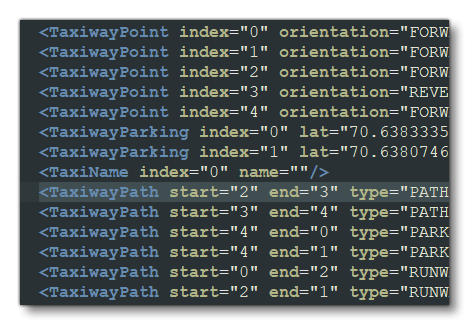
The different taxiway elements would go inside of the <Airport> element, and you can (and normally would) define multiple taxiways in a single airport. It is very important to note that these elements must go in the following order:
1) List all your Taxiway Points.
2) Define any Taxiway Parking.
3) Define any Service Stands.
4) Define any Taxi Names.
5) list all the Taxiway Paths.
The image below shows an example:
<TaxiwayPoint />
This element is used to add a point to the taxiway network for routing on the ground within an <Airport> element. Since the network will contain many taxiway points (and possibly parking spots), each of these locations need to have an "index" that uniquely identifies a point when building the network.
When defining a taxiway point, there are two ways to specify the position:
- The first is to use a lat/lon pair that will give the exact coordinate
- the second is to use a biasX/biasZ pair that specifies the displacement of the point from the airport reference point
Note that this is a self-closing element and has the following attributes:
| Attribute | Description | Type | Required |
|---|---|---|---|
|
|
The display name for the object in the Scenery Editor. NOTE: this is only used for ordering in the The Scenery Contents List |
String | No |
|
|
The ID of the parent group this object belongs to. NOTE: this is only used for ordering in the The Scenery Contents List |
Integer | No |
|
|
The group index of the object. NOTE: this is only used for ordering in the The Scenery Contents List |
Integer | No |
index |
Identifier index assigned to this taxiway point inside of an airport. This identifier must be unique for all <TaxiwayPoint>, <TaxiwayParking> and <TaxiwayServiceStand> locations. Values must be between 0 and 65534. |
Integer | Yes |
type |
Taxiway point type. The *_NO_DRAW options indicate that the taxiway points should not be drawn (as is the case for grass or gravel taxiways, for example). |
Enum:
|
Yes |
orientation |
The orientation of a HOLD_SHORT. |
Enum:
|
No |
lat |
Latitude of the airport reference point, in degrees between -90.0° and 90.0° |
Float |
Yes (only if |
lon |
Longitude of the airport reference point, in degrees between -180.0° and 180.0° | Float |
Yes (only if |
biasX |
Bias from airport reference along the longitudinal axis in meters. |
Float |
Yes (only if |
biasZ |
Bias from airport reference along the latitudinal axis in meters. | Float |
Yes (only if |
<WaitingRoom />
This element still appears in the bglcomp.xsd file, but is obsolete and not used by the simulation. It has no sub-elements, and the following attributes:
name
planeStandName
lat
lon
biasX
biasZ
heading
apronControlIndex
<TaxiwayParking />
This element is used to add a parking spot to the taxiway network. Taxiway parking spots can have preferred airline designations. Since the network will contain many taxiway points and parking spots, each of these locations need to have an "index" that uniquely identifies a point when building the network.
When defining a taxiway parking spot, there are two ways to specify the position:
- The first is to use a lat/lon pair that will give the exact coordinate
- the second is to use a biasX/biasZ pair that specifies the displacement of the point from the airport reference point
The size of a parking spot required for an aircraft is taken from the wingspan of the aircraft recorded in the Aircraft Configuration Files. The wingspan is converted to meters and rounded up.
This element may contain the sub-elements <Coloration /> and <Material />, and has the following attributes:
| Attribute | Description | Type | Required |
|---|---|---|---|
|
|
The display name for the object in the Scenery Editor. NOTE: this is only used for ordering in the The Scenery Contents List |
String | No |
|
|
The ID of the parent group this object belongs to. NOTE: this is only used for ordering in the The Scenery Contents List |
Integer | No |
|
|
The group index of the object. NOTE: this is only used for ordering in the The Scenery Contents List |
Integer | No |
index |
Identifier index assigned to this taxiway parking spot inside of an airport. This identifier must be unique for all <TaxiwayPoint>, <TaxiwayParking> and <TaxiwayServiceStand> locations. Values must be between 0 and 65534. |
Integer | Yes |
lat |
Latitude of the airport reference point, in degrees between -90.0° and 90.0° |
Float |
Yes (only if |
lon |
Longitude of the airport reference point, in degrees between -180.0° and 180.0° | Float |
Yes (only if |
biasX |
Bias from airport reference along the longitudinal axis in meters. |
Float |
Yes (only if |
biasZ |
Bias from airport reference along the latitudinal axis in meters. | Float |
Yes (only if |
heading |
The parking spot heading - oriented from the North - from -360.0° to 360.0°. |
Float |
Yes |
radius |
The parking spot radius, in meters. | Float | Yes |
type |
Taxiway parking type. |
Enum: NONE |
Yes |
name |
Taxiway parking name. |
Enum: DOCK |
Yes |
number |
Number of this spot (goes with given name),from 0 to 65534 | Integer | Yes |
suffix |
Suffix to be added to the taxiway parking name and number. |
Enum: GATE_A |
No |
pushBack |
The behavior of "parking pushback" is to push back the aircraft either one wingspan radius, or to the first taxiway node (whichever comes first), do a 180° turn, and then proceed along the taxiways. There is no control over which way the aircraft will turn the 180°, but if the pushback of one radius is too far, entering a taxiway node closer to the parking area will shorten the pushback distance. IMPORTANT! This is a legacy setting and has no effect on the behaviour of aircraft in Microsoft Flight Simulator 2024. |
Enum:
|
No |
teeOffset1 |
Stopping points for aircraft, in meters, from the center of the parking spot. Value is between 0.1 to 50.0 | Float | No |
teeOffset2 |
|||
teeOffset3 |
|||
teeOffset4 |
|||
airlineCodes |
This is a comma separated list of airline codes that can use this parking spot. This text should match the strings entered for the atc_parking_codes entry for the aircraft. To maintain compatibility, the ICAO code for airlines should be used. |
String list | No |
|
|
This is a comma separated list of manufacturer names that can be used to limit the aircraft that spawn on the parking spot. The list will be compared against the ui_manufacturer parameter of all available aircraft variations. |
String | No |
numberMarking |
Enable (TRUE) or disable (FALSE) number markings for the taxiway parking point. | Bool | No |
numberBiasX |
Bias from parking spot reference along the longitudinal axis in meters. | Float | No |
numberBiasZ |
Bias from parking spot reference along the latitudinal axis in meters. | Float | No |
numberHeading |
The parking spot number heading, from -360.0° to 360.0°. | Float | No |
|
|
When this attribute is "TRUE", the parking space will generate a fuel mesh. |
Bool | No |
drawDirt |
When this attribute is "TRUE", a dirt texture will be applied to the area within and around the parking space (the actual texture used will depend on the size and type of parking). Note that ground vehicle parking will ignore have this attribute. | Bool | No |
|
|
When this attribute is "TRUE" - and the |
Bool | No |
|
|
When this attribute is "TRUE" - and the |
Bool | No |
|
|
When this attribute is "TRUE", the parking space be considered as being a helicopter stand. Requires that the |
Bool | No |
|
|
When this attribute is "TRUE" - and the |
Bool | No |
|
|
When this attribute is "TRUE" - and the |
Bool | No |
|
|
This attribute defines the kind of passenger access for the parking spot, and assigns a boarding flow apron service to this parking for the Passenger Boarding Service. This flow will adapt to the possibilities allowed for the aircraft using the services. When this is not set, the spot will detect automatically if it has a Jetway or not, then behaving as if it was "BUS" or "JETWAY". |
Enum:
|
No |
|
|
This is the index of the Apron Controller to be assigned to this taxiway stand service location. IMPORTANT! This index value cannot be set in the XML and is assigned by the The Scenery Editor when you assign an Apron Control to a taxiway. |
Integer | No |
<TaxiwayServiceStand />
A Taxiway Service Stand object is an element that is used to add a service control taxiway parking spot. Taxiway service stands can have preferred airline designations. Since the network will contain many taxiway points and service stands, each of these locations need to have an "index" that uniquely identifies a stand when building the network.
When defining a taxiway service stand, there are two ways to specify the position:
- The first is to use a lat/lon pair that will give the exact coordinate
- the second is to use a biasX/biasZ pair that specifies the displacement of the point from the airport reference point
This element may contain the sub-elements <Coloration /> and <Material />, and has the following attributes:
| Attribute | Description | Type | Required |
|---|---|---|---|
|
|
The display name for the object in the Scenery Editor. NOTE: this is only used for ordering in the The Scenery Contents List |
String | No |
|
|
The ID of the parent group this object belongs to. NOTE: this is only used for ordering in the The Scenery Contents List |
Integer | No |
|
|
The group index of the object. NOTE: this is only used for ordering in the The Scenery Contents List |
Integer | No |
index |
Identifier index assigned to this taxiway service stand inside of an airport. This identifier must be unique for all <TaxiwayPoint>, <TaxiwayParking> and <TaxiwayServiceStand> locations. Values must be between 0 and 65534. |
Integer | Yes |
|
|
This attribute is used to set the type of taxiway stand that is being edited. Note that the values shown in the Type column are default values that are always defined within the simulation, however you may define your own values by setting up the |
String: "BAGGAGE_CART" |
Yes |
|
This option lets you assign a role to the parking stand. |
String:
|
Yes | |
|
|
Latitude of the airport reference point, in degrees between -90.0° and 90.0° |
Float |
Yes (only if |
|
|
Longitude of the airport reference point, in degrees between -180.0° and 180.0° | Float |
Yes (only if |
|
|
Bias from airport reference along the longitudinal axis in meters. |
Float |
Yes (only if |
|
|
Bias from airport reference along the latitudinal axis in meters. | Float |
Yes (only if |
|
|
The parking stand heading - oriented from the North - from -360.0° to 360.0°. |
Float |
Yes |
|
|
The parking stand radius, in meters. | Float | Yes |
|
|
This is the index of the Apron Controller to be assigned to this taxiway stand service location. IMPORTANT! This index value cannot be set in the XML and is assigned by the The Scenery Editor when you assign an Apron Control to a taxiway stand. |
Integer | Yes |
The name of an associated <TaxiwayParking />. Only used if the standRole is set to "PLANE" or "GATE". |
String | No | |
The suffix of an associated <TaxiwayParking />. Only used if the standRole is set to "PLANE". |
String | No | |
The name of an associated <TaxiwayParking />. Only used if the standRole is set to "PLANE". |
Integer | No |
<TaxiName />
This element is used to add a name to a <TaxiwayPath> element in the taxiway network. Note that this is a self-closing element and has the following attributes:
| Attribute | Description | Type | Required |
|---|---|---|---|
|
|
The display name for the object in the Scenery Editor. NOTE: this is only used for ordering in the The Scenery Contents List |
String | No |
|
|
The ID of the parent group this object belongs to. NOTE: this is only used for ordering in the The Scenery Contents List |
Integer | No |
|
|
The group index of the object. NOTE: this is only used for ordering in the The Scenery Contents List |
Integer | No |
index |
The unique index for the name, from 0 to 255. |
Integer |
No |
name |
The name to be associated with this index, which can have a maximum of 8 characters. | String | No |
<TaxiwayPath>
This element can be used to add a taxiway path to the taxiway system for an airport. This element may contain the following sub-elements
If it has no sub-elements, then it can be self-closing. The element has the following attributes:
| Attribute | Description | Type | Required |
|---|---|---|---|
|
|
The display name for the object in the Scenery Editor. NOTE: this is only used for ordering in the The Scenery Contents List |
String | No |
|
|
The ID of the parent group this object belongs to. NOTE: this is only used for ordering in the The Scenery Contents List |
Integer | No |
|
|
The group index of the object. NOTE: this is only used for ordering in the The Scenery Contents List |
Integer | No |
start |
Index number of taxiway point or parking space to start from. Value from 0 to 65534. | Integer | Yes |
end |
Index number of taxiway point or parking space to end on. Value from 0 to 65534. | Integer | Yes |
type |
Taxiway path type. |
Enum:
|
No |
surface |
The name of the surface material to use. | String | No |
drawSurface |
Whether to draw the taxiway surface (TRUE) or not (FALSE) |
Bool |
No |
drawDetail |
Set to TRUE to draw the taxiway detail (such as a bump map, for example), or FALSE otherwise. | Bool | No |
width |
Width, in meters, of the taxiway path. | Float | No |
weightLimit |
The maximum weight for the taxiway path, in pounds. | Float | No |
name |
This is the name index as defined by the IMPORTANT! Only include this attribute if the |
Integer | No |
centerLine |
Whether the taxiway path has a center line (TRUE) or not (FALSE). The default is FALSE. | Bool | No |
centerLineLighted |
Whether the taxiway path center line is lit (TRUE) or not (FALSE). The default is FALSE. | Bool | No |
leftEdgeLighted |
Whether the taxiway path left edge line is lit (TRUE) or not (FALSE). The default is FALSE. | Bool | No |
rightEdgeLighted |
Whether the taxiway path right edge line is lit (TRUE) or not (FALSE). The default is FALSE. | Bool | No |
leftEdge |
The left edge type. |
String:
|
No |
rightEdge |
The right edge type. |
String:
|
No |
number |
Number of the runway the path is being added to. Note that you do not suffix the designator onto this value, but instead define it separately in the IMPORTANT! Only include this attribute if the |
Integer:
or Enum:
|
No |
designator |
Designator of the runway the path is being added to. IMPORTANT! Only include this attribute if the |
Enum: NONE |
No |
enhanced |
When this attribute is "TRUE" then any center line markings will use the enhanced marking. | Boolean | No |
groundMerging |
When this attribute is "TRUE", the the taxiway path material will be merged with the terrain textures. | Boolean | No |
excludeVegetationAround |
When this attribute is "TRUE", any vegetation that is near the edge of the taxiway path object will be removed. |
Boolean | No |
excludeVegetationInside |
When this attribute is "TRUE", any vegetation that is within the bounds of the taxiway path object will be removed. |
Boolean | No |
<TaxiwaySign />
This element is used to add a taxiway sign to an airport. Note that this is a self-closing element and has the following attributes:
| Attribute | Description | Type | Required |
|---|---|---|---|
|
|
The display name for the object in the Scenery Editor. NOTE: this is only used for ordering in the The Scenery Contents List |
String | No |
|
|
The ID of the parent group this object belongs to. NOTE: this is only used for ordering in the The Scenery Contents List |
Integer | No |
|
|
The group index of the object. NOTE: this is only used for ordering in the The Scenery Contents List |
Integer | No |
lat |
Latitude of the object, in degrees between -90.0° and 90.0°. |
Float |
No |
lon |
Longitude of the object, in degrees between -180.0° and 180.0°. | Float | No |
heading |
The heading in degrees of the sign. Note that this is the heading of the sign, so the text will face 90° clockwise from this heading. Value is from from 0.0° to 360.0°. |
Float |
No |
label |
Label string (explained in more detail below) |
String |
No |
justification |
Whether to right or left justify the text (default is LEFT). |
Enum:
|
No |
size |
The size of the sign (SIZE1 is the smallest and SIZE5 is the largest). |
Enum:
|
No |
The label attribution is a string comprised of at least one sign-type symbol (a lower case letter) and one or more characters to define the sign contents. A simple example would be "l[G]" which creates a location sign for taxi "Golf". The sign-type symbols are as follows:
| Sign-type Identifier | Description | Colours |
|---|---|---|
l |
Location | Yellow text on black |
d |
Direction | Black text on yellow |
m |
Mandatory | White text on red |
i |
Information | Black text on white |
r |
Runway | White text on red |
u |
Unknown | Black text on white |
The following characters describe the content of the sign. The characters can be any upper case letter (A-Z), any numerical digit (0-9), or any one of the following special characters:
| Character | Symbol Description |
|---|---|
_ or space |
Space |
- |
Dash |
> |
Right Arrow |
< |
Left Arrow |
^ |
Up Arrow |
v |
Down Arrow |
| ' (apostrophe) | Up-right arrow |
` (backwards apostrophe) |
Up-left arrow |
/ |
Back-left arrow |
\ |
Back-right arrow |
[ |
Left border |
] |
Right border |
| |
Vertical Line |
Here are a couple more examples:
l[AE]- This sign indicates to the pilot that they are on taxiway "alpha-echo"l[G]d[F\]m[11R-29L]- This sign will tell a pilot that they are located on taxiway Golf at the intersection with runway 11R/29L and that taxiway Foxtrot is back and to their right
Note the use of brackets in these examples. Brackets create the black outline around the letter on many of the signs, and if you omit the brackets the letter will have no "box" around it. You can also use brackets on direction and runway signs to increase the spacing at either end of the segment.
Direction signs are made up of a combination of directional arrows and taxiway and runway designators. Arrows can appear before or after the taxiway or runway designator. All of the following are valid direction signs:
d/GdG/d/G/
Using these components you can create signs of arbitrary complexity.
Related Topics