GROUND TRAFFIC
On this page you can find additional information related to AI Ground Traffic. For aircraft, please see the following page:
Idle Workers And Marshallers
Idle workers and marshallers are human sim objects which are spawned at airports. They will be created at a position relative to the parking spot that they belong to (taking into account the radius and heading of the parking spot). The models that are used will be determined by the region that has been set for the airport as part of the Living World Configuration file.
The behavior of the idle workers is defined in their XML files (in the AirportServices folder), and it will describe the way the object navigates the waypoints used to move around, and its animations. The marshaller, on the other hand, uses an AI simulation to set some SimVars (using data retrieved from the approaching aircraft), and then use those SimVars to play the various animations that are available.
Ambient Traffic And Services
The ambient traffic is a system to give some impression of "life" on the airports. A number of vehicles of various types are generated, and move semi-randomly across the airport.
When getting close enough to an airport, N vehicles are generated, each picking a random model from the list corresponding to the Region of the airport, and they are placed on an empty parking space. The number N is computed by adding the number of each type of parking, multiplied by its factor from the GeneralSettings AmbientVehiclesQuantityByParking, and then multiplying that by the Airport Vehicle Density (found in the in-sim Options of Microsoft Flight Simulator 2024, taken as a percentage). If every single parking space is occupied before N vehicles have been created, the generation is stopped, ending up with less vehicles. This could be due to too many Parked Aircraft, or to too much overlapping parking on the airport.
While occupying parking spaces the same way an aircraft would, ambient vehicles will wait some random time - anywhere from a few seconds to a few minutes - before choosing another random unoccupied parking somewhere on the airport. They will then move towards this new parking, starting over the process of waiting once it has been reached. A fraction of the ambient vehicles - determined by the General Settings RatioOfAmbientVehiclesThatAreImmobile - will stay on their original parking without ever moving.
When moving across the airport, ambient vehicles will use the TaxiPaths of the airport, favoring paths of type VEHICLE whenever possible, and they will also trying to avoid runways. When crossing a runway, they will pause at holdshort, and wait until the runway is free if ATC has been warned that the runway is currently in use for a takeoff or landing. If the User tries to takeoff without clearance, for example, the vehicles might cross the runway because they are not aware of the takeoff, since ATC has not been talked to. When taxiing on regular taxi paths, ambient vehicles are aware of other vehicles and aircraft taxiing, and ATC will also warn them in the case of incoming traffic near intersections.
If an aircraft (User or Air Traffic) lands and requires a parking space, but all parking spots are currently occupied due (in part) to ambient vehicles, then a vehicle is destroyed (removed from the sim world) to make some room for the aircraft.
Road Traffic
Road traffic - or FreewayTraffic - is a system that simulates the traffic of cars and other vehicles on all types of roads all across the world. Note though that road traffic is excluded from airport perimeters.
Based on the type and width of roads, a different amount of vehicles will be generated and move at different speeds depending on the type of road. At night, lights are also generated around the vehicles to simulate their headlights and backlights. The amount of vehicles is also influenced by the Road Vehicles slider (in the in-sim Options of Microsoft Flight Simulator 2024).
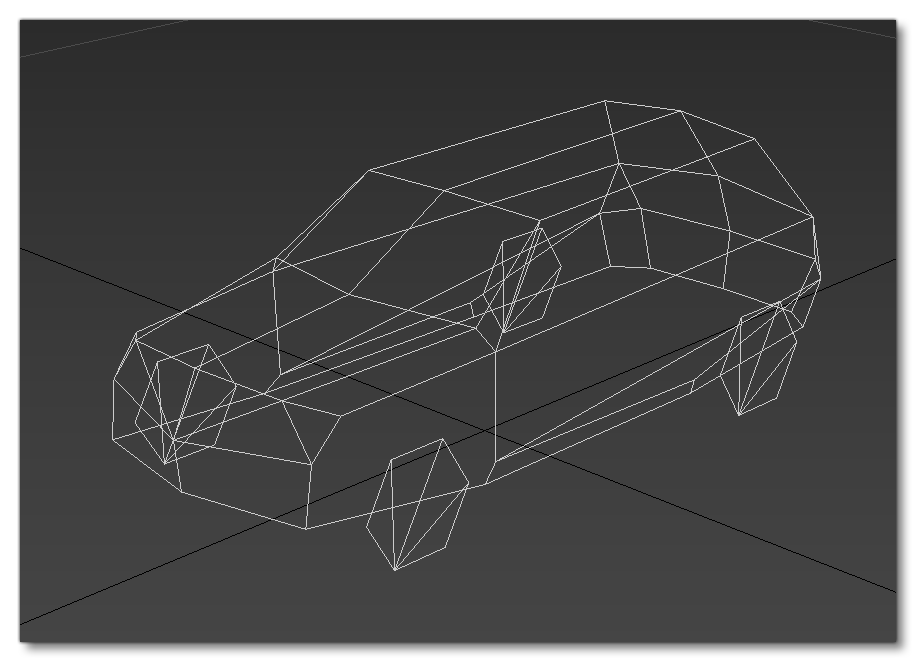
When creating vehicles for this system, we recommend creating models with a single LOD, that is on the "low side" of quality, to avoid performances issues. Also avoid adding lights to the vehicles, since - as we've mentioned above - the system already generates lights. An example of such a vehicle is available in the Samples folder of the SDK, and the image below show's the wireframe of a simple car from the sim so you can get an idea of the typical LOD we're discussing:
Boats
Boats are spawned under two different circumstances:
- Inland boats - or leisure boats - use a system that is used to generate boats on coastal areas and lakes. The amount of boats is influenced by the Leisure Boats slider (in the in-simulation Options of Microsoft Flight Simulator 2024) and also by the density of population in zones nearby. These boats are only generated near coasts, on the open sea, or on lakes. They wander randomly in their surroundings, trying to stay on water at all times.
- Cruise ships, which are generated in deeper water and follow a generally pre-planned routes and schedules, much like offline air traffic.
Their models are defined by the Living World Configuration region parameters, where various weights can be used to have some models more common than others.
Related Topics