flight_performance.cfg - SETUP
The in-simulation EFB and MSFS 2024 Flight Planner can use data defined in the flight_performance.cfg to enable performance-based flight planning calculations. Performance-based flight planning allows for greater accuracy when calculating things like enroute time and fuel-burn by using performance data specific to your aircraft. For this reason, we recommend all developers configure the flight_performance.cfg to enable support for one of the two types of performance-based flight planning calculations described in the following sections.
Configuring Simple Performance
For aircraft that do not have turbojet/turbofan engines, only the simple form of performance calculations are supported. Aircraft with turbojet/turbofan engines can also use these simple calculations, but they also have access to a more advanced form of calculations (explained below).
Simple performance calculations allow the user to choose pre-defined performance profiles for each of the three phases of flight: climb, cruise, and descent. These profiles define the performance characteristics of the aircraft in their respective phases of flight.
The following images show an example of the EFB performance menu when simple performance calculations have been enabled for an aircraft, and how the user can select from multiple pre-defined profiles for each phase of flight:
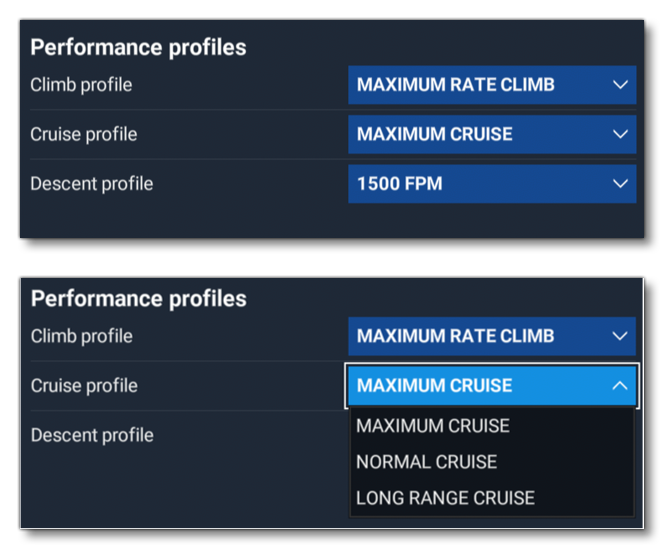
To configure the flight_performance.cfg to enable these simple performance calculations, the sections and parameters listed below must be defined.
[AIRCRAFT_CONFIGURATION.N]
At least one aircraft configuration section must be defined, and it should preferably provide data for the aircraft in a "clean" configuration (i.e: the one used for normal cruising operations). It is important to note that in this section the lookup tables defined by the CL_table_by_Mach_and_AoA and CD_table_by_Mach_and_AoA parameters must have the exact same parameters for Mach and AoA in the header. For detailed descriptions of each parameter in this section, please refer to the information at the following link: [AIRCRAFT_CONFIGURATION.N].
It is worth noting that you can use the DevMode Debug Aircraft Flight Performance Tool to generate the aircraft configuration section for you.
[ENGINE_PERFORMANCE]
For the simple configuration, the engine performance section can be left mostly empty except for one parameter: fuel_density_table. This parameter is a comma-separated list of the densities (in lbs per Gallon) of all the fuel types used by the aircraft. Most aircraft only use a single fuel type and will therefore only need to include one value in this list. If your aircraft can use multiple fuel types - and you wish to include performance profiles for these different fuel types - then you should include the density of each of them in this list.
An example of the fuel_density_table parameter is as follows:
fuel_density_table = 6.0, 6.7, 6.5This defines the fuel densities for 100LL, Jet-A(1), and Jet-B. For detailed descriptions of each parameter in this section, please refer to the information at the following link: [ENGINE_PERFORMANCE].
Note that if you use the DevMode Debug Aircraft Flight Performance Tool to generate the engine performance section, it will not include the fuel_density_table parameter, and you will need to manually add it.
NOTE: You can include additional parameters in this section if you wish, but they are not currently not be used for flight planning calculations.
[AIRCRAFT_LIMITS]
This optional section allows you to define the maximum cruising altitude of your aircraft using the cruise_max_altitude_table_by_weight_and_ISA_dev parameter. This parameter defines the maximum cruise pressure altitude (in ft) as a function of aircraft gross weight (in lbs and the deviation of outside static air temperature from ISA temperature (in degrees Celsius).
Here is an example of a table for an aircraft that has a maximum cruise altitude of 31,000 feet in all conditions:
cruise_max_altitude_table_by_weight_and_ISA_dev = 0 : 0 :: 31000
The maximum cruise altitude defined here applies globally to the aircraft in all scenarios, although you have the option of overriding this global maximum with individual cruise profiles (see the [CRUISE_PERFORMANCE.N] section, below). If you omit this section and the cruise_max_altitude_table_by_weight_and_ISA_dev parameter, then no global maximum cruise altitude will be applied for the aircraft. If this is the case and the user chooses a cruise profile that also does not define a maximum altitude, then there will be no maximum cruise altitude applied at all. This can lead to situations where the flight planner selects cruise altitudes that are too high for the aircraft. As such, it is highly recommended to either define a maximum cruise altitude table in this section or ensure that all cruise profiles define their own maximum altitude tables.
[CLIMB_PERFORMANCE.N]
Each climb performance section you create defines a single climb performance profile, and you must define at least one climb profile (but there is no limit to how many you can define in total).
NOTE: If you use the DevMode Debug Aircraft Flight Performance Tool to generate a flight_performance.cfg, it will include an example climb performance section in the output. This example section is for demonstration purposes only and will not be applicable to your aircraft. You must manually define every climb profile.
Each [CLIMB_PERFORMANCE.N] section used to define a performance profile for simple calculations supports the following parameters:
profile_name: The name of the profile that will be displayed to users. This parameter is optional but it is highly recommended to include it, since without it users will only see a generic name such as "Profile 1".
fuel_type_idx: The index of the fuel type used by the aircraft when climbing using the profile. The index references one of the values in the list defined by thefuel_density_tableparameter in the[ENGINE_PERFORMANCE]section. Indices start at 0 for the first value and increment by 1 for each value thereafter. This is an optional parameter, and will default to 0 if not defined.
IAS_below_transition: The maximum indicated airspeed - in Knots - maintained by the aircraft when climbing using the profile and below 10,000ft (i.e: when the standard 250 knots below 10,000ft speed limit is in effect). The actual calculated speed of the aircraft will be the lower value between this speed and the Mach number specified by theMachparameter (if defined). This is a required parameter.
IAS_above_transition: The maximum indicated airspeed - in Knots - maintained by the aircraft when climbing using the profile and above 10,000ft (i.e. when the standard 250 knots below 10,000ft speed limit is not in effect). The actual calculated speed of the aircraft will be the lower value between this speed and the Mach number specified by theMachparameter (if defined). This is a required parameter.
Mach: The maximum Mach number maintained by the aircraft when climbing using the profile. The actual calculated speed of the aircraft will be the lower value between this speed and the indicated airspeed specified by theIAS_below_transitionorIAS_above_transitionparameter (depending on whether the aircraft is below 10,000ft or not). This is an optional parameter and If not defined, the aircraft speed will not be limited by any mach number.
time_to_climb_table_by_initial_weight_and_altitude: A lookup table that defines the time (in seconds) required to climb from sea level (0ft) to cruise altitude using the profile as a function of the initial gross weight of the aircraft (in lbs) and the cruise altitude (in ft). Note that this table must have exactly the same parameters for weight and altitude in the header as thefuel_to_climb_table_by_initial_weight_and_altitudeparameter table. This is a required parameter.
fuel_to_climb_table_by_initial_weight_and_altitude: A lookup table that defines the fuel (in Gallons) required to climb from sea level (0ft) to cruise altitude using the profile as a function of the initial gross weight of the aircraft (in lbs) and the cruise altitude (in ft). Note that this table must have exactly the same parameters for weight and altitude in the header as thetime_to_climb_table_by_initial_weight_and_altitudeparameter table. This is a required parameter.
Here is an example of a [CLIMB_PERFORMANCE.N] section that defines a climb profile for simple performance calculations (the lookup tables have been truncated for brevity):
[CLIMB_PERFORMANCE.0]
profile_name = "Maximum Rate Climb"
fuel_type_idx = 0
IAS_below_transition = 124
IAS_above_transition = 124
time_to_climb_table_by_initial_weight_and_altitude = 5794, ... : 2000, ... :: 45, 90, 135, ...
fuel_to_climb_table_by_initial_weight_and_altitude = 5794, ... : 2000, ... :: 1.0, 2.1, 3.1, ...
[CRUISE_PERFORMANCE.N]
Each cruise performance section defines a single cruise performance profile, and you must define at least one cruise profile (but there is no limit to how many you can define in total).
NOTE: If you use the DevMode Debug Aircraft Flight Performance Tool to generate a flight_performance.cfg, it will include an example cruise performance section in the output. This example section is for demonstration purposes only and will not be applicable to your aircraft. You must manually define every climb profile.
Each [CRUISE_PERFORMANCE.N] section used to define a performance profile for simple calculations supports the following parameters:
IMPORTANT: Do not include additional parameters beyond the ones listed below. While the [CRUISE_PERFORMANCE.N] section supports additional parameters, they are not used for simple performance calculations.
profile_name: The name of the profile that will be displayed to users. This parameter is optional but it is highly recommended to include it, since without it users will only see a generic name such as "Profile 1".
fuel_type_idx: The index of the fuel type used by the aircraft when climbing using the profile. The index references one of the values in the list defined by thefuel_density_tableparameter in the[ENGINE_PERFORMANCE]section. Indices start at 0 for the first value and increment by 1 for each value thereafter. This is an optional parameter, and will default to 0 if not defined.
cruise_TAS_table_by_weight_and_ISA_dev_and_altitude: A lookup table that defines the true airspeed (in Knots) achieved by the aircraft using the profile as a function of the initial gross weight of the aircraft (in lbs), the deviation of the outside static air temperature from ISA temperature (in degrees Celsius) and the cruise altitude (in ft). This is a required parameter.
cruise_fuel_consumption_table_by_weight_and_ISA_dev_and_altitude: A lookup table that defines the fuel burn rate (in Gallons per hour) required by the aircraft using the profile as a function of the initial gross weight of the aircraft (in lbs), the deviation of outside static air temperature from ISA temperature (in degrees Celsius) and the cruise altitude (in ft). This is a required parameter.
cruise_max_altitude_table_by_weight_and_ISA_dev: A lookup table that defines the maximum altitude (in ft) for the aircraft when cruising using the profile as a function of the gross weight of the aircraft (in lbs) and the deviation of outside static air temperature from ISA temperature (in degrees Celsius). If a global maximum cruise altitude table is defined in the[AIRCRAFT_LIMITS]section, then this table will override the global one when using the profile. This is an optional parameter, and - if not defined - the global maximum cruise altitude table will be used instead. If neither this table nor the global maximum cruise altitude table is defined, then no maximum cruise altitude will be applied when using the profile.
Here is an example of a [CRUISE_PERFORMANCE.N] section that defines a cruise profile for simple performance calculations (the lookup tables have been truncated for brevity):
[CRUISE_PERFORMANCE.0]
profile_name = "Maximum Cruise"
fuel_type_idx = 0
cruise_TAS_table_by_weight_and_ISA_dev_and_altitude = 5500, ... : -20, ... : 0, ... :: 236, 248, 262, ...
cruise_fuel_consumption_table_by_weight_and_ISA_dev_and_altitude = 5500, ... : -20, ... : 0, ... :: 85.9, 78.9, 73.3, ...
[DESCENT_PERFORMANCE.N]
Each descent performance section defines a single descent performance profile, and you must define at least one descent profile (but there is no limit to how many you can define in total).
NOTE: If you use the DevMode Debug Aircraft Flight Performance Tool to generate a flight_performance.cfg, it will include an example descent performance section in the output. This example section is for demonstration purposes only and will not be applicable to your aircraft. You must manually define every climb profile.
Each [DESCENT_PERFORMANCE.N] section used to define a performance profile for simple calculations supports the following parameters:
profile_name: The name of the profile that will be displayed to users. This parameter is optional but it is highly recommended to include it, since without it users will only see a generic name such as "Profile 1".
fuel_type_idx: The index of the fuel type used by the aircraft when descending using the profile. The index references one of the values in the list defined by thefuel_density_tableparameter in the[ENGINE_PERFORMANCE]section. Indices start at 0 for the first value and increment by 1 for each value thereafter. This is an optional parameter, and will default to 0 if not defined.
IAS_below_transition: The maximum indicated airspeed - in Knots - maintained by the aircraft when descending using the profile and below 10,000ft (i.e: when the standard 250 knots below 10,000ft speed limit is in effect). The actual calculated speed of the aircraft will be the lower value between this speed and the Mach number specified by theMachparameter (if defined). This is a required parameter.
IAS_above_transition: The maximum indicated airspeed - in Knots - maintained by the aircraft when descending using the profile and above 10,000ft (i.e. when the standard 250 knots below 10,000ft speed limit is not in effect). The actual calculated speed of the aircraft will be the lower value between this speed and the Mach number specified by theMachparameter (if defined). This is a required parameter.
Mach: The maximum Mach number maintained by the aircraft when descending using the profile. The actual calculated speed of the aircraft will be the lower value between this speed and the indicated airspeed specified by theIAS_below_transitionorIAS_above_transitionparameter (depending on whether the aircraft is below 10,000ft or not). This is an optional parameter and If not defined, the aircraft speed will not be limited by any mach number.
average_descent_rate: The average descent rate achieved by the aircraft when descending using the profile, in ft per minute. This is a required parameter, and the value must be positive.
fuel_to_descent_table_by_cruise_altitude: A lookup table that defines the fuel (in Gallons) required to descend to sea level (0 ft) from cruise altitude using the profile as a function of the cruise altitude (in ft). This is a required parameter.
Here is an example of a [DESCENT _PERFORMANCE.N] section that defines a descent profile for simple performance calculations (the lookup tables have been truncated for brevity):
[DESCENT_PERFORMANCE.0]
profile_name = "1500 FPM"
fuel_type_idx = 0
IAS_below_transition = 230
IAS_above_transition = 230
average_descent_rate = 1500
fuel_to_descent_table_by_cruise_altitude = 31000, ... :: 18.5, 17.9, 16.8, ...
Configuring Advanced Performance
For aircraft that have turbojet/turbofan engines, you have the option to enable support for an advanced form of performance calculations. These calculations offer potentially greater accuracy than the simple performance calculations and unlock additional parameters that the user can customize when setting up a flight plan.
The flight planning features that are enabled when an aircraft supports advanced performance calculations include:
- The ability for the user to freely set speed schedules (calibrated airspeed and mach targets) for climb, cruise, and descent in addition to being able to select from a number of preset speed schedules.
- The ability for the user to freely set altitude speed limits (e.g. X Knots under Y ft) for the climb and descent.
- The ability to calculate and use ECON - minimum cost - speeds (which requires optional cost index data, as explained in the
[COST_INDICES]section, below).
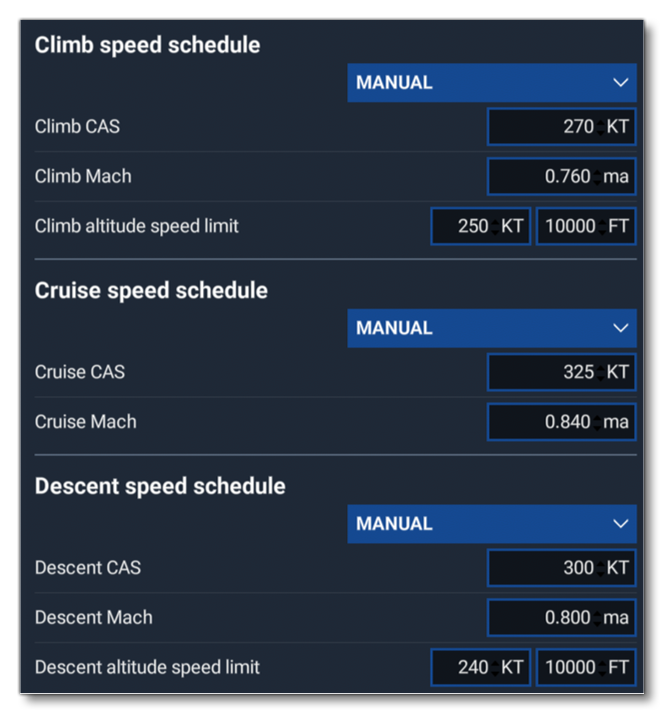
The following image shows an example of the EFB performance menu when advanced performance calculations have been enabled for an aircraft:
When deciding whether to configure support for advanced calculations, keep in mind the following limitations:
- Supersonic flight is not supported.
- Use of afterburners is not supported.
- Only one engine type/configuration is supported per aircraft preset/variation (i.e. scenarios where an aircraft can switch between different engine types or selectively engage/disable a subset of engines during flight are not supported).
If any of the above limitations apply to your aircraft - or if you do not wish to enable advanced performance calculations for other reasons - you can always choose to configure support for simple performance instead.
To configure the flight_performance.cfg to enable these advanced performance calculations, the sections and parameters listed below must be defined.
[AIRCRAFT_CONFIGURATION.N]
At least one aircraft configuration section must be defined, and it should preferably provide data for the aircraft in a "clean" configuration (i.e: the one used for normal cruising operations). It is important to note that in this section the lookup tables defined by the CL_table_by_Mach_and_AoA and CD_table_by_Mach_and_AoA parameters must have the exact same parameters for Mach and AoA in the header. For detailed descriptions of each parameter in this section, please refer to the information at the following link: [AIRCRAFT_CONFIGURATION.N].
It is worth noting that you can use the DevMode Debug Aircraft Flight Performance Tool to generate the aircraft configuration section for you.
[ENGINE_PERFORMANCE]
The engine performance section ([ENGINE_PERFORMANCE]) must include all of the following required parameters:
number_of_engines: The number of engines the aircraft has. Must be greater than or equal to 1.
engine_net_thrust_table_by_ISA_dev_and_altitude_and_Mach_and_throttle: A lookup table that defines the net thrust produced by each engine (in lbf) as a function of the deviation of outside static air temperature from ISA temperature (in degrees Celsius), the pressure altitude (in ft), the Mach number, and the throttle setting (from 0 to 1). This table must have exactly the same parameters for ISA deviation, altitude, mach, and throttle in the header as theengine_fuel_consumption_table_by_ISA_dev_and_altitude_and_Mach_and_throttleandengine_corrected_N1_table_by_ISA_dev_and_altitude_and_Mach_and_throttle tables.
engine_fuel_consumption_table_by_ISA_dev_and_altitude_and_Mach_and_throttle: A lookup table that defines the fuel burn rate of each engine (lbs per hour) as a function of the deviation of outside static air temperature from ISA temperature (in degrees Celsius), the pressure altitude (in ft), the Mach number, and the throttle setting (from 0 to 1). This table must have exactly the same parameters for ISA deviation, altitude, mach, and throttle in the header as theengine_net_thrust_table_by_ISA_dev_and_altitude_and_Mach_and_throttleandengine_corrected_N1_table_by_ISA_dev_and_altitude_and_Mach_and_throttle tables.
engine_corrected_N1_table_by_ISA_dev_and_altitude_and_Mach_and_throttle: A lookup table that defines the corrected N1 rotation speed achieved by each engine (percent of maximum) as a function of the deviation of outside static air temperature from ISA temperature (in degrees Celsius), the pressure altitude (in ft), the Mach number, and the throttle setting (from 0 to 1). This table must have exactly the same parameters for ISA deviation, altitude, mach, and throttle in the header as theengine_net_thrust_table_by_ISA_dev_and_altitude_and_Mach_and_throttleandengine_fuel_consumption_table_by_ISA_dev_and_altitude_and_Mach_and_throttle.
engine_idle_corrected_N1_table_by_ISA_dev_and_altitude_and_Mach: A lookup table that defines the flight idle corrected N1 rotation speed of each engine (percent of maximum) as a function of the deviation of outside static air temperature from ISA temperature (in degrees Celsius), the pressure altitude (in ft), and the Mach number.
engine_idle_descent_corrected_N1_table_by_ISA_dev_and_altitude_and_Mach: A lookup table that defines the targeted corrected N1 rotation speed of each engine (percent of maximum) during off-idle (performance) descent as a function of the deviation of outside static air temperature from ISA temperature (in degrees Celsius), the pressure altitude (in ft), and the Mach number.
engine_max_corrected_N1_table_by_ISA_dev_and_altitude_and_Mach: A lookup table that defines the maximum continuous corrected N1 rotation speed of each engine (percent of maximum) as a function of the deviation of outside static air temperature from ISA temperature (in degrees Celsius), the pressure altitude (in ft), and the Mach number.
engine_climb_corrected_N1_table_by_ISA_dev_and_altitude_and_Mach: A lookup table that defines the targeted corrected N1 rotation speed of each engine (percent of maximum) during climb as a function of the deviation of outside static air temperature from ISA temperature (in degrees Celsius), the pressure altitude (in ft), and the Mach number.
It is recommended that you have the DevMode Debug Aircraft Flight Performance Tool generate the tables in this section for you. However, it should be noted that the tool will only generate valid tables if your aircraft uses the simulation turbine engine simulation. If you simulate your aircraft engines externally, then you cannot use the tool and must fill these tables manually.
If you use the Debug Aircraft Flight Performance Tool to generate the tables in this section, then there are a couple of things to keep in mind:
- First, the idle and max N1 tables will be populated with the N1 speeds achieved by setting the
GENERAL ENG THROTTLE LEVER POSITIONSimVar to 0 and to 1, respectively. If these values do not accurately reflect your aircraft's flight idle and maximum continuous N1 speeds (for example, if you are using a FADEC to manage your engines), then you will need to manually fill out these tables instead. - Second, the descent and climb N1 tables will be populated with the same N1 speeds as the idle and max N1 tables, respectively. If this is not desired, then you will need to manually fill out these tables instead.
Whether you use the Debug Aircraft Flight Performance Tool to generate the engine tables or manually fill them out, it is recommended to choose the table parameter values (breakpoints) carefully. The breakpoints should cover the entire - normal - operating envelope of the aircraft. The total number of breakpoints used should strike a balance between accuracy (more breakpoints usually yields greater accuracy) and table size (more breakpoints produce larger tables, which are more computationally expensive to use). As a general rule of thumb, tables should not exceed 2000-4000 total breakpoints (the total number of breakpoints is the product of the number of parameter values in each table dimension).
[AIRCRAFT_LIMITS]
This optional section allows you to define the maximum cruising altitude of your aircraft with the cruise_max_altitude_table_by_weight_and_ISA_dev parameter. This parameter defines the maximum cruise pressure altitude (in ft) as a function of aircraft gross weight (in lbs) and the deviation of outside static air temperature from ISA temperature (in degrees Celsius).
Here is an example of a table for an aircraft that has a maximum cruise altitude of 31,000 feet in all conditions:
cruise_max_altitude_table_by_weight_and_ISA_dev = 0 : 0 :: 31000
If you omit this section and the cruise_max_altitude_table_by_weight_and_ISA_dev parameter, then no global maximum cruise altitude will be applied for the aircraft. This can lead to situations where the flight planner selects cruise altitudes that are too high for the aircraft. As such, it is highly recommended to define a maximum cruise altitude table in this section.
NOTE: Unlike with simple performance calculations, per-profile maximum cruise altitudes are not supported with advanced performance calculations. Therefore, this section is the only place where you can define maximum cruise altitude for your aircraft when using advanced performance calculations.
[CLIMB_PERFORMANCE.N] / [CRUISE_PERFORMANCE.N]/ [DESCENT_PERFORMANCE.N]
Each performance section ([CLIMB_PERFORMANCE.N], [CRUISE_PERFORMANCE.N], and [DESCENT_PERFORMANCE.N]) defines a single preset speed schedule. You must define at least one preset speed schedule for each phase of flight (climb, cruise, and descent), and there is no limit to how many you can define in total.
NOTE: If you use the Debug Aircraft Flight Performance Tool to generate a flight_performance.cfg, it will include example climb / cruise / descent performance sections in the output. These example sections are for demonstration purposes only and are not suitable for use when defining preset speed schedules.
Each performance section used to define a preset speed schedule for advanced calculations supports the following properties:
IMPORTANT: Do not include additional parameters beyond the ones listed above. While the performance sections support additional parameters, they are not used for advanced performance calculations.
- profile_name: The name of the profile that will be displayed to users. This is an optional parameter, and - if not defined - the profile will be displayed to users as "[CAS target] KTS / M[mach target]", for example "300 KTS / M0.80".
- IAS_above_transition: The calibrated airspeed target, in Knots. This is a required parameter.
- Mach: The Mach number target. This is an optional parameter, and - if not defined - the aircraft will not target a particular mach number when using the preset (in effect the speed of the aircraft will not be bounded by mach).
IMPORTANT: Do not mix climb/cruise/descent performance sections that define performance profiles for simple performance calculations with sections that define preset speed schedules! Including the former will cause the EFB and MSFS 2024 Flight Planner to revert to the simple performance calculations for your aircraft.
Here are examples of the different performance sections used to define one preset speed schedule for each phase of flight using advanced performance calculations:
[CLIMB_PERFORMANCE.0]
profile_name = "High Speed Climb"
IAS_above_transition = 300
Mach = 0.8

[CRUISE_PERFORMANCE.0]
profile_name = "Maximum Cruise"
IAS_above_transition = 325
Mach = 0.84

[DESCENT_PERFORMANCE.0]
profile_name = "Recommended Descent"
IAS_above_transition = 300
Mach = 0.8
[COST_INDICES]
This optional section defines data used to compute ECON (minimum cost) speeds. Without this data, the option for the user to use ECON speeds during flight planning will be disabled. You can safely omit this section if your aircraft is not operated using ECON speeds in real life (a feature typically found only in commercial airliners).
All parameters except climb_econ_IAS_table_uses_TOC_weight_and_ISA_dev and climb_econ_Mach_table_uses_TOC_weight_and_ISA_dev are required to enable ECON speed support (those two optional parameters will default to 0 / false if omitted).
NOTE: The Debug Aircraft Flight Performance Tool will not generate a valid [COST_INDICES] section, and you must fill this section manually if you wish to include it.
When filling out the tables in this section, keep in mind that the tables define zero-wind ECON speeds. The adjustment of zero-wind ECON speeds for headwind/tailwind is estimated algorithmically by the EFB and MSFS 2024 Flight Planner. Therefore, there is no place to define wind adjustments in this section, and you do not need to include them.
When choosing the parameter values (breakpoints) for the tables, the total number of breakpoints used should strike a balance between accuracy (more breakpoints usually yields greater accuracy) and table size (more breakpoints produce larger tables, which are more computationally expensive to use). As a general rule of thumb, tables should not exceed 2000-4000 total breakpoints (the total number of breakpoints is the product of the number of parameter values in each table dimension).
For detailed descriptions of each parameter in this section, please refer to the information at the following link: [COST_INDICES].
Related Topics