BOAT DEFINITION
Boats within the Microsoft Flight Simulator 2024 world are SimObjects that can be added to water features, like rivers lakes and oceans. These SimObjects are defined through a sim.cfg file and can be a basic SimObject, or a modular SimObject. If it's modular then the package setup will be the same as that described for a Modular SimObject, although the list of files and folders that are applicable within the Common, and Presets folders are the same as those listed below for basic SimObjects:
- A model folder (obligatory) which will have the
model.cfgandmodel.xmlfiles for the SimObject, along with the glTF files for the simobject. - A texture folder (obligatory) which will have the
texture.cfgand XML files for the SimObject. - A soundai folder (optional)
- An Airport folder (optional, see the Adding Helipads To Boat Objects section for more information)
- A config folder (obligatory)
The only file that is obligatory in the config folder is the sim.cfg to define the basic boat properties, however you can also have an ai.cfg file, as well as the camara.cfg and navigation_graph.cfg files. Since the modular project structure is explained in detail here, we'll look at the structure of a basic boat SimObject package setup:
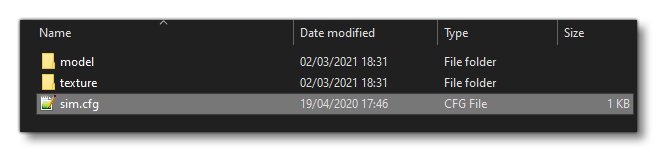
Note that the model folder contains an *.xml file referencing LODs and model behaviors - as described in the corresponding section here: <Behaviors> - and may also contain animation data (explained here: Model Animation Definitions). Like other SimObjects you may also include additional model and texture folders to create different variations that can then be used in the world.
The pages linked below outline the general requirements for the main configuration file used by all boat SimObjects:
Sim.cfg
While boats are meant to go on water, they do share most of the same characteristics that Ground Vehicles have, and should be configured similarly. However, there are a couple of unique parameters in the [DesignSpecs] section that will need to be given a value:
Additionally, you may want to configure the wake of the boat object using the [Effects] section and this parameter:
However this method is considered deprecated and you may prefer to configure and assign some Visual Effects instead.
Finally, if the boat SimObject is to be used as an aircraft carrier then you should include the [Carrier] section and fill in the following parameters:
Adding Helipads To Boat Objects
If your boat / ship is large enough to have a helipad, for example a cruise ship or large cargo supply ship. To be able to add the helipad, the boat SimObject will first need to have an "Airport" folder added, along with the appropriate airport XML file. This file should only contain a helipad definition, for example:
<?xml version="1.0"?>
<FSData version="9.0">
    <Airport groupID="1" groupGenerated="FALSE" country="United States" name="Cargo Supply Pad" ident="PSUP" lat="26.080171999975" lon="-94.746390000000" alt="72.945445853285" magvar="5.18725" trafficScalar="0.7" airportTestRadius="2000" applyFlatten="FALSE" isOnTIN="FALSE" tinColorCorrection="TRUE">
        <Helipad parentGroupID="1" type="NONE" lat="26.0801715" lon="265.25332" alt="65" heading="90" length="13.0091" width="13.1887" surface="CEMENT" closed="FALSE" transparent="TRUE" apronControlIndex="1"/>
        <Start type="HELIPAD" number="1" designator="NONE" lat="26.0801715" lon="265.25332" alt="65" heading="90"/>
        <Aprons/>
        <PaintedElements/>
        <ApronEdgeLights/>
    </Airport>
</FSData>
The airport "ident" value given in the XML should also be used to name the XML file, for example PSUP.xml, and it must be 4 characters long, unique, and not exist in the world (essentially it is an ICAO prefix and will have numbers added to it to create a full 8 character ICAO, for example: PSUP0001). The file should then be placed in a folder called "airport", beside the other folders for the SimObject (for modular SimObjects, this would be in either the Common or the Presets folder):
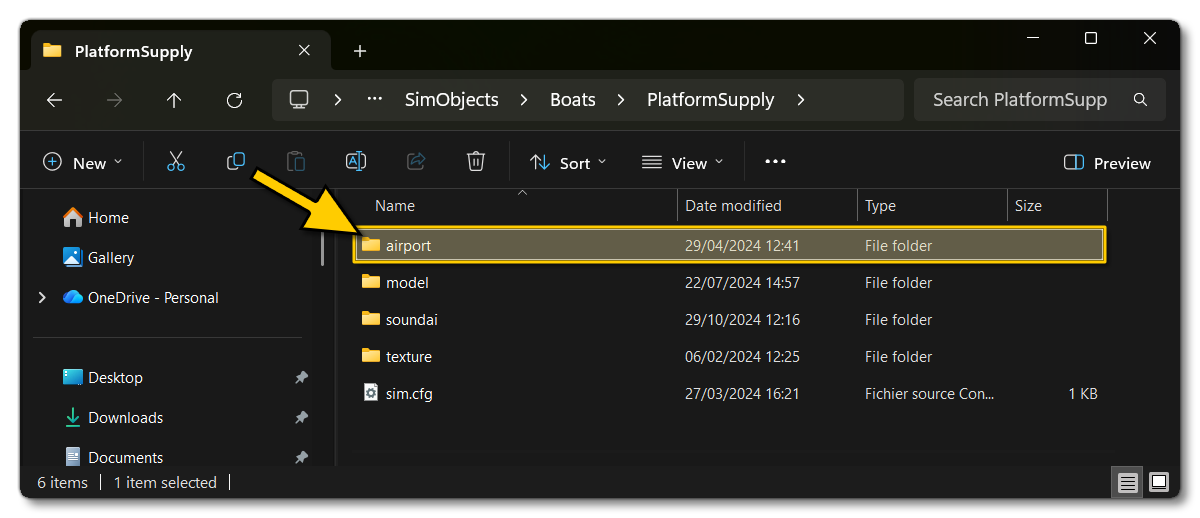
This file now needs to be referenced in the boat sim.cfg file using the AttachedAirport parameter, as follows:
[General]
AttachedAirport=PSUP.mbgl
Note that the file is referenced as an *.mbgl, not as an *.xml. This is because the airport XML will be compiled into an *.mbgl file and so needs to be referenced as such. The CFG file should also include the HasMovingPlatform paramater set to 1 (True), so that any landed helicopter will move along with the boat.