PASSENGER TRANSPORT
For your airport to be able to use the built-in passenger transportation systems, it will require an adequate setup. The information on this page can be used to create the correct set of objects and files such that passengers will be able to move around the airport on busses and use boarding ramps, and ensure that the various airport support vehicles are available and correctly positioned for use.
For more information on the various built in airport services, please see here:
Setting Up An Airport For Passengers
To benefit from the passenger service at an airport, the airport will require an Apron Control unit. This can be added from the Scenery Editor, using the Apron Control setting for the airport object. Having set this up, you need to assign this apron control unit to every single taxiway parking object (in the Apron Control section), and also set up an appropriate Passenger Access Type for aircraft that use the stand (make sure that buses - and ramps for larger aircraft - have been made available if there is no jetway).
NOTE: Currently this kind of passenger service is only available for taxiway parking that allows a ramp or a jetway, and currently only the following Type can use the ramp: RAMP_GA_LARGE, RAMP_GA_EXTRA, RAMP_GA_MEDIUM, RAMP_GA, GATE_SMALL, GATE_MEDIUM, GATE_HEAVY, GATE_EXTRA and RAMP_CARGO.
The next thing you will need to set up for the airport are the TaxiwayServiceStand Objects. These will be setup slightly differently depending on whether they are for buses or for ramps, but you will need both:
IMPORTANT! Every single one of the taxiway service stand objects mentioned in the sections below will need to have the Apron Control Unit that was created on the Airport object assigned to them in the Apron Control section of their properties.
-
For Buses
For buses, you will need to add service stands that form a logical hierarchy where:
-
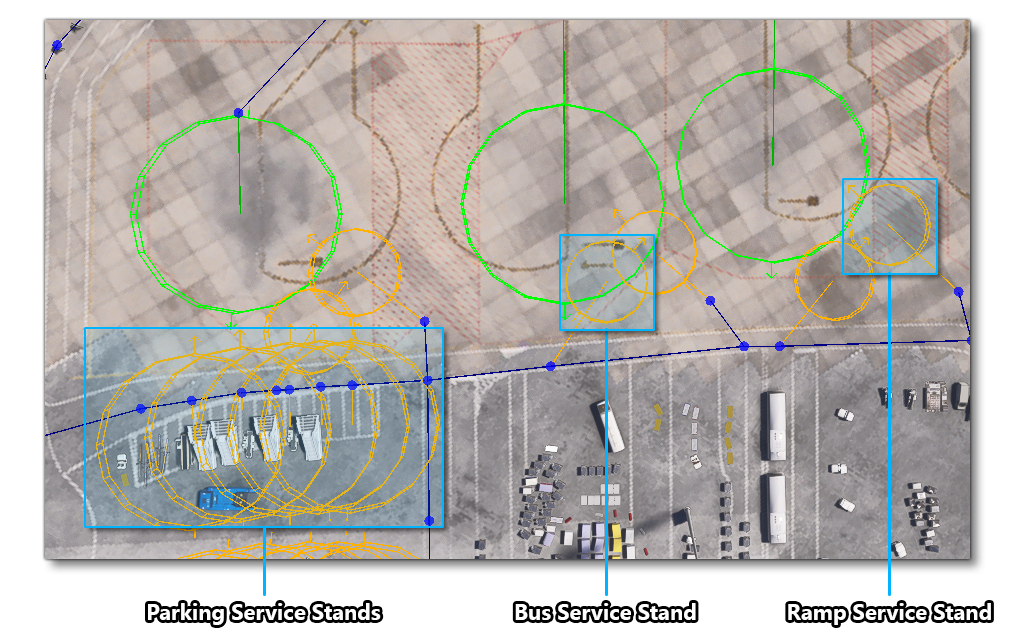
A stand needs to be added by the airport building, which is where the buses will be spawned when the airport is first instantiated, and this needs to have the Stand Type set to "
BUS", and the Stand Role set to "PARKING". Parking stands can service multiple gates. -
Stands need to be added for each of the gates so passengers can be picked up to be delivered to the aircraft. These stands need to have the Stand Type set to "
BUS", and the Stand Role set to "GATE". These stands will additionally need the name of the Gate they are servicing (this is the Name of the taxiway parking spot). Gate stands can service multiple aircraft. -
For each gate stand, you can then add stands beside the aircraft parking spots. These stands need to have the Stand Type "
BUS" and the Stand Role set to "PLANE". Additionally they will need not only the Name of the taxiway parking spot but the Number and the Suffix as well, since a single gate stand can service multiple aircraft stands.
-
-
For Ramps
For ramps the setup is a little simpler than for buses, and the hierarchy is as follows:
-
A stand needs to be added somewhere on the airport apron, close to the aircraft parking spots that will require the ramp. This is where the ramps will be spawned when the airport is first instantiated, and these stands need to have the Stand Type set to "
RAMP", and the Stand Role set to "PARKING". Parking stands can service multiple aircraft. - For each aircraft parking spot, you can then add stands with the Stand Type "
RAMP" and the Stand Role set to "PLANE". Additionally they will need to not only reference the Name of the taxiway parking spot, but the Number and the Suffix as well, since a single ramp parking stand can service multiple aircraft stands.
-
Around the airport itself, you will need to have added various TaxiwayPath Objects of the "VEHICLE", since both the ramps and the buses will follow these paths to move around the airport. Each of the taxiway service stand objects will need to be connected to the vehicle paths using another TaxiwayPath Object, but this time of the "SERVICESTAND". The image below is from Bilbao (LEBB) and shows the basic setup:
The last thing you'll need to do is set up the relevant navigation_graph.cfg files for the airport. These are setup using The Navigation Graph Editor (opened from the View menu of The Scenery Editor), and will need some very specific nodes so that the simulation can generate and move passengers correctly. The files fall into two categories:
-
Gate Graphs
This file is used to spawn the passengers and then move them to the gate. Since you may need a number of these files, and since the navigation graph files for airports are all compiled together, you should ensure that the files all have unique names that follow exactly this naming convention:
navigation_graph_[ICAO]_gate_[ParkingName].cfg
This navigation graph requires starting nodes with the tag "
GATE_SEAT", which should be placed around the seating/waiting area of the airport. The graph will then need and at least one other node placed at the point where the gate exits the airport to the exterior, and this node should have the tag "GATE_TO_STAND_[Name]_[Number]_[Suffix]" where the Name, Number and Suffix parts match that of the taxiway parking object of the aircraft they will be going to. Note though, that if the name isGATE_[letter]then only the letter needs to be used. Here are a few examples of tag structure:GATE_TO_STAND_PARKING_13_NONE GATE_TO_STAND_B_4_Y GATE_TO_STAND_DOCK_1_A
-
Gate-to-Stand Graphs
This file is used to move the passengers from the airport gate exit to the services stand to board either a bus or the ramp to the aircraft, or to the start of the jetway entrance. As with the gate graphs, the CFG files should have unique names that follow exactly this naming convention:
navigation_graph_[ICAO]_gateToStand_[ParkingName]_[ParkingNumber]_[ParkingSuffix].cfg
When creating the graph, the first node requires the tag "
GATE_TO_STAND_[Name]_[Number]_[Suffix]", which is formatted exactly the same as the final node of the gate navigation graph (see above). This ensures that the two graphs will link correctly in the simulation. The last node on this graph also requires a unique tag and position depending on where that destination is:-
For boarding a jetway - the graph should go to the jetway entrance, and the last node should have the tag "
JETWAY_WAITING_SPOT". -
For boarding a bus - the graph should go to a spot where you want passengers to wait for the bus, and the last node should have the tag "
BUS_WAITING_SPOT". -
For boarding a ramp - the graph should go to a spot where you want passengers to board the ramp, and the last node should have the tag "
RAMP_WAITING_SPOT".
-
NOTE: In some cases you may only need a single node on the graph, for example, if passengers are being picked up by a bus directly outside the gate exit from the main airport building. In these cases the node should have BOTH the start and the end tags required for the service.
Related Topics