engines.cfg - ADDITIONAL INFORMATION
This page contains various notes related to some of the functionality derived from the engines.cfg sections and parameters.
Note On Time Constants And Tuning Constants
When setting up the engines.cfg, regardless of the engine type, you will be using some general parameters which will be affected by time constants (suffixed with _tc) and tuning constants (suffixed with _tuning_constant). These parameters are used to perform integrations by the simulation to compute time dependent values, typically taking the form of:
$$ value(t+dt)=value(t)+(target\_value \times tuning\_constant - value(t))\times dt \times \textrm{tc} $$
Where:
- \(dt\) is the time step that is given by the simulation for each frame (delta time).
- \(target\_value\) is the value calculated using the current simulation conditions.
In these integrations, the tuning constant acts as a multiplier on the \(target\_value\) thus increasing the final value. This is essentially the same effect as increasing the target value given in whichever parameter or table dictates the \(target\_value\).
The time constant, however, has a very different effect. It does not modify the final value, but instead it controls the rate at which the value will be evaluated towards the \(target\_value\).
Notes On Emergency Boost
The emergency boost system will work in two "modes" depending on whether the emergency_boost_mp_damage parameter has been set to anything other than 0 or not. When set to 0, boost calculations will be done using the legacy FSX time counter:
- for water and methanol-water injection: \(Elapsed\_time = Elapsed\_time + (deltaT \times \frac{current_rpm}{max_rated_rpm})\)
- for WEP: \(Elapsed\_time = Elapsed\_time + deltaT\)
NOTE: deltaT here is the "Delta Time" value, which is the time that has elapsed between the last simulation frame and the current simulation frame. See here for a more in-depth explanation.
When setting emergency_boost_mp_damage to a value that is greater than 0, it will enable the Microsoft Flight Simulator 2024 time counter which works like this for methanol-water injection, water injection, and WEP: \(Elapsed\_time = Elapsed\_time + (deltaT \times \frac{current_manifold_pressure}{emergency_boost_mp_damage})\)
Considering that a manifold pressure above the damage threshold will accelerate the counter, one should take into account the desired upper limit for manifold pressure when setting the max_emergency_boost_time.
As an example: let's consider an aircraft where going above 61inHg of manifold pressure will start damaging the engine and emergency boost can allow for a maximum of 67inHg. If one wants to be able to spend 315 seconds at 67inHg then max_emergency_boost_time should be set to:
max_emergency_boost_time = 315 * (67/61) = 315 * 1.098 = 346To get the current elapsed time since the emergency boost has been activated, you can use the SimVar RECIP_ENG_EMERGENCY_BOOST_ELAPSED_TIME.
Notes On Supercharger
In legacy FSX, the supercharger - activated using the supercharged parameter - used a calculation that was actually lacking an essential parameter:
$$\textrm{boost} = (supercharger\_boost\_high\_end - supercharger\_boost\_low\_end) \times Throttle\_Position$$
In this formula, the supercharger_boost_low_end parameter is not used at all. In Microsoft Flight Simulator 2024 this has been rectified and you can enable the use of the correct formula by enabling the new_supercharged parameter in the engines.cfg file, using one of the following values:
- 1: This will make the simulation use a fixed formula to calculate the supercharger boost using the existing legacy supercharger parameters
supercharger_boost_high_endandsupercharger_boost_low_end. Boost will then be calculated using the following formula:
$$\textrm{boost} = (supercharger\_boost\_high\_end - supercharger\_boost\_low\_end) \times Throttle\_Position + supercharger\_boost\_low\_end$$
- 2: This will permit the simulation to have multi speed support for the supercharger using the following parameters:
supercharger_altitude_gear.N,supercharger_boost_high_end_gear.N,supercharger_boost_low_end_gear.N. This system will allow for a maximum of 5 gears. As an example, if a two speed supercharger is needed then the CFG parameters would have this structure:
When using the multi-speed supercharger you can monitor which gear is engaged by monitoring the SimVarsupercharger_altitude_gear.1 = [VALUE] supercharger_boost_high_end_gear.1 = [VALUE] supercharger_boost_low_end_gear.1 = [VALUE] supercharger_altitude_gear.2 = [VALUE] supercharger_boost_high_end_gear.2 = [VALUE] supercharger_boost_low_end_gear.2 = [VALUE]RECIP_ENG_SUPERCHARGER_ACTIVE_GEAR. The supercharger system will continuously check if the current Pressure Altitude is superior or equal to the altitude at which each gear should engage in order to automatically switch between the gears. If an altitude is set as -1.0 the gear is considered inactive and the engaging altitude for this gear will not be checked thus preventing the switch to this particular gear (which is why default altitude value is -1.0). When a gear is engaged the boost values corresponding to this gear will be used in the following calculation of boost:
$$\textrm{boost} = (supercharger\_current\_gear\_boost\_high\_end - supercharger\_current\_gear\_boost\_low\_end) \times Throttle\_Position + supercharger\_current\_gear\_boost\_low\_end$$
IMPORTANT! When using the "new_supercharged" param, the legacy "supercharged" parameter must be either set to 0 or removed from the CFG file.
Note On Autofeathering
If your aircraft is to support auto-feathering, then it is worth knowing the following information to enable you to set it up and use it correctly:
- You must have created a dedicated electrical
CIRCUIT_AUTO_FEATHER. - You will need to set up the
min_n1_for_autofeather_armedparameter as this will be used to arm autofeathering (if the N1 goes above this value, it will be armed). - You will need to set up the
max_n1_for_autofeather_actuatedvalue, which is used to unfeather the propeller when the N1 goes above this value.
NOTE: Currently you will need to use the aliasmax_pct_torque_for_autofeather_actuatedsince there is a bug in the code.
Once those have been setup, in the simulation the SimVars CIRCUIT AUTO FEATHER ON and PANEL AUTO FEATHER SWITCH will need to be set to 1.
Note On Propeller Pitch And Throttle
The parameter min_flight_beta_throttle_pos enables the propeller pitch control algorithm in the BETA-range of throttle (power lever), while simultaneously defining a throttle position that forces the propeller to the minimum flight pitch, specified by the beta_min parameter. The way this works is that the min_flight_beta_throttle_pos value essentially divides the entire range of travel of the throttle into two ranges:
- the normal position (ie: when the throttle position is greater than the
min_flight_beta_throttle_pos), in which the propeller pitch is controlled by the governor, in accordance with the prop speed set by the throttle - the beta position (ie: when the throttle position is less than or equal to the
min_flight_beta_throttle_pos), in which the throttle position sets the the propeller pitch using the following guidelines:- When the throttle is at
min_flight_beta_throttle_pos, the propeller pitch is atbeta_min. - When the propeller is between
min_flight_beta_throttle_posand 0, the propeller pitch is interpolated betweenbeta_minandminimum_on_ground_beta. - When the throttle is at 0, the propeller pitch is at
minimum_on_ground_beta. - When the throttle is less than 0 and greater than or equal to the
min_throttle_limitthen the propeller pitch is atminimum_reverse_beta.
- When the throttle is at
NOTE: Set tp_high_idle_throttle_pos to the min_flight_beta_throttle_pos if you want a turboprop engine to idle in the range of throttle positions between 0 and tp_high_idle_throttle_pos.
When min_flight_beta_throttle_pos is greater than 0 it will additionally have the following effect on the simulation:
- If the throttle is in the thrust reverse range (ie, the throttle position is less than 0) and
prop_reverse_availableis enabled, then the minimum propeller pitch limitation no longer depends on the throttle position (this is the same as for Microsoft Flight Simulator 2020 aircraft). Thus, if a pilot sharply moves the throttle from the reverse position to position 0 and above, then the propeller blades will no longer exit the reverse mode instantly, but will increase pitch at a limited speed. - When the following conditions are met:
- the throttle is greater than 0 and:
prop_reverse_availableis enabled and:- one or more landing gear is touching the ground and:
- the ground type is not water:
minimum_on_ground_beta. Thus, it becomes possible to control the propeller pitch in the BETA-range, regardless of the interaction of the aircraft landing gear with the ground.
Note On Propeller Pitch Angle
The rate of change for the propeller pitch angle is calculated as follows:
$$\textrm(Rate) = NominalRate \times Ratio$$
Where:
- \(NominalRate\) is specified by
governor_prop_pitch_rate,feathering_prop_pitch_rate,beta_range_prop_pitch_rate, orbeta_forced_prop_pitch_rate, depending on the current propeller mode (beta range, governing range, feathering, etc...).
- \(Ratio\) is defined as:
- 0 when oil pressure is less than the
prop_pitch_control_min_oil_pressure. - 1 when oil pressure is greater than the
prop_pitch_control_nominal_oil_pressure. - \(Ratio = \frac{oil\_pressure - prop\_pitch\_control\_min\_oil\_pressure}{prop\_pitch\_control\_nominal\_oil\_pressure - prop\_pitch\_control\_min\_oil\_pressure}\) when oil pressure is between the minimum and nominal values.
- if
prop_pitch_control_min_oil_pressureis equal to theprop_pitch_control_nominal_oil_pressurethen \(Ratio\) will be 0 when the oil pressure is below this value, and \(Ratio\) will be 1 when the oil pressure is equal to or above this value.
- 0 when oil pressure is less than the
Note that if the prop_pitch_control_min_oil_pressure and prop_pitch_control_nominal_oil_pressure parameters are not specified - and thus the default values are used - the propeller pitch control behaves as before, with zero nominal oil pressure assumed sufficient for full operation.
Note On Propeller RPM Limiter
The automatic propeller RPM limiter is designed for piston engine aircraft with a constant speed propeller and turboprop aircraft. It's purpose is to prevent dangerous overspeeding of the propeller beyond its maximum allowed RPM. Such overspeeding typically occurs when the propeller enters a "windmilling" mode, where the propeller spins faster than expected driven by the energy of the incoming airflow during flight, takeoff, or landing. This mainly happens when there is an unfavorable combination of too low a blade pitch angle (propeller in a fine pitch, beta range, or reverse mode) and higher than average engine torque (excess power on the shaft).
The limiter is implemented as two different types over 5 parameters, and they can be used independently or together (although it's more likely you'll use one or the other):
- Propeller pitch angle governor (for aircraft with a constant speed propeller) - Increases blade pitch to absorb more torque by increasing the blade aerodynamic drag, thus reducing the propeller overspeed. Controlling parameters are:
prop_rpm_limiter_pitch_governor_max_rpmandprop_rpm_limiter_pitch_governor_pid. - Engine fuel flow governor (for turboprop engines only) – Reduces the fuel supply to the engine, thus lowering torque on the propeller shaft. Controlling parameters are
prop_rpm_limiter_ff_governor_max_rpm,prop_rpm_limiter_ff_governor_pid, andprop_rpm_limiter_ff_governor_active_below_throttle_pos.
It should be noted that there is also a dedicated debug tool which has been developed to make tuning of both limiter types easier, clearer, and more effective. This window can be found by opening the Engines debug window, and then selecting Propeller RPM Limiter Analysis.
IMPORTANT: For proper initialization and operation of each limiter type, the following conditions must be met:
- The RPM limit value must be greater than zero
- At least one of the PID controller coefficients P or I must be greater than zero.
The limiter will not be initialized and will have no effect on the propeller if these conditions are not met.
Note On Propeller Rotation Direction
The propeller rotation direction will depend on how you have set up the model materials, and how you have set up the available parameters. The following table shows the relationship between the model material used, and the available parameters:
| Legacy propeller physics | Modern propeller physics | |
|---|---|---|
| Standard material | The rotation parameter determines both visual and physical direction. | The rotation parameter determines the visual direction, and the prop_mod_reverse_left, prop_mod_reverse_right, and prop_mod_reverse_centre, parameters determine the physical direction. |
| Propeller material | The rotation parameter determines the physical direction, while the Node Z axis determines the visual direction. | The Node Z axis determines the visual direction, and the prop_mod_reverse_left, prop_mod_reverse_right, and prop_mod_reverse_centre, parameters determine the physical direction. |
In the above table, "legacy" propeller physics is when prop_mod_use_modern is set to false or prop_mod_version is <1. "modern" physics is when prop_mod_use_modern is set to true or prop_mod_version is >= 2.
Note On The Fuel Flow PID
The functioning of the fuel flow PID (defined using the fuel_flow_controller_p, fuel_flow_controller_p, fuel_flow_controller_p, fuel_flow_controller_iboundary, and fuel_flow_controller_dboundary, parameters) will vary depending on a few factors, which we'll outline below:
- For jet engines, the PID works different based on the
use_commanded_Ne_table: - See the Note On Computing Commanded Ne for more information.
- For turboprop or helo-turbine engines, the fuel flow PID controller regulates corrected N1, driving it toward commanded Ne.
For more information on PID functionality, please see here: PID Parameters
Note On Computing Commanded Ne
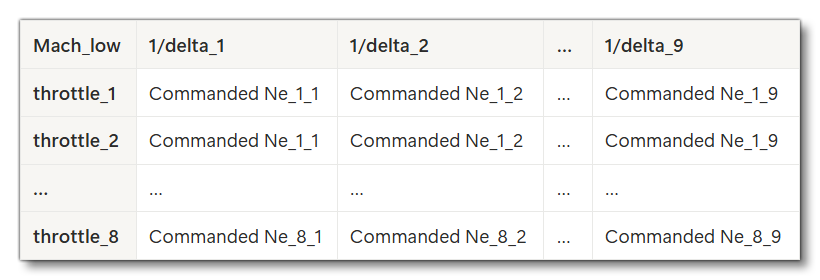
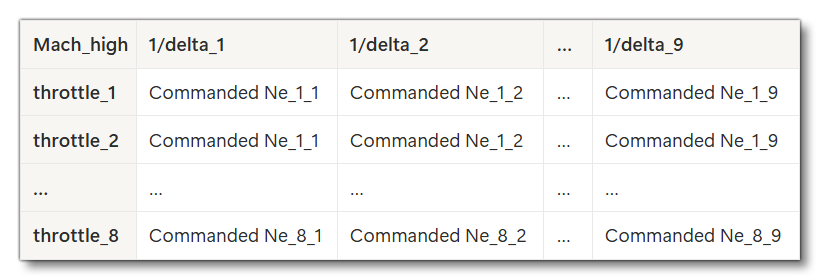
The mach_0_corrected_commanded_ne_table and mach_hi_corrected_commanded_ne_table tables are only used when the use_commanded_Ne_table is set to 1 (TRUE). In that case they should be filled in where:
- The top row of the table is the low/high Mach value in column 1, followed by the inverted pressure ratio \(\frac{1}{delta}\) values in ascending order (and therefore in ascending pressure altitude) in all subsequent columns.
- All other rows of the table have the Effective Throttle position in the first column, followed by the Commanded Ne values corresponding to the inverted pressure ratio (1/delta) values in the 1st row of the table.
The following images show a schematic of how those tables would look if added into a spreadsheet:
When using these tables, the commanded Ne is computed in three steps:
- First, we obtain the commanded Ne for inlet Mach = Mach_low from the first table (
mach_0_corrected_commanded_ne_table) for the given Effective Throttle position and pressure altitude (using the inverted pressure ratio (\(\frac{1}{delta}\)) value). - Next, we obtain the commanded Ne for inlet Mach = Mach_high from the second table (
mach_hi_corrected_commanded_ne_table) for the given Effective Throttle position and pressure altitude (using the inverted pressure ratio (\(\frac{1}{delta}\)) value). - Finally, we compute the commanded Ne for the target Inlet Mach as a linear interpolation between the values found for Low Mach and High Mach. If the target Inlet Mach is outside this range, the value is linearly extrapolated (for more information on Inlet Mach, please see the Note On Inlet Parameter Calculations).
It is worth noting the following when using these tables:
- As with any 2D table, the data must be arranged such that the inverted pressure ratio (\(\frac{1}{delta}\)) values in the first row and the Effective Throttle position values in the first column are in ascending order. This is why the inverted delta is used, as it increases with altitude.
- Because interpolation within each table is performed independently, the inverted pressure ratio (\(\frac{1}{delta}\)) and Effective Throttle position breakpoints in the first table do not have to match those in the second table.
- Low Mach and High Mach may be arbitrary but must not be equal.
- Please avoid cases where the interpolation results from the first and second tables are equal for the same throttle position and pressure altitude. In such cases, the engine may incorrectly switch to idle.
- Extrapolation beyond the table limits is not performed, so you should expand the table boundaries sufficiently to prevent Effective Throttle position and pressure altitude from exceeding the defined ranges.
Effective Throttle
In many places in the simulation calculations, the effective throttle is used over the actual throttle position. This is an internal parameter that is calculated as follows:
- If user throttle input ≥ 0 then it's: \(min(\frac{throttle}{AB\_threshold}, max\_limit) \times life\_factor\)
- If user throttle input < 0 then it's: \(\throttle_input \times reverse\_factor \times life\_factor\)
Where:
- \(throttle\_input\) - This is the user-defined throttle lever position input.
- \(throttle\) - This represents either the user input (\(throttle\_input\)) or the autopilot-commanded throttle value (when the autopilot is active).
- \(AB\_threshold\) - a unitless scalar that depends on afterburner availability, defined using the following table:
Condition AB_threshold afterburner_available= 0 OR1 afterburner_available> 0 ANDafterburner_throttle_threshold> 0 AND - \(max\_limit\) - a unitless limit that depends on afterburner availability, defined using the following table:
Condition max_limit afterburner_available= 0 ORThere is no limit afterburner_available> 0 ANDafterburner_throttle_threshold> 0 AND1 - \(reverse\_factor\) - a unitless scalar that depends on the engine type:
- Jet = 1.6
- Turboprop = 1.5
- Helo-turbine = 0
- \(life\_factor\) - a unitless coefficient that depends on engine damage, from 0 (fully damaged) to 1 (no damage).
Note On Inlet Parameter Calculations
This section details the internal parameters and equations used for jet / turboprop / helo-turbine engines using the Inlet Mach number, so that you can better understand how the simulation works and tweak your engines.cfg file parameters accordingly.
This Inlet Mach number number is either the current Mach value, or the inlet Mach limit, which is found based on the following parameters:
- If
supersonic_inletis 1 (TRUE), then the inlet Mach limit will be the value set for thesupersonic_inlet_design_mach. - If
supersonic_inletis 0 (FALSE) and thevariable_inletis 0 (FALSE), then the inlet Mach limit will be 1. - If
supersonic_inletis 0 (FALSE) and thevariable_inletis 1 (TRUE), then the inlet Mach limit will be 0.5.
Such that:
$$\texttrm{Inlet_Mach} = min(Mach, Inlet\_Mach\_limit)$$
This Inlet Mach number is used in the following calculations for Jet (turbofan), Turboprop and Helo-turbine (turboshaft) engines:
- When calculating the total temperature ratio (θ Total) and total pressure ratio (δ Total).
- As an limit on the
n2_and_mach_to_epr_table. - For enforcing a lower limit of target EPR ≥ 1.0 when Inlet Mach < 0.05.
And additionally, the Inlet Mach number is used in these calculations only in Jet engines:
- As an input for interpolating or extrapolating Commanded Ne between the outputs of two tables:
mach_0_corrected_commanded_ne_tableandmach_hi_corrected_commanded_ne_table. - As an input to the
n2_to_n1_tablefor calculating target corrected N1 and the value exposed via the SimVarTURB ENG COMMANDED N1. -
For computing a correction to target corrected N1 and to the value exposed via the SimVar
TURB ENG COMMANDED N1, using themach_influence_on_n1parameter, whenuse_n2_to_n1_tableis 0 (FALSE):\(\textrm{final_value} = initial\_value + correction\)
\(\textrm{correction} = max(0, mach\_influence\_on\_n1 \times inlet\_Mach)\)
- As an input to the
corrected_airflow_tablewhensupersonic_ram_dragis 0 (FALSE).
θ Total
The total temperature ratio (θ total) is used internally and calculated as:
- \(θ = frac{OAT}{To}\)
- \(θ_total = θ \times (1 + 0.2 \times inlet\_Mach^2)\)
Where:
- \(θ\) is the temperature ratio (unitless).
- \(OAT\) is the outside ambient air temperature (Rankine).
- \(To\) is the standard air temperature at mean sea level (MSL) according to the International Standard Atmosphere (ISA): 518.67 Rankine (15 °C)
This total temperature ratio (θ_total) is used in the following calculations:
- \(N1 = N1\_corrected \times \sqrt{θ\_total}\)
- \(N2 = N2\_corrected \times \sqrt{θ\_total}\)
- \(ITT = ITT\_corrected \times θ\_total\)
- \(EGT = EGT\_corrected \times θ\_total\)
Note that in ram drag calculations, the total temperature ratio for determining airflow is computed using the aircraft Mach number rather than the inlet Mach number:
- \(θ\_total = θ\_total = θ \times (1 + 0.2 \times Mach^2)\)
- \(airflow = \frac{airflow\_corrected \times δ\_total}{\sqrt{θ\_total}}\)
- \(ram\_drag = \frac{TAS * airflow}{g}\)
Where:
- \(Mach\) is the aircraft (not inlet) Mach number.
- \(airflow\) / \(airflow\_corrected\) is the airflow through the engine (lbs per second).
- \(TAS\) is the true air speed (ft per second).
- \(g\) is the standard acceleration due to gravity (~32.174 ft/sec^2 / 9.80665 m/sec^2)
- \(δ\_total\) is the total pressure ratio (unitless).
δ Total
The total pressure ratio (δ total) is used internally and calculated as:
- \(δ = \frac{P}{Po}\)
- \(δ\_total = max(0.05, δ) \times (1 + 0.2 \times M^2)^3.5 \times inlet\_efficiency \times Mach\_losses\)
Where:
- \(δ\) is the Pressure ratio, [unitless]
- \(P\) is the Ambient static air pressure, in the same units as **Po**
- \(Po\) is the Standard air pressure at mean sea level (MSL) according to the International Standard Atmosphere (ISA): 1013.25 mBar (760 mmHg, ~29.92 inHg, ~ 2116.2 psf)
- \(M\) is defined as:
- the aircraft Mach number when
supersonic_inletis 1 (TRUE). - the inlet Mach number when
supersonic_inletis 0 (FALSE).
- the aircraft Mach number when
- \(inlet\_efficiency\) is a unitless correction coefficient computed based on engine inlet configuration parameters and
- \(aircraft\) is the Mach number:
Condition inlet_efficiency supersonic_inlet= 0 (FALSE)1 supersonic_inlet= 1 (TRUE)Interpolated using supersonic_inlet_efficiency_correction_table, with aircraft Mach as input - \(Mach\_losses\) is a unitless correction coefficient computed based on engine inlet configuration parameters and aircraft Mach number:
Condition Mach_losses supersonic_inlet= 0 (FALSE)
OR Mach < 11 supersonic_inlet= 1 (TRUE)
AND Mach > 5
ANDsupersonic_inlet_hypersonic= 1 (TRUE)(-0.0084 * Mach^2 - 0.0028 * Mach + 0.9031) / 0.89 Otherwise, meaning:
supersonic_inlet= 1 (TRUE)
AND Mach ≥ 1
AND (Mach ≤ 5 ORsupersonic_inlet_hypersonic= 0 (FALSE))1 - 0.075 * (Mach - 1)^1.35
Note that due to the lower bound constraint of δ ≥ 0.05, δ total becomes independent of altitude at pressure altitudes exceeding approximately 67450ft (20559 m).
The total pressure ratio (δ_total) is used in the following calculations:
- \(gross\_thrust = gross\_thrust\_corrected * δ\_total\)
- \(airflow = \frac{airflow\_corrected * δ\_total}{\sqrt(θ\_total)}\)
- \(ram\_drag = frac{TAS * airflow}{g}\)
Where:
- \(airflow\) / \(airflow\_corrected\) is the airflow through the engine (lbs per second).
- \(TAS\) is the true air speed (ft per second).
- \(g\) is the standard acceleration due to gravity (~32.174 ft/sec^2 / 9.80665 m/sec^2)
Note On Ram Drag
Ram drag is the drag generated by the air that a turbine engine ingests to produce thrust. Essentially, all the air entering the engine inlet generates drag and that drag is calculated through the following formula:
$$D_{ram}=\frac{dm_0}{dt} \times V_0$$
Where:
- \(\frac{dm_0}{dt}\) is the mass flow (kg/s or lb/s).
- \(V_0\) is the speed of the incoming airflow (or mass flow). Note that "airflow" is an interpolation of the parameter
corrected_airflow_tablemultiplied by the parameterinlet_area, both of which can be set inengines.cfg.
Because we need to be able to tune this ram drag effect we are simulating this formula like this:
$$D_{ram} = \frac{a(\rho,P) \times Ma_{inlet} \times airflow}{g}$$
Where:
- \(a(\rho,P)\) is the speed of sound in the current flight conditions
- \(Ma_{inlet}\) is the Inlet Mach number
- \(airflow\) is a term dependent on the inlet design and computed through interpolation and correction using δ Total and \(g\) the gravity constant of Earth.
- the product \(a \times Ma_{inlet}\) gives the previously stated \(V_0\).
By default the simulation will compute the ram drag for a turbine engine using a maximum mach value of 1. However if you wish to add supersonic (even hypersonic) planes to the simulator then this will have the consequence of creating an inferior airflow speed leading to less drag than there should be. To correct this issue, the parameter supersonic_ram_drag should be set to 1 (true) in the [TURBINEENGINEDATA] section of the CFG file for the aircraft. Setting it to 1 will allow for the simulation to use the flight Mach number instead of the inlet Mach number thus removing the default Mach 1 limit.
Note On Corrected Values
The various parameters that use corrected values have their calculations based on the following paper:
- GAS TURBINE PARAMETER CORRECTIONS, by Allan J. Volponi
- January 2020
- DOI: 10.1007/978-3-030-41076-6
- ISBN: 978-3-030-41075-9