PACKAGE TOOL XML PROPERTIES
The <project_name>.xml file should be formatted as follows:
<?xml version="1.0" encoding="utf-8"?>
<AssetPackage Version="0.1.0">
    <PackageOrderHint>
        <!-- HINT HERE -->
    </PackageOrderHint>
    <ItemSettings>
        <!-- GENERAL ITEM DATA HERE -->
    </ItemSettings>
    <Flags>
        <!-- ITEM FLAGS HERE -->
    </Flags>
    <Dependencies>
        <!-- DEPENDENCIES HERE -->
    </Dependencies>
    <AssetGroups>
        <AssetGroup [Attributes]>
            <!-- ASSET GROUP DETAILS HERE -->
        </AssetGroup>
        <!-- FURTHER ASSET GROUP ELEMENTS HERE -->
    </AssetGroups>
    <GloballyOverridenBaseSimFiles>
        <!-- OVERRIDES HERE -->
    </GloballyOverridenBaseSimFiles>
</AssetPackage>
Within the <AssetPackage> element you would define some of the meta data related to the entire package, and then have one or more opening and closing <AssetGroup> elements for the different types of assets that comprise the package.IMPORTANT! The XML format for the Package Tool is constantly evolving as new features and elements are added to the DevMode tools. As such this documentation is a constant work-in-progress.
This document is here for reference only and you should not be creating package XML yourself, but should instead be using The Project Editor to create projects, packages and asset groups, as that will always generate correct XML.
The contents of the main <AssetPackage> container are listed below.
<PackageOrderHint>
This is used to give the package order hint which is used by the VFS to place the package in the correct place in the load order. This element simply takes a string which can be any one of those listed in the table below, for example:
<PackageOrderHint>CUSTOM_NAVDATA</PackageOrderHint>
The table below lists all the package order hints, but note that only those flagged for 3rd parties should be used. The others are provided for reference only.
| Hint | Description | 3rd Parties |
|---|---|---|
BESPOKE_AIRPORT |
These are core simulation packages that bring changes to one or more generic airports. This cannot be used. | |
BESPOKE_AIRPORT_PATCH |
These are 3rd party packages that override changes in BESPOKE_AIRPORT packages. |
|
CUSTOM_AIRPORT |
These are 3rd party packages that override one or more generic airports or that add in new ones to the simulation. | |
CUSTOM_AIRPORT_LIFE |
These are 3rd party packages that change airport life (ie: apron services or navigation services). | |
CUSTOM_AIRPORT_PATCH |
These are 3rd party packages that override changes in CUSTOM_AIRPORT packages. |
|
CUSTOM_INSTRUMENT |
These are 3rd party packages that contain one or more cockpit instruments (altimeters, radios, flight computers, etc...). | |
CUSTOM_INSTRUMENT_PATCH |
These are 3rd party packages that override changes in CUSTOM_INSTRUMENT packages. |
|
CUSTOM_LOCAL_SCENERY |
These are 3rd party packages that contain scenery from a specific region. | |
CUSTOM_MATERIAL_LIB |
These are 3rd party packages that contain a library of different materials. | |
CUSTOM_MATERIAL_LIB_PATCH |
These are 3rd party packages that override changes in CUSTOM_MATERIAL_LIB packages. |
|
CUSTOM_MODELLIB |
These are 3rd party packages that contain models. | |
CUSTOM_MODELLIB_PATCH |
These are 3rd party packages that override models from CUSTOM_MODELLIB packages. |
|
CUSTOM_NAVDATA |
These are 3rd party packages that replace all the navigation data for the world. | |
CUSTOM_NAVDATA_PATCH |
These are 3rd party packages that override navigation data from CUSTOM_NAVDATA packages. |
|
CUSTOM_POI |
These are 3rd party packages that contain POI scenery elements. | |
CUSTOM_POI_PATCH |
These are 3rd party packages that override POI scenery elements from CUSTOM_NAVDATA packages. |
|
CUSTOM_SCENERY_PATCH |
These are 3rd party packages that override CUSTOM_WORLD_SCENERY or CUSTOM_LOCAL_SCENERY packages. |
|
CUSTOM_SIMATTACHMENT_LIB |
These are 3rd party packages that contain one or more sim-attachments for use in aircraft or elsewhere in the world. | |
CUSTOM_SIMATTACHMENT_LIB_PATCH |
These are 3rd party packages that override sim-attachment data from CUSTOM_SIMATTACHMENT_LIB packages. |
|
CUSTOM_SIMOBJECTS |
These are 3rd party packages contain one or more SimObjects. | |
CUSTOM_SIMOBJECTS_PATCH |
These are 3rd party packages that SimObject data from CUSTOM_SIMOBJECTS packages. |
|
CUSTOM_SIMPROPCONTAINER_LIB |
These are 3rd party packages that contain one or more SimProp Container objects. | |
CUSTOM_SIMPROPCONTAINER_LIB_PATCH |
These are 3rd party packages that SimProp Container data from CUSTOM_SIMPROPCONTAINER_LIB packages. |
|
CUSTOM_TEXTURELIB |
These are 3rd party packages that contain textures. | |
CUSTOM_TEXTURELIB_PATCH |
These are 3rd party packages that override textures from CUSTOM_TEXTURELIB packages. |
|
CUSTOM_VFX |
These are 3rd party packages that contain custom visual effects. | |
CUSTOM_WORLD_SCENERY |
These are 3rd party packages that contain scenery from around the world. | |
DEVICE |
These can be either core simulation packages or 3rd party packages that are related to input device configurations. | |
GENERIC_AIRPORT |
These are core simulation packages that contain all the airports of the world. | |
GENERIC_AIRPORT_PATCH |
These are 3rd party packages that override one or more airports from GENERIC_AIRPORT packages. |
|
GENERIC_COVERAGE_MAP |
These are core simulation packages that contain generic vegetation coverage maps from around the world. This cannot be used. | |
GENERIC_MODELLIB |
These are core simulation packages that contain generic models. This cannot not be used. | |
GENERIC_MODELLIB_PATCH |
These are 3rd party packages that override some models of the GENERIC_MODELLIB packages. |
|
GENERIC_NAVDATA |
These are core simulation packages that contain all the navigation data for the world (waypoints, NDB, VOR, ILS, etc...). This cannot be used. | |
GENERIC_NAVDATA_PATCH |
These are 3rd party packages that override the navigation data from GENERIC_NAVDATA package. |
|
GENERIC_SCENERY |
These are core simulation packages that contain generic scenery from around the world. This cannot be used. | |
GENERIC_SCENERY_PATCH |
These are 3rd party packages that override scenery from GENERIC_SCENERY packages. |
|
GENERIC_TEXTURELIB |
These are core simulation packages which contain generic textures used by core models. This cannot be used. | |
GENERIC_TEXTURELIB_PATCH |
These are 3rd party packages that override some textures of GENERIC_TEXTURELIB packages. |
|
INPUT |
These can be either core simulation packages or 3rd party packages that are related to input binding configurations. | |
INSTRUMENT |
These are core simulation packages that are focused on cockpit instruments, such as altimeters, radios, or flight computers. This cannot be used. | |
INSTRUMENT_PATCH |
These are 3rd party packages that override INSTRUMENT packages. |
|
INVALID |
This would be the default category for those packages with an unset category hint. This cannot be used. | |
MATERIAL_LIB |
These are core simulation packages which contain the materials used in the world and on some models. This cannot be used. | |
MATERIAL_LIB_PATCH |
These are 3rd party packages that override some materials from MATERIAL_LIB packages. |
|
MISC |
These are core simulation packages that do not match any other hint category available. This cannot be used. | |
MISSION |
These are core simulation packages that contain predefined flight scenarios, challenges, or story-driven missions. This cannot be used. | |
PANEL |
These are core simulation packages that define cockpit panel layouts, displays, and/or interactable controls. This cannot be used. | |
PANEL_PATCH |
These are 3rd party packages that override PANEL packages. |
|
POI |
These are core simulation packages that contain POI scenery elements (for example, the Eiffel tower). This cannot be used. | |
POI_PATCH |
These are 3rd party packages that override POI packages. |
|
SERVICES |
These are core simulation packages that describe airport services. | |
SIMATTACHMENT_LIB |
These are core simulation packages that define various sim-attachments such as instruments and decorations. This cannot be used. | |
SIMATTACHMENT_LIB_PATCH |
These are 3rd party packages that modify or enhance SIMATTACHMENT_LIB packages. |
|
SIMOBJECTS |
These are core simulation packages that define interactive objects in the simulation, such as aircraft or characters. This cannot be used. | |
SIMOBJECTS_PATCH |
These are 3rd party packages that modify or enhance SIMOBJECTS packages. |
|
SIMPROPCONTAINER_LIB |
These are core simulation packages that define SimProp Containers that are used in the simulation. This cannot be used. | |
SIMPROPCONTAINER_LIB_PATCH |
These are 3rd party packages that modify or enhance SIMPROPCONTAINER_LIB packages. |
|
TRAFFIC |
These are core simulation packages that define or manage AI traffic behavior. This cannot be used. | |
TRAVEL_BOOK |
These are core simulation packages that contain information needed by travel book missions. This cannot be used. | |
UI |
These are core simulation packages that include user interface elements such as menus, overlays, and HUD designs. This cannot be used. | |
UI PATCH |
These are 3rd party packages that override UI packages. |
|
VFX |
These are core simulation packages that contain visual effects such as weather effects, explosions, water splashes, or other graphical enhancements. This cannot be used. | |
WILDLIFE |
Core packages that introduce or modify wildlife models, animations, or behaviors within the world. This cannot be used. |
<ItemSettings>
This is the main container element that defines the package. It has no attributes and contains the the sub-elements listed below. For example:
<ItemSettings>
    <ContentType>LIVERY</ContentType>
    <Title>103 Solo - Livery 07</Title>
    <Manufacturer/>
    <Creator>Asobo Studio</Creator>
    <Description/>
</ItemSettings>
<ContentType>
This element is where the type of content that the package is for will be defined. It can be any one of the following:
- MISSION
- AIRCRAFT
- INSTRUMENTS
- LIVERY
- SCENERY
- MISC
<Title>
This element is for the title of the package, as shown in the Project Editor.
<Manufacturer>
This element is only required for Aircraft and is used to define the manufacturer of the aircraft.
<Creator>
With this element you can define the person or company that created the package.
<Description>
This element is used to add a description of the package.
<Flags>
This is a container element that sets some extra flags for the package when being compiled. It has no attributes and can contain the sub-elements listed below. For example:
<Flags>
    <VisibleInStore>true</VisibleInStore>
    <CanBeReferenced>true</CanBeReferenced>
</Flags>
<VisibleInStore>
This element can be either true or false. It is used to tell the compiler if the package is to be shown in the Microsoft store or not.
<CanBeReferenced>
This element can be either true or false. It is used to tell the compiler that the package can be refrenced from other packages.
<FSXCompatibility>
This element can be either true or false and is only used when the <Flags> container element is used within the <AssetGroup> element. The element is used to tell the compiler that the asset group should be compiled as legacy FSX file (see the example shown in the <AssetGroup> section below).
<Dependencies>
This element is used to set any package dependencies for the package being defined. It has no attributes and can have one or more <Dependency> sub-element.For example:
<Dependencies>
    <Dependency Version="0.1.0">
        <Name>dependency-package-name</Name>
    </Dependency>
</Dependencies>
<Dependency>
This element is used as a container for the <Name> element. You can have multiple <Dependency> elements in a package to define multiple dependencies. It has the following attribute:
| Attribute | Description | Type | Required |
|---|---|---|---|
Version |
This should always be "0.1.0". | String | Yes |
<Name>
This element has no attributes and is used to give the name of the package that the package being defined is dependent on. The package name should be given without any file extension.
<AssetGroups>
This is a container element for the different <AssetGroup> elements that are required to generate the package being defined. This element has no attributes, and you can see how it looks with all the sub-elements in this example:
<AssetGroups>
    <AssetGroup Name="ContentInfo">
        <Type>ContentInfo</Type>
        <Flags>
            <FSXCompatibility>false</FSXCompatibility>
        </Flags>
        <AssetDir>PackageDefinitions\asobo-aircraft-103solo-smallwheels-livery-07\ContentInfo</AssetDir>
        <OutputDir>ContentInfo\asobo-aircraft-103solo-smallwheels-livery-07</OutputDir>
    </AssetGroup>
    <AssetGroup Name="Asobo_103Solo_SmallWheels_Livery_07">
        <Type>SimObject</Type>
        <Flags>
            <FSXCompatibility>false</FSXCompatibility>
        </Flags>
        <AssetDir>Content\fs\SimObjects\Airplanes\Asobo_103Solo_SmallWheels_Livery_07\</AssetDir>
        <OutputDir>SimObjects\Airplanes\Asobo_103Solo_SmallWheels_Livery_07\</OutputDir>
        <Config>
            <Extras>
                <File>Readme.txt</File>
            </Extras>
        </Config>
    </AssetGroup>
</AssetGroups>
<AssetGroup>
This element is used to define a single asset group that is contained within the package. You can have multiple <AssetGroup> elements in a single package and it has the following attribute:
| Attribute | Description | Type | Required |
|---|---|---|---|
Name |
The name of the asset group. | String | Yes |
<Type>
This sub-element defines the type of asset group that is being defined. It can be any one of those listed here:
<AssetDir>
This element sets the (relative) path to the assets that are used to generate the package.
<OutputDir>
This element sets the path to the output directory where the package will be created. This is a relative path that will always be within the Packages output folder.
<Config>
This is a simple container element for the <Extras> sub-element, and has no attributes. It is a child element of <AssetGroup>.
<Extras>
This container element is used for listing any files that you may wish to include as part of the package. It is a child of the <Config> element, has no attributes, and can contain one or more <File> sub-elements.
<File>
This sub-element should be within the <Extras> element and is used to include an extra file as part of the package. The files that you can include here can be of any type, and can also be within sub-folders, however they should not be any of the "base" files used by a SimObject (as listed here: ). Essentially, this section is only for files that are not directly referenced by the simulation itself. Also note that the files/folders must be included within the package at the root level relative to the main package CFG/XML. For example:
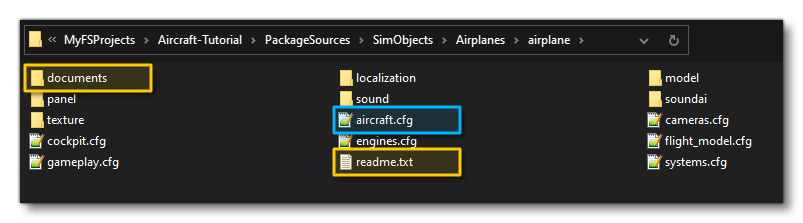
<AssetGroup Name="airplane">
    <Type>SimObject</Type>
    <Flags>
        <FSXCompatibility>false</FSXCompatibility>
    </Flags>
    <AssetDir>Assets\SimObjects\Airplanes\airplane</AssetDir>
    <OutputDir>SimObjects\Airplanes\airplane\</OutputDir>
    <Config>
        <Extras>
            <File>readme.txt</File>
            <File>Documents\licence.pdf</File>
        </Extras>
    </Config>
</AssetGroup>
<GloballyOverridenBaseSimFiles>
This is a container element for the different <GloballyOverridenBaseSimFile> elements that are used to define the different override files that the package requires. This element has no attributes, and you can see how it looks with a sub-element in this example:
<GloballyOverridenBaseSimFiles>
    <GloballyOverridenBaseSimFile>effects\fx_beacon.fx</GloballyOverridenBaseSimFile>
</GloballyOverridenBaseSimFiles>
For more information please see here:
<GloballyOverridenBaseSimFile>
This is a sub-element of <GloballyOverridenBaseSimFile> and is used to give the relative path and filename to a core simulation file that you want to override.