ASSET TYPES
This page lists the different asset types that can be created when you add a new asset group to a package in The Project Editor.
Airport
The Airport asset group is used to store the XML files that are created by the Scenery Editor along with the CFG files created by the The Navigation Graph Editor, and is specifically used for Microsoft Flight Simulator 2024 airports equipped with Apron Services. This should be selected when creating any airport packages.
BGL
The BGL asset group is used to store the XML files that are created by the Scenery Editor, or files added for navigation data etc... This should be selected when doing anything that requires editing the scenery data and that isn't covered by one of the other asset group types. Note that this can be used when creating airports, but will mean that the airport can't have Apron Services. In general this asset group is most used for creating scenery assets that are not specificaly for an airport.
CGL
Used for secondary aerials, replacing & blending aerial imagery from third parties with the aerials from MSFS 2024. You can find more information about them here:
Copy
This type of asset group requires no extra setting up, other than to have a source folder of files. All it does is simply copy the source folder into the package when the package is compiled.
Localization
This type of asset group should be used to hold all the *.loc files associated with the package. You only ever need to make this type of asset group for localizations that are NOT part of a SimObject or a Mission (as the localisation folder should be a part of those assets and not listed separately, see Localization for more information). If you need to create a localization asset group it's done as follows:
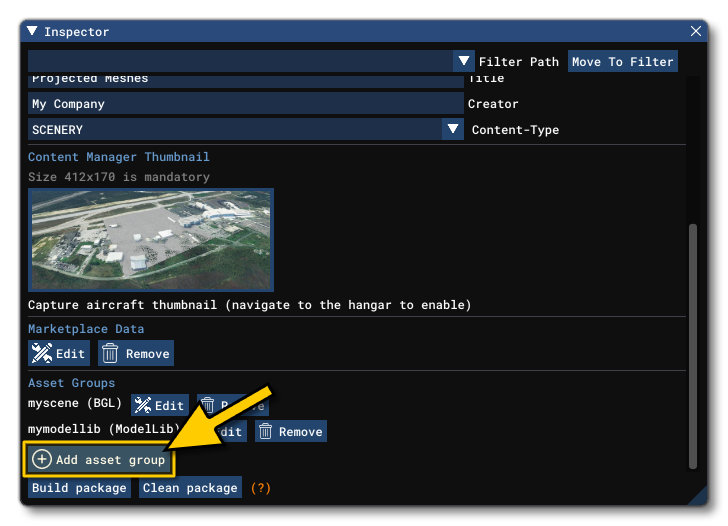
- Select the package to add the localization to in the Project editor, then in the Inspector, click the
Add Asset Groupbutton:
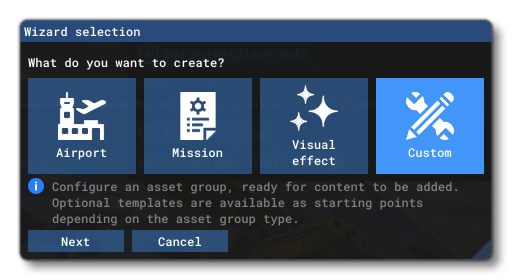
- The Asset Group Wizard will open and you should select the Custom option:
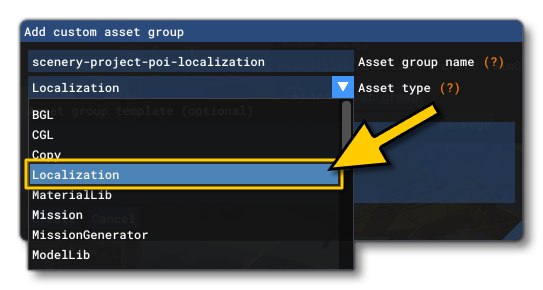
- This will then take you to the window where you should select the Asset Type, which should be Localization:
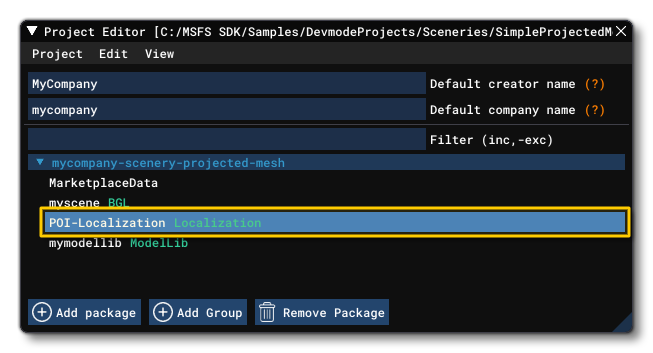
- Once you click on the
Createbutton, the asset group will be added to the project and you can then go ahead and add the required files to it.
MaterialLib
This asset type is used for adding a material library group which contains different materials created using the The Material Editor. These materials can then be referenced in a number of other asset groups, like those used for texturing airport elements, or Visual Effects, etc...IMPORTANT! When giving an Asset Group name for a material library, it needs to be unique otherwise you face conflicts with libraries from other packages. For example, just calling it "MaterialLib" is not enough, and you should instead be using something like the following schema: mycompany-packagename-materiallibname
ModelLib
The ModelLib asset group is used to contain a directory of XML files along with their corresponding gLTF and BIN files, and these define models that are required by the package. This asset group type is generally used in conjunction with BGL asset groups, since the ModelLib asset XML will contain GUIDs that are then used by the BGL files to request a referenced model within the simulation. See Creating A Scenery Object for more information.
IMPORTANT! This asset group should be built using the Build Package button in the Inspector before any objects that it creates can be used in any of the editors. It must also be built again if the contents of the package sources change (ie: you add a new set of source files to the asset group).
The ModelLib asset group should contain the following files:
- An XML file, named
[MODEL_NAME].xml - At least one glTF file, named
[MODEL_NAME]_LODxx.gltf(where xx is the LOD number) - A BIN file, named
[MODEL_NAME]_LODxx.bin(where xx is the LOD number)
It should be noted that this asset group type permits you to use the Simplygon SDK to auto-generate LODs for the model, as long as you are in possession of a licenced copy of the SDK. For more information, please see here:
If you wish to preview the contents of the ModelLib asset group, you can right-click on it in the Project Editor and select Load In Editor. This will open the Model Thumbnail Baker where you can click on the Bake missing thumbnails to generate thumbnail previews of the library contents.
ModularSimObject
This asset group is used to hold the necessary files to create a Modular Sim Object. These are SimObjects that are comprised of a common base, and then have attachments added to them to generate a final complete SimObject. The idea being that you have only a few "base" objects and can then create multiple different SimObjects by combining them in various ways. For more information, please see here:
ProceduralAssets
This asset type is used for the materials and models and other base assets that are used to generate procedural assets (ie: buildings and other scenery objects that are generated randomly from a few base assets and parameters). For more information please see here:
SPB
This asset type creates an SPB ("SimPropBinary") file, which is a compiled version of the base XML files used for various different things. This asset type is used for missions, airport services, RTC (Real Time Cameras), and a few other things. For more information, please see here:
Service
This asset group would be used for adding airport services XML files to the package. However this is now obsolete and should not be used, as the services XML is added using the SPB asset type.
SimAttachmentLib
This asset group is for creating groups independent SimAttachment objects that can then be used by other modular SimObjects. For more information please see here:
SimObject
This asset type is used for adding SimObjects to the simulation. This was previously used for aircraft and many other objects in the simulation, but those are now created as Modular SimObjects. Instead this asset group is used for legacy SimObjects that haven't been updated to modular, for any scenery element that requires participation with the simulation systems, and for ground traffic, boats, animals and sometimes people. For more information see:
SimPropContainerLib
This asset type is used for storing SimPropContainer Objects. These assets are comprised of multiple Scenery objects or SimObj objects which are collected together in a single "container" so they can be placed as a single object within The Scenery Editor. For more information, please see here:
TextureLib
This asset type is used to bundle a number of textures together and is usually associated with other asset types in a package (like a ModelLib and a BGl, or a SimObject livery, etc...). For information on how to use this asset group with liveries, please see here:
VisualEffectLegacyLib
This is a legacy asset type that should not be used for any Microsoft Flight Simulator 2024 package. This group type was used for collections of *.FX files, which are the old files for visual effects used by FSX.
VisualEffectLib
This is the current Microsoft Flight Simulator 2024 asset type that should be used for Visual Effects made using The Visual Effects Editor.
WorldScript
This asset group is used when you wish to add specific World Script XML files to perform actions or show POI within the world. For more information please see here:
Related Topics