SCIENTIFIC RESEARCH
A fun and interesting challenge in Microsoft Flight Simulator 2024 is to fly a scientific research mission. In these activities, you must transport a scientific team to record precious data about rare natural events from your aircraft. The user will need to follow their requests to position the aircraft and ensure optimal flight conditions so that they can carry out their work safely and accurately. If you wish your aircraft to be used on this kind of activity you will need a preset that has been appropriately set up as part of the Modular SimObject, as explained below.
For more information on the various other career activities and how to prepare your aircraft, please see here:
Scientific Research Constraints
When it comes to setting up planes for the available scientific research activities, there are a few requirements that must be fulfilled:
- The plane will need to have the
navigation_graph_pilot.cfg(as explained here). - The plane will need to have both the
Apron.fltand theApronWithoutCovers.fltfiles (as explained below). - The
targeted_specializationsmust include theDIC-SCRdressing code. - The
object_classmust be "Airplane". - The
operating_statusmust be either "in_service" or "experimental". - The plane cannot be flagged as military.
- The plane cannot be flagged as premium.
- The plane
ui_max_rangemust be greater than 1. - The payload mass must be greater than 1kg (see Note On Payload Mass for more information).
- The plane can have wheels or big wheels, for landing gear.
- The plane cannot have skis or floats for landing gear.
- There must be a navigation graph called
navigation_graph_passenger.cfgwith the following nodes:OPERATOR,SCIENTIFIC_PLANE_ENTRANCE,SCIENTIFIC_WALK_START,DIRECTOR,SCIENTIFIC_DIRECTOR_ENTRANCE, andSCIENTIFIC_DIRECTOR_START. This is explained in more detail below.
Following these constraints will give the aircraft the DIC_Cabin type. See here for more information:
Mission Flow
The flow for a scientific research mission is as follows:
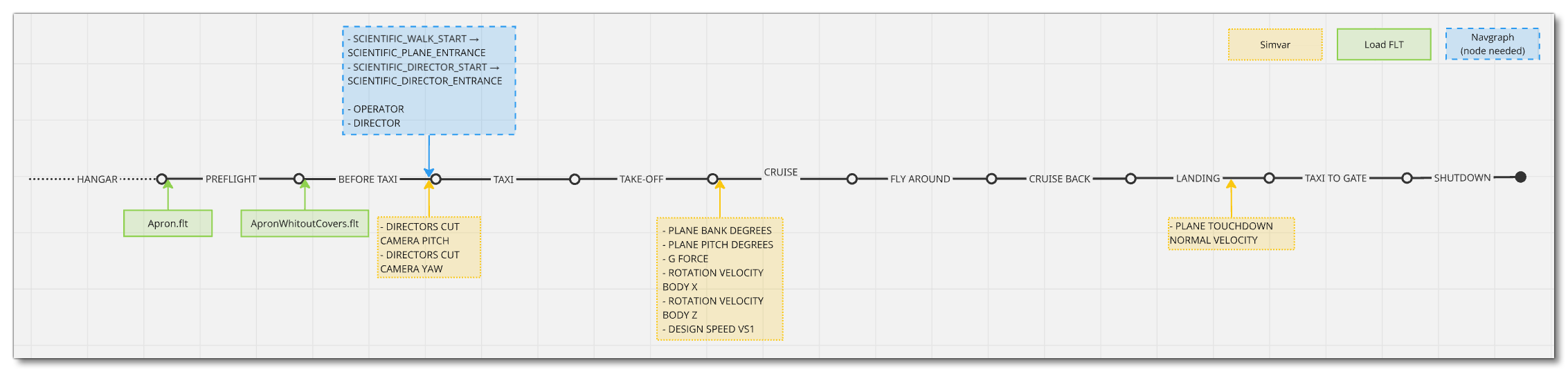
This flow will also require the aircraft to be setup for - and follow - the General Career Mode Requirements.
SimVars
While not directly influencing the mission flow, the following SimVars are important for ensuring a smooth user experience without frustrations. These are what are used in the simulation code to decide whether the user should receive a penalty on their mission score or not, and as such, particular attention should be paid to ensure that these are always returning correct values.
| Penalty | SimVar | Description |
|---|---|---|
| Smoothness Score | PLANE BANK DEGREES |
This is used to check the banking angle of the aircraft while performing the research flight. |
PLANE PITCH DEGREES |
This is used to check the pitch angle of the aircraft while performing the research flight. | |
G FORCE |
This is used to check the G forces applied in the aircraft to passengers while performing maneuvers. | |
ROTATION VELOCITY BODY X |
This is used to check the bank rotation speed of the aircraft while performing the research flight. | |
ROTATION VELOCITY BODY Z |
This is used to check the pitch rotation speed of the aircraft while performing the research flight. | |
PLANE TOUCHDOWN NORMAL VELOCITY |
This is used to check the vertical speed at touchdown of the aircraft when landing. | |
| Research Quality | DESIGN SPEED VS1 |
This is needed to compute the best speed to do the research flight around for the tour. |
Navigation Graph Setup
Once the aircraft model has been prepared for scientific activities and the Modular SimObject has been created with a preset that uses the adapted model parts and respects the constraints, the next thing to do would be to add in the required navigation_graph.cfg files. One thing that all these navigation graphs have in common is the need to set up mass stations and station loads for weight distribution. These things are explained in detail here: Weight Distribution. The navigation graph for this kind of activity should be called navigation_graph_passenger.cfg and you can include the required nodes for this activity in the same graph as that used for Commercial Flights And Passenger activities.
For scientific research activities the following nodes are required:
-
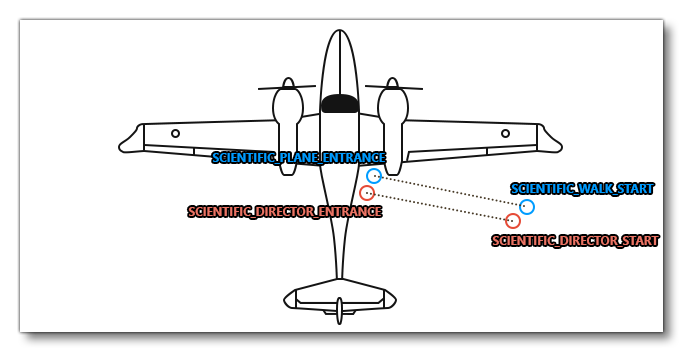
SCIENTIFIC_WALK_START
This is the node where the scientific researcher will be spawned. It should be projected on the ground, around 5-6m from the aircraft, and the node heading should be pointed towards the aircraft entrance. You can only have one of these nodes and it requires a correspondingSCIENTIFIC_PLANE_ENTRANCEnode and - inside the aircraft - anOPERATORnode as well.
-
SCIENTIFIC_DIRECTOR_START
This is the node where the scientific director will be spawned. It should be projected on the ground, around 5-6m from the aircraft, and the node heading should be pointed towards the aircraft entrance. You can only have one of these nodes and it requires a correspondingSCIENTIFIC_DIRECTOR_ENTRANCEnode and - inside the aircraft - aDIRECTORnode as well.
-
SCIENTIFIC_PLANE_ENTRANCE
This is the node where the scientific researcher will enter the aircraft at the end of the RTC animation. It should be projected on the ground, close to the aircraft entrance, and the node heading should be pointed towards the aircraft entrance as well. Once placed, you will need to connect the node to the correspondingSCIENTIFIC_WALK_STARTusing an edge.
-
SCIENTIFIC_DIRECTOR_ENTRANCE
This is the node where the scientific director will enter the aircraft at the end of the RTC animation. It should be projected on the ground, close to the aircraft entrance, and the node heading should be pointed towards the aircraft entrance as well. Once placed, you will need to connect the node to the correspondingSCIENTIFIC_DIRECTOR_STARTusing an edge.
-
OPERATOR_SEAT (OPERATOR)
This is a node where the the scientific researcher will sit and operate the equipment used for the activity. This node is used spawn a seat logic object which has a navigation graph with theOPERATORnode used by the scientific operator and/or passengers (this can be set up as a seat object with two nodes listed -SITandOPERATOR- if required). Please see Aircraft Seats And Seatbelts for how to set this up.
-
DIRECTOR_SEAT (DIRECTOR)
This is a node where the the scientific director will sit and operate the equipment used for the activity. This node must be placed where the copilot would sit and is used to spawn a seat logic object which has a navigation graph with theDIRECTORnode used by the scientific director or copilot (this can be set up as a seat object with two nodes listed -COPILOTandDIRECTOR- if required). Please see Aircraft Seats And Seatbelts for how to set this up.
Included SimAttachments
To make things simpler when creating your aircraft, some components that can be used scientific research activities are available as Included Attachments for you to use. These are:
- Asobo_Camera_DirectorsCut
- Asobo_Camera_Thermal
- Asobo_Observation_Device_01
- Asobo_Observation_Device_02
- Asobo_Observation_Device_03
- Asobo_Observation_Stabilizer
You can find out how to set these up from the following page:
FLT Files
When a user starts a scientific flight activity they will be going through the usual Preflight checks, and so they will need to have the Apron.flt setup in the activity preset as follows:
- Section
[SimVars.0]must have the parameterSimOnGroundset totrue. - All defined
[Covers]need to be set totrue(see here for more information). - Section
[Controls.0]must have the parameterParkingBrakeset to 100.00 (if the aircraft has a parking brake). - Aircraft electrics and engines must be turned off.
- The aircraft flight parameters (trim, flaps, etc...) should be set for a cold and idle aircraft.
An additional FLT file is required - the ApronWithoutCovers.flt file - for those occasions when the user may skip the preflight phase and there is an RTC event, or when something causes a Back On Track event after preflight. This file should be set up like a regular apron FLT file, however you should ensure that these changes are made:
Related Topics