AIRCRAFT SEATS AND SEATBELTS
This page outlines the recommended setup for seats and seatbelts in your aircraft, based on how things have been done within the aircraft that come with Microsoft Flight Simulator 2024. In the context of this document, seats are not modeled objects, but rather logic objects, which are simplified SimObjects used to generate other interactive elements within a complex SimObject.
The general flow is going to be:
- The aircraft is spawned.
- The aircraft pilot / passenger navigation graph CFG (based on the common files, preset files, and/or attachments) will spawn a seat logic object.
- The seat logic object is registered with the interaction manager, and contains a tagged node with at least one of the required tags.
- The interaction manager spawns the seatbelt Simple SimObject (optional).
The actual seats of the aircraft can be modeled as part of the interior cockpit or cabin, or they can be added as simple attached objects in the modular aircraft (see here for more information: Modular SimObjects).
Aircraft Navigation Graphs
The initial navigation graph files for the aircraft will depend on the missions and the seats required. They can contain multiple nodes related to free-flight and career missions, but here we'll only be listing the nodes that are required for the Spawn Pilot (Transversal) setup and for Passenger setup, as those are the only ones directly related to seats and seatbelts. You can check the Career Activities documentation for other nodes that the navigation graph files require. The rest of this document is only concerned with the setup of the seat logic objects which specific navigation graph files will spawn, as these objects are what control the interactions between the pilot / copilot / passenger and the seats and seatbelts.
Seat Logic Objects
Since the seat logic objects are going to be spawned as part of the interaction system for the aircraft, they should be created in a separate folder, alongside the seatbelt objects (if you have created them, as described here: Seats And Seatbelts). Each unique seat will require its own Simple SimObject, and you would normally have one for the pilot, one for the copilot, and at least one for the passengers, although you can have more if the seats require unique seatbelts, like in the DA62:
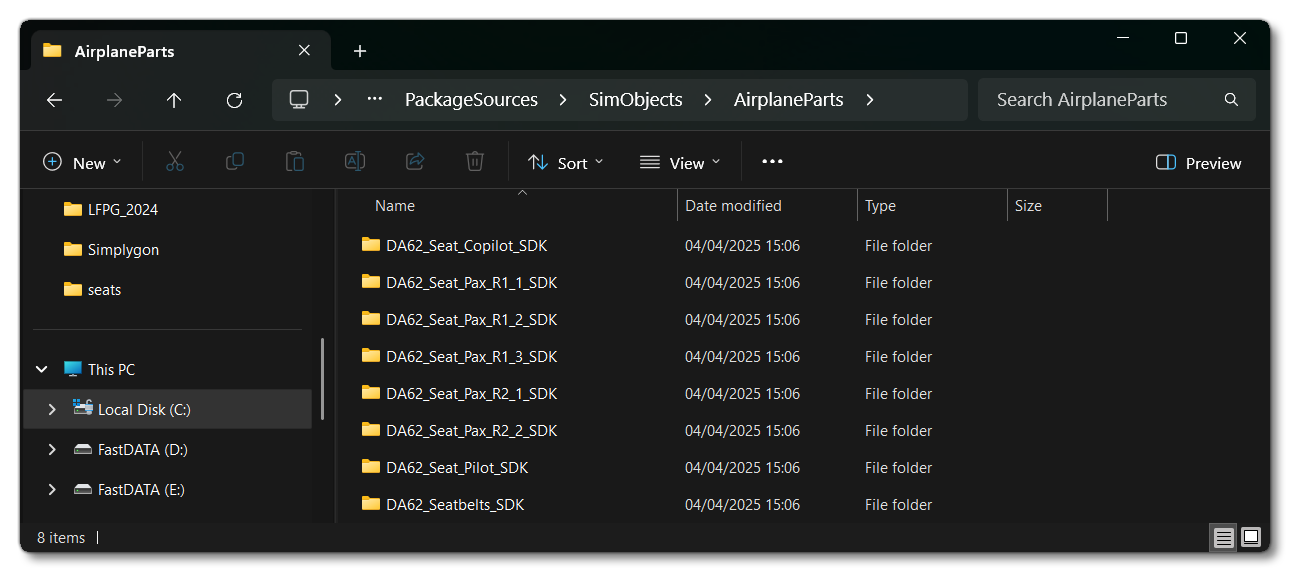
Each seat logic object is classed as a Simple SimObject , the folder containing the Simple SimObject files will be very basic, only requiring the following 4 things:
- A
modelfolder - This folder is required, as is themodel.cfgfile it contains. The file simply needs the following:
This file is only required so that the simulation will recognise the logic object as a Simple SimObject. However, if you wish to include a seat model as part of the SimObject then you would need this (and probably a[models] normal=texturefolder) to be set up correctly as well.
- A
navigation_graphfolder - This folder will hold anavigation_graph_*.cfgfile containing a single node, which has atag(thetagused will define what seat the logic object is being used for, one ofPILOT,COPILOT, orSIT), as well as variousinteractionFileparameters. The file should have a unique name, as it will be referenced by the interaction manager in thesim.cfgfile (explained below), for example:navigation_graph_seat_pilot.cfgornavigation_graph_seat_pax_l1_2.cfg. Within this file
- A
sim.cfgfile - This file is used to give the Simple SimObject atitle(name), assign the navigation graph file to the interaction manager, and set thecategoryto "SimpleObjectSim" (ie: Simple SimObjects). It should look something like this:[version] major = 1 minor = 0 [fltsim.0] title = SEAT_DA62_Pax_R1_1 model = texture = [interactionmgr.0] graph = navigation_graph_seat_pax_r1_1.cfg [general] category = SimpleObjectSim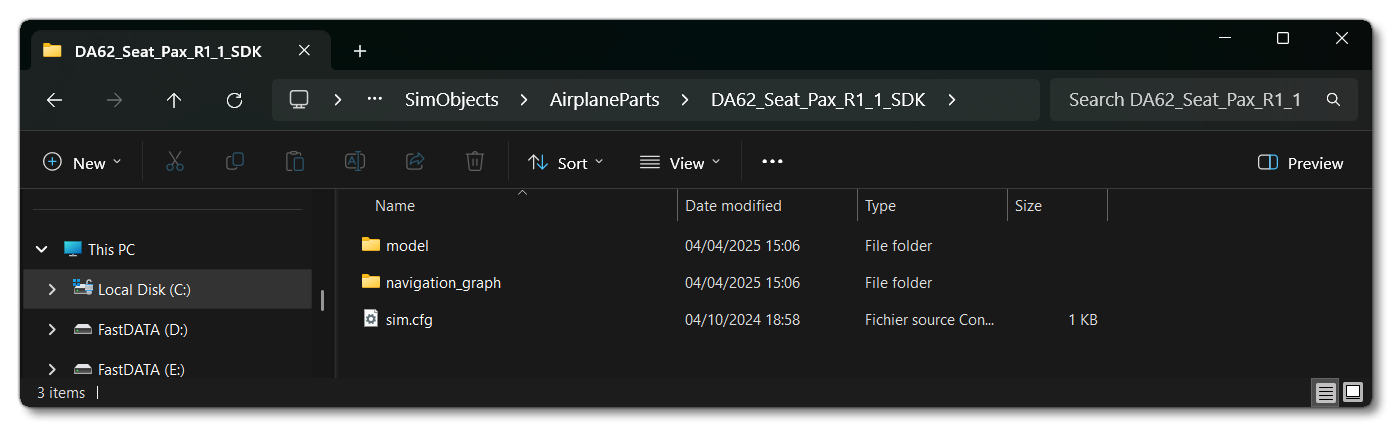
The title is what will be referenced in theinteractiveObjectparameter of the "parent" navigation graph (either thenavigation_graph_pilot.cfgornavigation_graph_passenger.cfg), and this parameter is what will spawn the seat logic object.
Default Seat Logic Objects
It may be that you want to set up your aircraft quickly and without using any seatbelt models. In these cases you use the default seat logic objects instead of creating your own. These objects provide the necessary minimum interactions, and do not expect the aircraft to be set up with seatbelts. The default seat logic objects that you can spawn are as follows:
- Asobo_DEFAULT_Seat_Pilot
- Title:
SEAT_DEFAULT_Pilot - Animation: Idle1_PosePropeller (similar to the IDLES_Straight animation)
- Navigation Graph Tag:
PILOT
- Title:
- Asobo_DEFAULT_Seat_Copilot
- Title:
SEAT_DEFAULT_Copilot - Animation: Idle1_PosePropeller (similar to the IDLES_Straight animation)
- Navigation Graph Tag:
COPILOT
- Title:
- Asobo_DEFAULT_Seat_Pax
- Title:
SEAT_DEFAULT_Pax - Animation: IDLES_LEANED
- Navigation Graph Tag:
SIT
- Title:
Note that these objects are meant to help with aircraft being updated from previous versions of the simulation, or to help with the initial setup of new aircraft. However it is recommended that you make your own logic objects to suit your own aircraft to prevent problems with the animations clipping through seats or cabins, and other minor issues.
Pilot / Copilot Seat Navigation Graph Setup
Within the seat logic object, you will need to include a navigation graph file. This file should have a unique name, and is used to define two things: the seat interactions and the node tag used to decide which objects can use the node. An example of this navigation graph for the pilot of the DA62 looks like this:
[node.0]
name = PILOT
pos = 0, 0, 0
tag = PILOT
interactionFile.0 = FilePath:InteractionsPreset\Asobo\Seat\Seat_pilot_open_enter #Param:INTERACTION_NAME:SIT_REMOTELY, VARIABLE_TRIGGER:ENTER_AIRCRAFT, ANIMATION_SIT:IDLES_Leaned, ANIMATION_GET:INTERACTIVE POINT OPEN:'DoorFrontLeft'_n, ANIMATION_SET:INTERACTIVE POINT GOAL:'DoorFrontLeft'_n
interactionFile.1 = FilePath:InteractionsPreset\Asobo\Seat\Seat_pilot_open_exit #Param:INTERACTION_NAME:EXIT_REMOTELY, VARIABLE_TRIGGER:EXIT_AIRCRAFT, TAG_TELEPORT:SPAWN_EXTERIOR, ANIMATION_GET:INTERACTIVE POINT OPEN:'DoorFrontLeft'_n, ANIMATION_SET:INTERACTIVE POINT GOAL:'DoorFrontLeft'_n
interactionFile.2 = FilePath: InteractionsPreset\Asobo\Seat\Seatbelt #Param:SEATBELT_FASTEN:SEATBELT_DA62_Pilot_Fasten, SEATBELT_UNFASTEN:SEATBELT_DA62_Pilot_Unfasten

[maingraph]
nodes = PILOT-
PILOT
This node is where the pilot will be positioned so they can sit and interact with things, and the position should always be (0, 0, 0), as it will be created on thePILOT_SEATnode of the "parent" navigation graph. This node must be namedPILOT, and will also need to setup certain interactions, as explained in the Pilot Interactions section below.
If the seat logic object is for the copilot then this will be setup something like the following (also from the DA62):
[node.0]
name = COPILOT
pos = 0, 0, 0
tag = COPILOT
interactionFile.0 = FilePath:InteractionsPreset\Asobo\Seat\Seat_with_seatbelt #Param:ANIMATION_SIT:IDLES_Leaned
interactionFile.1 = FilePath:InteractionsPreset\Asobo\Seat\Seatbelt #Param:SEATBELT_FASTEN:SEATBELT_DA62_Copilot_Fasten, SEATBELT_UNFASTEN:SEATBELT_DA62_Copilot_Unfasten

[maingraph]
nodes = COPILOT-
COPILOT
This optional node marks where the copilot will be sitting in the aircraft. This node may or may not be used depending on the criteria of the career activity or chosen flight mode. As with thePILOTnode, the position should always be (0, 0, 0), as it will be created on theCOPILOT_SEATnode of the "parent" navigation graph. As long as a node with theCOPILOTtag exists when a flight is started - and theaircraft.cfghas been setup correctly - then it will be detected and used (if appropriate for the flight/activity). For theaircraft.cfgyou will need to set up the[PILOT]section as follows for this node to be used:
For some careers this node can serve different purposes, since it can seat a passenger or some other kind of NPC. For this to be available to passengers the node should also have the[PILOT] cabin_service = CopilotService generated_copilot = Copilot copilot_behavior = COPILOTSITtag, and for other missions the appropriate tag for the mission (in the example below, it sits the Scientific Director during a Scientific Research mission). It will also need to have thesharedSeatparameter set totrue, eg:
NOTE: You will also need to ensure that the Passengers navigation graph is set up to use this node if you want NPC's other than the copilot to sit on it.This node will also need to setup certain interactions - as explained in the Copilot Interactions section below.[Node.0] name = COPILOT pos = 0, 0, 0 tag = COPILOT, SIT, DIRECTOR sharedSeat = true
Passenger Seat Navigation Graph Setup
Within the seat logic object for a passenger, you will need to include a navigation graph file. This file should have a unique name, and is used to define two things: the seat interactions and the node tag used to decide which objects can use the node. An example of this navigation graph for a passenger of the DA62 looks like this:
[Node.0]
name = PAX_1
pos = 0, 0, 0
tag = SIT
interactionFile.0 = FilePath: InteractionsPreset\Asobo\Seat\Seat_with_seatbelt #Param:ANIMATION_SIT:IDLES_Leaned
interactionFile.1 = FilePath: InteractionsPreset\Asobo\Seat\Seatbelt #Param:SEATBELT_FASTEN:SEATBELT_DA62_PAX_1_1_Fasten, SEATBELT_UNFASTEN:SEATBELT_DA62_PAX_1_1_Unfasten

[MainGraph]
nodes = PAX_1-
SIT
This node is where the passenger will be positioned so they can sit and interact with things, and the position should always be (0, 0, 0), as it will be created on the seat node of the "parent" navigation graph. This node must be namedSIT, and will also need to setup certain interactions, as explained in the Pilot Interactions section below.
For some careers this node can serve different purposes, since it can seat a passenger or some other kind of NPC. For this to be available to passengers the node must always have the SIT tag, but for other missions an additional tag - or tags - can be supplied. In the example below, the same node can sit a passenger or an Operator during a Scientific Research mission:
[Node.0]
name = PAX_1
pos = 0, 0, 0
tag = SIT, OPERATOR
This node will also need to setup certain interactions - as explained in the Copilot Interactions section below.
Pilot Interactions
The PILOT node needs to deal with moving the pilot avatar inside/outside the aircraft and interacting with the door objects (where applicable and depending on the aircraft). In addition it defines which of the body animations should be used when sitting, and optionally to deal with the seatbelts if the aircraft has been setup with any.The simulation has several Interaction Presets that can be used in the interactionFile.n parameter of the pilot navigation graph and we recommend that you use these presets to set up your own aircraft unless you require something particularly specialised.
The setup for these interaction presets is as follows for entering / exiting the aircraft:
- If the aircraft has no animated doors - use the presets Seat_pilot_enter.xml / Seat_pilot_exit.xml. The setup for the navigation graph
PILOTnode to use these interactions would be something like this:; Entering the aircraft interaction with no door animations interactionFile.0 = FilePath: InteractionsPreset\Asobo\Seat\Seat_pilot_enter #Param: INTERACTION_NAME:SIT_REMOTELY , VARIABLE_TRIGGER:ENTER_AIRCRAFT , ANIMATION_SIT:IDLES_Leaned ; Exiting the aircraft interaction with no door animations interactionFile.1 = FilePath: InteractionsPreset\Asobo\Seat\Seat_pilot_exit #Param: INTERACTION_NAME:EXIT_REMOTELY , VARIABLE_TRIGGER:EXIT_AIRCRAFT , TAG_TELEPORT:SPAWN_EXTERIORNote that the
TAG_TELEPORTparameter must beSPAWN_EXTERIORand that The Pilot Navigation Graph must have this node otherwise the interaction will not work correctly.
- If the aircraft has animated doors - use the presets Seat_pilot_open_enter.xml / Seat_pilot_open_exit.xml. The setup for the navigation graph
PILOTnode to use these interactions would be something like this:; Entering the aircraft interaction with door animations interactionFile.0 = FilePath:InteractionsPreset\Asobo\Seat\Seat_pilot_open_enter #Param:INTERACTION_NAME:SIT_REMOTELY, VARIABLE_TRIGGER:ENTER_AIRCRAFT, ANIMATION_SIT:IDLES_Leaned, ANIMATION_GET:INTERACTIVE POINT OPEN:'DoorFrontLeft'_n, ANIMATION_SET:INTERACTIVE POINT GOAL:'DoorFrontLeft'_n ; Exiting the aircraft interaction with no door animations interactionFile.1 = FilePath:InteractionsPreset\Asobo\Seat\Seat_pilot_open_exit #Param:INTERACTION_NAME:EXIT_REMOTELY, VARIABLE_TRIGGER:EXIT_AIRCRAFT, TAG_TELEPORT:SPAWN_EXTERIOR, ANIMATION_GET:INTERACTIVE POINT OPEN:'DoorFrontLeft'_n, ANIMATION_SET:INTERACTIVE POINT GOAL:'DoorFrontLeft'_nNote that the
TAG_TELEPORTparameter must beSPAWN_EXTERIORand that The Pilot Navigation Graph must have this node otherwise the interaction will not work correctly, and that theINTERACTIVE POINT GOALparameter should be the name of the interactive point setup for the doors, as explained here: File Setup. The interactive point must be enclosed in single quotes and be followed by_n.
If the aircraft has an optional exit node, then you will need to include an additional call to the Seat_pilot_enter.xml / Seat_pilot_exit.xml or Seat_pilot_open_enter.xml / Seat_pilot_open_exit.xml interaction file, for example:
; Entering the aircraft interaction with door animations
interactionFile.0 = FilePath:InteractionsPreset\Asobo\Seat\Seat_pilot_open_enter #Param:INTERACTION_NAME:SIT_REMOTELY, VARIABLE_TRIGGER:ENTER_AIRCRAFT, ANIMATION_SIT:IDLES_Leaned, ANIMATION_GET:INTERACTIVE POINT OPEN:'DoorFrontLeft'_n, ANIMATION_SET:INTERACTIVE POINT GOAL:'DoorFrontLeft'_n

; Exiting the aircraft interaction with door animations (obligatory spawn point)
interactionFile.1 = FilePath:InteractionsPreset\Asobo\Seat\Seat_pilot_open_exit #Param:INTERACTION_NAME:EXIT_REMOTELY, VARIABLE_TRIGGER:EXIT_AIRCRAFT, TAG_TELEPORT:SPAWN_EXTERIOR, ANIMATION_GET:INTERACTIVE POINT OPEN:'DoorFrontLeft'_n, ANIMATION_SET:INTERACTIVE POINT GOAL:'DoorFrontLeft'_n

; Exiting the aircraft interaction with door animations (optional spawn point)
interactionfile.3 = FilePath:InteractionsPreset\Asobo\Seat\Seat_pilot_open_exit #Param:INTERACTION_NAME:EXIT_REMOTELY_SECOND, VARIABLE_TRIGGER:EXIT_AIRCRAFT_SECOND, TAG_TELEPORT:SPAWN_EXTERIOR_SECOND, ANIMATION_GET:INTERACTIVE POINT OPEN:'DoorFrontLeft'_n, ANIMATION_SET:INTERACTIVE POINT GOAL:'DoorFrontLeft'_n
The name of the TAG_TELEPORT parameter can be anything here, but it must match that which is defined in the navigation_graph_pilot.cfg file, normally formatted as SPAWN_EXTERIOR_[something], for consistency.
Further interactions for the seatbelts are explained in the Seatbelt Interactions section, and the animations are explained in the Seating Animations section.
Copilot Interactions
The COPILOT node needs to deal with having a copilot (or optional passenger) sit on the copilot seat. It can also optionally deal with the seatbelts if the aircraft has been setup with any. The simulation has several Interaction Presets that can be used in the interactionFile.n parameter of the copilot navigation graph and we recommend that you use these presets to set up your own aircraft unless you require something particularly specialised.
If the COPILOT node does not require seatbelts then the only interaction file you need to add is the following:
- For the copilot to use a seat with no seatbelt you need the Seat_without_seatbelt.xml interaction file. The setup for the navigation graph
COPILOTnode to use this interaction would be something like this:; setting copilot interactions with no seatbelts interactionFile.0 = FilePath: InteractionsPreset\Asobo\Seat\Seat_without_seatbelt #Param: ANIMATION_SIT:IDLES_Leaned
Further interactions for the seatbelts are explained in the Seatbelt Interactions section, and the animations are explained in the Seating Animations section
Passenger Interactions
The SIT node needs to deal with having a passenger character sit on the passenger seat. It can also optionally deal with the seatbelts if the aircraft has been setup with any. The simulation has several Interaction Presets that can be used in the interactionFile.n parameter of the passenger navigation graph and we recommend that you use these presets to set up your own aircraft unless you require something particularly specialised.
If the SIT node does not require seatbelts then the only interaction file you need to add is the following:
- For the copilot to use a seat with no seatbelt you need the Seat_without_seatbelt.xml interaction file. The setup for the navigation graph
SITnode to use this interaction would be something like this:
; setting passenger interactions with no seatbelts
interactionFile.0 = FilePath: InteractionsPreset\Asobo\Seat\Seat_without_seatbelt #Param: ANIMATION_SIT:IDLES_Leaned
Further interactions for the seatbelts are explained in the Seatbelt Interactions section, and the animations are explained in the Seating Animations section
Seatbelt Interactions
The PILOT, COPILOT, and SIT nodes are used for seating the different generated characters (pilot, copilot, passengers, or any other character used by the mission). If the seats of the aircraft have seatbelts, then these nodes will need to have additional interactions defined in the interactionFile.n parameter for their node. We strongly recommend that you use the following included Interaction Presets to set up the seatbelt interactions:
- Seat_with_seatbelt.xml - This preset is used to set the animation to use while the character is on the seat. You can find a list of available poses in the Seating Animations section, below. Note that the PILOT node does not need to use this interaction as the sitting animation is defined in the aircraft enter preset.
- Seatbelt.xml - This preset is used to spawn the seatbelt SimObjects that contain the seatbelt models along with the fasten/unfasten animations.
IMPORTANT! For seatbelts to work, they must have been setup as outlined on the Seats And Seatbelts page, and both the above interaction presets need to be included on each of the nodes that require seatbelts, except for the PILOT node.
Here is an example of a PILOT node which has been correctly setup to use seatbelts:
; The pilot seatbelt interaction
interactionFile.0 = FilePath:InteractionsPreset\Asobo\Seat\Seatbelt #Param:SEATBELT_FASTEN:SEATBELT_DA62_Pilot_Fasten, SEATBELT_UNFASTEN:SEATBELT_DA62_Pilot_Unfasten
Here is an example of a COPILOT node which has been correctly setup to use seatbelts:
; The copilot seatbelt interaction
interactionFile.0 = FilePath: InteractionsPreset\Asobo\Seat\Seat_with_seatbelt #Param:ANIMATION_SIT:IDLES_Leaned
interactionFile.1 = FilePath: InteractionsPreset\Asobo\Seat\Seatbelt #Param:SEATBELT_FASTEN:SEATBELT_DA62_Copilot_Fasten, SEATBELT_UNFASTEN:SEATBELT_DA62_Copilot_Unfasten
Here is an example of a SIT node which has been correctly setup to use seatbelts:
; The passenger seatbelt interaction
interactionFile.0 = FilePath: InteractionsPreset\Asobo\Seat\Seat_with_seatbelt #Param:ANIMATION_SIT:IDLES_Leaned
interactionFile.1 = FilePath: InteractionsPreset\Asobo\Seat\Seatbelt #Param:SEATBELT_FASTEN:SEATBELT_DA62_PAX_1_1_Fasten, SEATBELT_UNFASTEN:SEATBELT_DA62_PAX_1_1_Unfasten
In all cases, the SEATBELT_FASTEN and SEATBELT_UNFASTEN parameters should be set to the title of the seatbelt Simple SimObject, as defined in the sim.cfg file (as explained here: Seatbelt Files)
Seating Animations
Within the interaction file setup, you must also set which kind of sitting animation is used using the ANIMATION_SIT parameter. The animation pose used here should match one of the three body morphotype positions:
IDLES_Straight- Used for very straight positioning of the character where there is adequate space, for example: airliner pilot seats, airliner passenger seats, business jet seats, etc...
IDLES_Leaned- Used for tighter aircraft with a more inclined positioning of the pilot, for example: F18, E330, C172.
Idle_Lying_01- Used for aircraft with very small cockpits with a nearly horizontal position of the pilot/passengers, also for gliders in general.
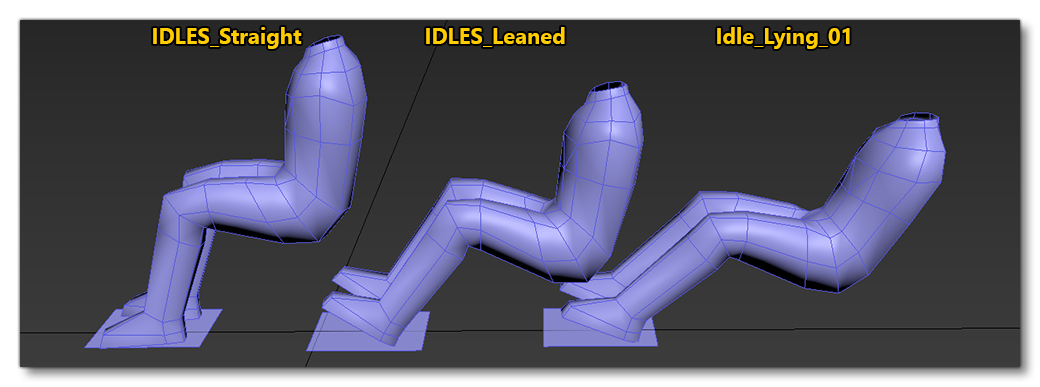
Which one you use will depend on the way the aircraft seat model was set up (see here for more information: Seats And Seatbelts).
Related Topics