GENERAL CAREER MODE REQUIREMENTS
This section outlines the essential SimVars and FLT files that all aircraft must comply with to function properly in all aspects of the Career Mode. It provides detailed descriptions of each SimVar and associated parameters, their significance in the simulation flow, and whether incorrect configurations may block career mission progression.
The information given on this page is considered obligatory for all aircraft that wish to participate in career missions, and should be the first step in preparing the aircraft before moving on to setting up mission-specific details.
Pre-Mission Checks
The table below details the essential career pre-mission checks that are carried out to ensure optimum compatibility with the Microsoft Flight Simulator 2024 career mode. Each item aims to ensure that critical parameters are correctly defined, and whether incorrect definitions are considered as "blockers" ( ) to participation in career activities or not.
| Item | Acceptance Criteria / Description | Blocker |
|---|---|---|
| Opt-Into Careers | To opt-into specific careers the targeted_specializations parameter should be correctly set in the aircraft.cfg file for each of the career activity Presets used by the aircraft. |
|
| Flight Performance Data |
Proper performance data allows the career system to select suitable airfields for mission activities. Landing distance data is crucial for destination runway selection. To that end, the career missions system uses data from the flight_performance.cfg file, so this file must be present and correctly filled out with accurate flight performance data, with particular attention being made to having correct landing distance tables. |
|
| Takeoff Weight |
The takeoff weight is used to check and make sure the aircraft can safely takeoff and land at the designated departure and arrival points, as well as check that the aircraft can carry enough fuel for the mission without exceeding the maximum weight permitted for the aircraft. As such, you must ensure that the $$\textrm{EmptyWeight} + \textrm{CargoWeight} + \textrm{PassengerWeight} + \textrm{FuelWeight} < \textrm{MaxTakeOffWeight}$$ Note that this is not considered a blocker as it won't stop an aircraft being eligible for some missions, but it plays an important part in which missions the aircraft can be used in. |
|
| Cruise Altitude |
You must ensure that the Note that this is not considered a blocker as a missing or incorrectly formatted cruise altitude value will result in the |
|
| Maximum Altitude |
Mission airports can be anywhere in the world, and at different altitudes. As such, for an aircraft to be eligible for some missions the parameter Note that this is not considered a blocker as it won't stop an aircraft being eligible for some missions, but it plays an important part in which missions the aircraft can be used in. |
|
| Fuel Burn Rate |
The career mission system uses various fuel parameters as the primary sources of data to determine the available mission selection for each aircraft (the parameters are used to ensures that selected missions can indeed be completed by the aircraft). Therefor these parameters should be set to a relatively conservative value to ensure mission completion. For an aircraft to be career compatible, the parameters being set will depend on the engine:
|
|
| Spawn Pilot | All aircraft that wish to participate in career missions will need to have set up the navigation_graph_pilot.cfg. This is a transversal file, which means it is used in all missions and as such it is usually placed in the Common folder for the aircraft. You can find more information on setting this up on the following page: Spawn Pilot (Transversal) |
|
| Spawn Aircraft |
All aircraft should have the
Aircraft with these typeroles will spawn facing away from the direction of the taxiway assigned to the parking spot - ie: towards the terminal - for passenger and luggage boarding, and are required to call a pushback to fly. However all non-airliner aircraft will spawn facing the direction of the taxiway from the parking spot, and will not call a pushback. |
|
| EFB Flight Plan Sync |
Flightplans should sync correctly with the simulation EFB and aircraft avionics. This can be achieved using one of the following solutions:
|
General Mission Flow
The flowchart below shows the general mission flow from start to finish, with the common FLT files, navigation graph nodes, and SimVars that are required for this basic flow to be considered "correct". This is the minimum flow that an aircraft must be able to follow to be eligible for the rest of the career missions and free flight.
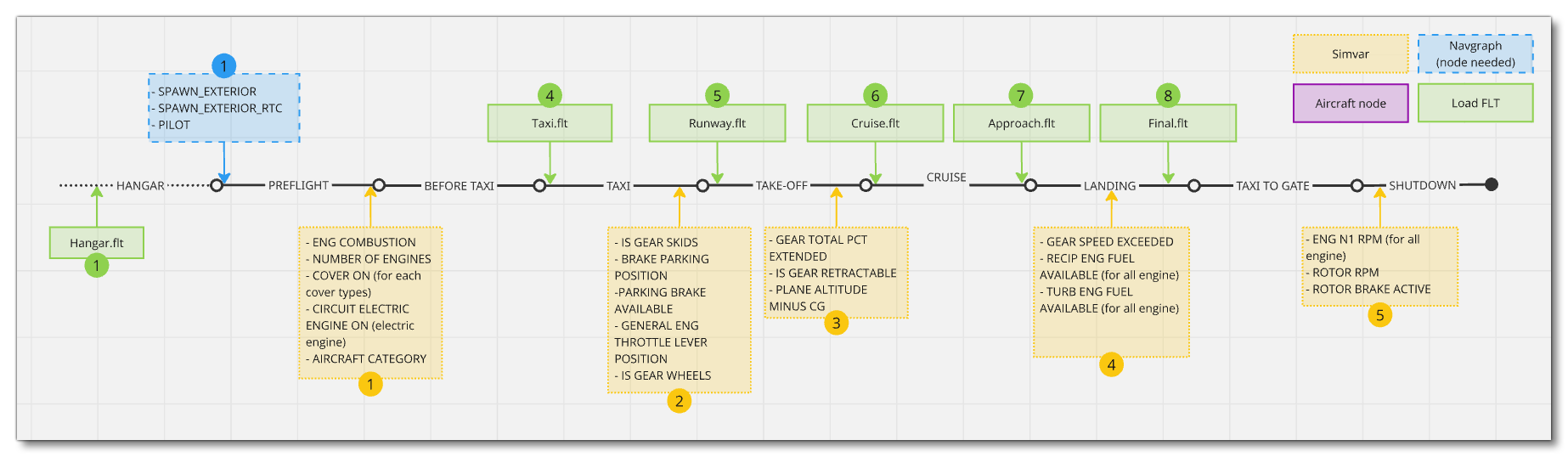
NOTE: The flow above makes no mention of the three different apron FLT files. All aircraft will need one or more of these files depending on the mission, and as such, the exact files required are listed on each mission page. However, for an aircraft to be used in free flight, it should also include the Apron.flt (used at the start of pre-flight) and ApronWithoutCovers.flt (used at the start of the before taxi flow, after a back on track event).
You can find information on setting up the shown navigation graph nodes, here:
General FLT File Requirements
The table below shows the different main mission steps, the FLT file that is required, and an overview of the main things that will be required to be setup in those files (multiple parameters may be needed for these, and only a general list is given). Be aware that you have access to the FLT Files Debug Window which lets you start flights and test the various FLT files that the aircraft has, which is very useful in ensuring that your aircraft is setup correctly for all the missions.
Please ensure that all FLT files are set up correctly for each stage of the flight, as you cannot assume that each file will be loaded sequentially. It is common to assume that some settings from one file will be "carried over" to the next file and so not include appropriate paramters, however there are circumstances where an FLT file may be "skipped" meaning that the configurations will be wrong. As such, each file must be set up fully and correctly for each phase of the flight.
It should be noted that the the [Covers] section of the FLT files is optional and does not have to be included, however if it is omitted, it will need to be omitted in all FLT files for the aircraft. The same is true if you have setup preflight checks and included the [Covers] section and some - or all - of the available parameters: these parameters will need to exist in all FLT files for the aircraft, and be set to true / false as appropriate. This does not mean that you must include all the covers parameters, only that if you include one or more, then the same ones must be present across all FLT files.
Finally, for career missions, you should never set the active frequencies in the [Avionics.N] section, for example Comm1Active or Nav1Active should never appear any FLT associated with a career. The different career missions will set these frequencies as part of the mission, and using the FLT will override them causing issues with the mission flow.
| FLT File | Mission Step | Requirements |
|---|---|---|
Hangar.flt |
Hangar - This file is loaded to setup the aircraft just before loading the hangar view. |
|
Apron.flt |
Pre-flight - This file is loaded at the very start of the mission flow, to set up the aircraft for pre-flight and the start of the mission. |
|
ApronWithoutCover.flt |
Pre-flight - This file is loaded during some RTC events with passengers, and/or after a skip of the pre-flight phase. If this file is required instead of the Apron.flt, it will be explicitly listed on the page related to the mission. |
|
ApronWithBatteriesWithoutCovers.flt |
Pre-flight - This file is loaded during specific career events, and/or after a skip of the pre-flight phase. If this file is required instead of the Apron.flt, it will be explicitly listed on the page related to the mission. |
|
Taxi.flt |
This file is loaded under any one of the following conditions:
The file should be setup so that the aircraft has completed preflight and is ready to be started and taxied to the runway. |
|
Runway.flt |
This file is loaded either after a skip of the taxi phase, or after a back on track during the takeoff phase. The aircraft should be setup as if it was ready to taxi down the runway for takeoff. NOTE: The water version of the file - |
|
Cruise.flt |
This file will be loaded after a back on track event during cruise phase. Should be set up correctly for the aircraft when cruising. |
|
Approach.flt |
This file will be loaded after a back on track during the landing phase before the aircraft has reached the final phase. The aircraft should be configured for the beginning of the deceleration phase, however - since approach procedures vary a lot - you should set this up to have an intermediate configuration, with a speed that is neither too low nor too high, and a flap setting that is consistent with this speed (for most aircraft it is recommended to have a 25% flaps solution or 1st flap setting). IMPORTANT! If the beginning of the approach procedure happens closer than 10 nm, the |
|
Final.flt |
This file will be loaded after a back on track during the landing phase after reaching final phase. The aircraft should be in a full-flaps setup in this file. NOTE: The water version of the file - |
|
General Mission Flow SimVars
In this section you can find various SimVars that are used throughout the general career mission flow. The main tables listed below show all the most important SimVars that missions will look for, flagging those that will be considered as "blockers" ( ) to the mission, and signalling the CFG/FLT file parameter associated with the SimVar so you can ensure that these are set to the required values (where applicable). The tables also indicate whether the parameters are checked with the Career Compatibility parameter verification tool. Note that a "blocker" may be something that is incorrectly set up, or that - if not performed correctly during the mission - will block the flow of the mission. For mission-specific SimVars, please see the appropriate career mission page.
Preflight
| SimVar | Blocker | Description | CFG / FLT Params | Acceptance criteria | Parameter Verification Check |
|---|---|---|---|---|---|
AIRCRAFT OBJECT CLASS |
This is used to check the type of aircraft being used for the mission. | object_class | If HELICOPTER then only rotorcraft missions available. | ||
CIRCUIT ELECTRIC ENGINE ON |
This is used to check if the engines are on for electric engine aircraft. | N/A | 1 (on) for electric engine aircraft, 0 (off) for all others. | ||
COVER ON:index |
This SimVar is checked during the preflight to see if the indexed covers are removed before flight. Note too that if the Career Compatibility tool finds an issue with the FLT covers definition, this will be flagged. | 0 (removed) for all indexed covers. | FLT Files Checked |
||
ENG COMBUSTION:index |
Check if indexed engines are on for combustion engine aircraft. This can block engine ignition step validation, preventing the user from passing to the next part of the flow |
N/A |
1 (on) for all engines. | Requires Running Simulation |
|
NUMBER OF ENGINES |
Used to find out how many engines the aircraft has (returns the number of associated engine.N parameters have been defined). This is linked to the ignition step validation. |
Engine.N | Int: From 1 to 4 |
Taxi
| SimVar | Blocker | Description | CFG Params | Acceptance criteria | Parameter Verification Tool Check |
|---|---|---|---|---|---|
BRAKE PARKING POSITION |
Used to check and see if the user must remove the parking brake before taxiing (if set). | N/A | 0 (off) | Requires Running Simulation |
|
GENERAL ENG THROTTLE LEVER POSITION |
Used to inform the user that they must reduce speed before reaching the holdshort on taxi. | N/A | Percent : From 0 to 100 | Requires Running Simulation |
|
IS GEAR SKIDS |
Used to check and see how the taxi phase should be performed: either "hover" (helicopters) or "rolling" (aircraft). | point.N | 1 if aircraft has skids. | ||
IS GEAR WHEELS |
Used to check and see if the users needs a step to activate/deactivate the parking brake. | point.N | 1 if aircraft has wheels. |
Take-Off
| SimVar | Blocker | Description | CFG Params | Acceptance criteria | Parameter Verification Tool Check |
|---|---|---|---|---|---|
IS GEAR RETRACTABLE |
Used to check if the player needs a step to retract the wheels. | point.N | Either 1 or 0 | ||
GEAR TOTAL PCT EXTENDED |
Used to check if the player has retracted the wheels (if landing gear is retractable) | N/A | If gears are retractable, 0 is required. | Requires Running Simulation |
|
PLANE ALT ABOVE GROUND MINUS CG |
Used to check if the aircraft is at or near the correct altitude to validate takeoff. | N/A | Should be a positive number | Requires Running Simulation |
Landing
| SimVar | Blocker | Description | CFG Params | Acceptance criteria | Parameter Verification Tool Check |
|---|---|---|---|---|---|
GEAR SPEED EXCEEDED |
Used to check if it is safe to extend your gear, based on the landing gear overspeed limits set for the contact point. | point.N | Landing gear can be extended. | Requires Running Simulation |
|
RECIP ENG FUEL AVAILABLE |
Used to check if the player needs to perform a dead stick landing with a reciprocating engine aircraft, due to lack of fuel. | N/A | Reciprocal Engine(s) with fuel | Requires Running Simulation |
|
TURB ENG FUEL AVAILABLE |
Used to check if the player needs to perform a dead stick landing with a turbine/jet engine aircraft, due to lack of fuel. | N/A | Turbine/Jet Engine(s) with fuel | Requires Running Simulation |
Shutdown
| SimVar | Blocker | Description | CFG Params | Acceptance criteria | Parameter Verification Tool Check |
|---|---|---|---|---|---|
GENERAL ENG RPM |
Used to check check if the engine propeller / fan rotation is completely stopped so that the reward screen can be triggered. | N/A | RPM should be 0. | Requires Running Simulation |
|
ROTOR RPM |
Check if rotor blade rotation is completely stopped to trigger reward screen. | N/A | RPM should be 0. | Requires Running Simulation |
|
ROTOR BRAKE ACTIVE |
Check if the player needs a step to trigger the rotor brake. | N/A | If a rotor brake exists, this should be 1 (on). | Requires Running Simulation |
Helicopters
| SimVar | Blocker | Description | CFG Params | Acceptance criteria | Parameter Verification Tool Check |
|---|---|---|---|---|---|
ROTOR BRAKE AVAILABLE |
Used to check check if the helicopter has a rotor brake or not. Incorrect setup may mean the user gets instructions that are not appropriate for the helicopter and they may suffer penalties. | N/A | The rotor_brake_scalar and rotor_brake_torque must be correctly set up for the helicopter. If no rotor brake is available, then rotor_brake_scalar and rotor_brake_torque must be set to 0. |
Requires Running Simulation |
Aviator Performance Considerations
While not directly influencing the mission flow, the following SimVars are incredibly important for ensuring a smooth user experience without frustrations. These are what are used in the simulation code to decide whether the user should receive a penalty on their mission score or not, and as such, particular attention should be paid to ensure that these are always returning correct values.
| Penalty | SimVar | Description |
|---|---|---|
| Flaps Overspeed | FLAPS AVAILABLE |
Check if aircraft has flaps or not to activate the possibility of a penalty. Requires that the aircraft has flaps setup correctly (see FLAPS.N). |
FLAPS CURRENT SPEED LIMITATION |
If flaps are available, then a check will be performed to see if the user is extending the flaps at a too high speed and incurring a penalty. Flaps overspeed limits should be setup correctly (see damaging-speed and blowout-speed). |
|
| Cruise Speed IFR | Check if the user is respecting the cruise speed announced by the ATC. The cruise reference speed should be correctly setup for the aircraft (see cruise_speed). |
|
| Cruise Altitude IFR | ATC ASSIGNED ALTITUDE |
Check if the player is respecting the cruise altitude announced by the ATC. The cruise reference altitude should be correctly setup for the aircraft (see cruise_alt). |
| Fuel Minimum | ENG FUEL FLOW GPH |
Check that the fuel supply is sufficient for the duration of the flight and that no "dead stick" landings occur (see the sections on Fuel Burn Rate and fuel tanks). |
FUEL TOTAL QUANTITY EX1 |
||
| Landing Light | LIGHT LANDING ON |
Check that the landing lights are on when landing the aircraft during the night. Lights and the electrical system will need to be setup correctly (see Modular Electrical System Information). |
| Max G Force | POSITIVE G LIMIT FLAPS UP |
Check that the aircraft doesn't take too much positive G force on the flaps when they are retracted (see positive_g_limit_flaps_up). |
POSITIVE G LIMIT FLAPS DOWN |
Check that the aircraft doesn't take too much positive G force on the flaps when they are deployed (see positive_g_limit_flaps_down). |
|
NEGATIVE G LIMIT FLAPS UP |
Check that the aircraft doesn't take too much negative G force on the flaps when they are retracted (see negative_g_limit_flaps_up). |
|
NEGATIVE G LIMIT FLAPS DOWN |
Check that the aircraft doesn't take too much negative G force on the flaps when they are deployed (see negative_g_limit_flaps_down). |
|
| Max Speed | REFERENCE SPEED MAX IAS |
Check that the user respects the regulatory speed for the aircraft. This requires that the aircraft maximum reference speed is correctly set (see max_indicated_speed). |
| Overtorque | TURB ENG MAX TORQUE PERCENT |
Check that the user doesn't over-torque their aircraft engines. If the aircraft uses turbine or jet engines then this should be correctly setup (see maximum_torque). |
| Gears Overspeed | REFERENCE SPEED MAX IAS GEAR DOWN |
Check that the user respects the regulatory flying speed for the aircraft with landing gear down. This should be defined for all aircraft (see max_gear_extended). |
SURFACE RELATIVE GROUND SPEED |
Check that the user respects the regulatory ground speed for the aircraft during taxi procedures. |
Mission Solving Constraints
Mission solving is the name given to the system that assigns a compatible aircraft to a mission on the World Map. Being compatible with a specialisation makes an aircraft eligible for missions of this type, but mission-specific constraints can still take the aircraft out of the compatible list (for example the weight to transport in a Cargo mission, or the number of passengers in a Commercial Flight mission, etc...).
Takeoff And Landing
One of the mission constraints that can prevent an aircraft from being selected for a mission are the runway lengths of the different airports used in the mission. Solving the constraint requires compairing the maximum available runway length on the departure and arrival airports, to the required runways lengths for the chosen aircraft to takeoff and land.
Since mission solving has to work quickly on every mission for every compatible aircraft, these required runway lengths are not simulated but are instead computed using tables based on the aircraft maximum takeoff weight. However, for increased accuracy, those tables can be overridden for a specific aircraft by filling in the takeoff and landing parameters listed in the section [PERFORMANCE_DATA] of the flight_performance.cfg file.
Related Topics