THE CAREER TOOL
The career tool is opened from the Tools menu. This tool is designed to help aircraft creators test their work in the various activities available in the simulation Career Mode (one sample mission is provided for each activity).
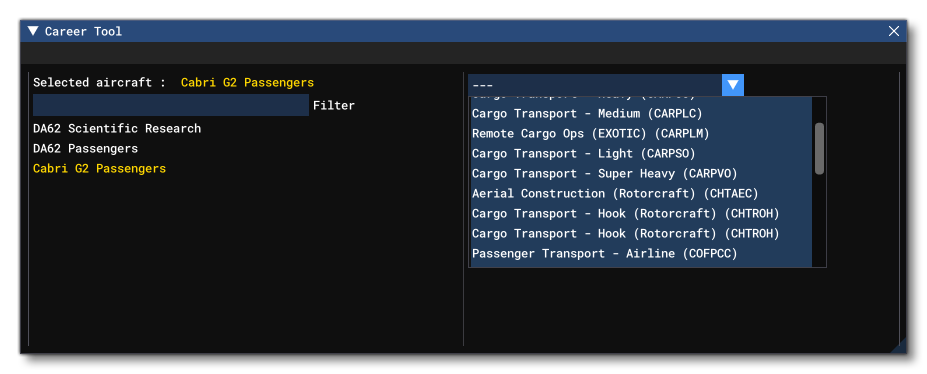
- On the left side of the window you will find the list of all aircraft currently loaded in the simulator. Your current aircraft is selected by default but you can choose another one if needed.
- On the right side is the list of available activities with both their full name and their short code. Select the activity you would like to test the aircraft with.
How to use the tool
On opening the tool you will be presented with a list of aircraft (on the left) and possible activities (on the right). After selecting an aircraft and an activity, a warning message will appear indicating that using a non compatible aircraft in these missions may lead to unexpected results, which is something to be aware of and you should ensure the aircraft is as compatible as possible with the mission being flown. Note that selecting an activity will also cause a Parameters section to appear, allowing you to set some variables used within the activity - each activity has its own set of parameters (see the Activity Parameters table below).
IMPORTANT: When setting up the career parameters, you should also take into account the maximum number of passengers and/or loads the aircraft can carry, since this tool does not check or validate these things (however they will be validated on package creation and upload). Therefor, try to ensure you set the parameters to the appropriate values for the aircraft and the career mission.
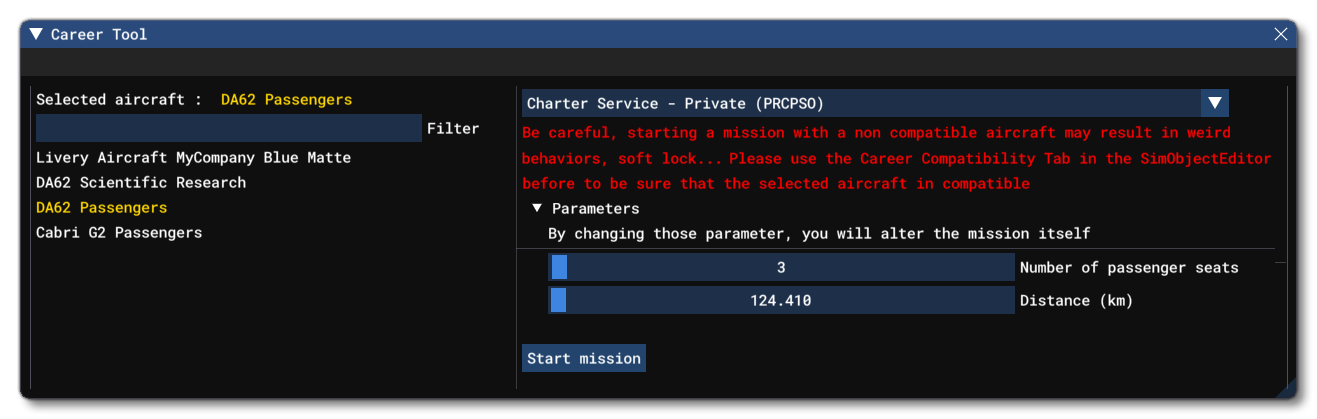
When ready, you can click the Start mission button to begin.
NOTE: This tool uses shortcuts in the normal Career flow which will teleport you almost instantly at the start of the mission. Hence the environment and objects around your aircraft may require a few seconds to load and be rendered correctly.
In order to ensure that the aircraft you are testing is fully compatible with the selected activity we advise you to:
- First go through the mission without skipping any stage and:
- Ensure all NPCs are correctly located.
- Ensure all RTCs are played correctly.
- Ensure you can play the mission from start to finish.
- Then go through the mission once more, skipping any of the stages that can be skipped while:
- Ensuring your aircraft is properly configured after each skipped step.
- Ensuring you can play the mission from start to finish.
NOTE: Make sure you read carefully the FLT Files section of the Career Activities documentation page.
Activity Parameters
The table below lists the parameters available for any given activity in the tool. Note that these parameters are those that the tool lets you manipulate, but they are not the only ones required by an aircraft for any given mission. You can find a full list of those parameters directly on the linked mission pages.
| Activity | Career Code | Parameters |
|---|---|---|
| Medevac - Plane | MED-PLN | N/A |
| Cargo Transport (Light) - Plane | CAR-PSO | Cargo (weight, lbs) |
| Cargo Transport (Medium) - Plane | CAR-PLC | Cargo (weight, lbs) |
| Cargo Transport (Heavy) - Plane | CAR-PCC | Cargo (weight, lbs) |
| Cargo Transport (Oversized) - Plane | CAR-PVO | Cargo (weight, lbs) |
| Remote Cargo Ops - Plane | CAR-PLM | Cargo (weight, lbs) |
| Cargo Transport - Rotorcraft | CHT-ROH |
Cargo (weight, lbs) |
| Aerial Construction - Rotorcraft | CHT-AEC |
Cargo (weight, lbs) |
| Scientific Research - Plane | DIC-SCR | N/A |
| Passenger Transport - Plane | COF-PCC |
Number of passenger seats |
| Passenger Transport - Rotorcraft | COF-ROT |
Number of passenger seats |
| Charter Service (Private) - Plane | PRC-PSO | Number of passenger seats |
| Charter Service (VIP) - Plane | PRC-PLC | Number of passenger seats |
| Charter Service (VIP Airliner) - Plane | PRC-PCC | Number of passenger seats |
| Search & Rescue - Plane | SAR-PLN | N/A |
| Search & Rescue - Rotorcraft | SAR-ROT | N/A |
| Search & Rescue (Hoist) - Rotorcraft | SAR-ROI | N/A |
| Aerial Firefighting (Initial Attack) - Plane | FIR-INA | N/A |
| Aerial Firefighting (Extended Attack) - Plane | FIR-EXA | N/A |
| Skydive Aviation - Plane | SKP-PLN | Number of passenger seats |
| Agricultural Aviation - Plane | AEA-PLN | N/A |
| Agricultural Aviation - Rotorcraft | AEA-ROT | N/A |
| Aerial Advertising - Plane | AAD-PLN | N/A |
| First Flight - Plane | FIF-PLN | Number of passenger seats |
| Flightseeing - Plane | TOR-PLN | Number of passenger seats |
| Flightseeing - Rotorcraft | TOR-ROT | Number of passenger seats |
| Ferry Flight - Plane | FEF-PLN | Cargo (weight, lbs) |
Full Flow Testing Profile
If you are a Microsoft registered partner, not only will you have access to the Content Creator Testing Tool, but you will have access to an extra option at the top of this tool: Use full flow testing profile.
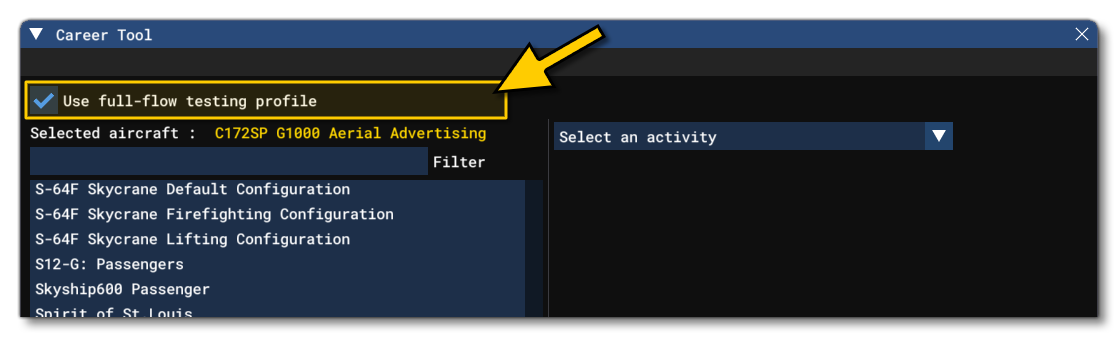
IMPORTANT! This option can only be checked when you are on the main menu of the simulation.
When this option is checked, the next time you enter Career Mode, the simulation will load a Flight Simulator developer save which has everything unlocked. This safe is separate to the "retail" save file, and permits the testing of your aircraft in the "full flow" of the simulation career mode. The save will give you a large sum of money with which to buy aircraft, and will also unlock all the different career certifications, companies, and missions.
It should be noted that the first time you enable this option during a run of the simulation, loading the career may take some time initially. Also, if you wish to test your own aircraft while using this developer save file, you will need to have uploaded the package to the marketplace, ie: it will need to be at least on the pre-release track, since only streamed packages can be used. Packages build using The Project Editor or placed in the Community folder, will not be available using the developer save.
If you wish to return to your own "retail" save, simply uncheck the option at the top of the window again.